Complete Sentence Checker: Free Tools & Quick Fixes
Discover effective tools for your writing. Use a complete sentence checker to quickly fix grammar errors and enhance your clarity.

A complete sentence needs three things: a subject, a predicate, and a finished thought, closed out with the right end punctuation. If any of those pieces is missing, you have a fragment, not a sentence, and the fastest way to find out which one you’re dealing with is to paste the line into a free grammar checker and see what gets flagged.
You don’t need to memorize grammar terminology to get a fast answer. Copy your sentence, drop it into a checker, and read the suggestion. That’s it. For a quick gut check, four tools stand out for different reasons:
- Grammarly — best all-around pick for everyday writing, catches fragments and run-ons in real time.
- LanguageTool — open source, strong multilingual support, works well as a browser add-on.
- Hemingway Editor — no login needed, shows you exactly which sentences are too dense or passive.
- ProWritingAid — goes deeper than pass/fail, breaking down sentence structure and length patterns.
One caveat before you trust any tool completely: automated checkers are excellent at spotting mechanical errors but weaker at judging tone, intent, or a deliberately fragmented sentence used for effect. Save human review for contracts, legal language, or anything where the stakes of a misread sentence are high.
| Point | Details |
|---|---|
| Definition | A complete sentence has a subject, a predicate, and a finished thought. |
| Fastest check | Paste the sentence into Grammarly or LanguageTool and read the flag. |
| Deepest analysis | ProWritingAid breaks sentences into structural reports beyond grammar. |
| Human review needed | Legal documents, contracts, and high-stakes emails still need a person’s eyes. |
Key Takeaways
A complete sentence checker works best as a fast first pass, while a human eye still decides what the sentence should actually say.
| Point | Details |
|---|---|
| Core definition | A sentence needs a subject, predicate, and a finished thought to be complete. |
| Fastest fix | Paste into Grammarly or LanguageTool for instant fragment and run-on detection. |
| Deepest analysis | ProWritingAid’s structural reports reveal sentence variety, not just errors. |
| Manual backup | Ask “who or what [verb]?” before trusting any automated suggestion. |
| Business documents | Beesign centralizes signing and audit trails once your contract language is finalized. |
Table of Contents
- How Do Complete Sentence Checkers Actually Work?
- How Do You Check a Sentence Online Fast?
- Which Free & AI Sentence Checkers Are Worth Using?
- What Will a Sentence Checker Actually Flag?
- When Should You Trust Your Own Judgment Over a Checker?
- How Can You Tell If a Sentence Is Complete Without a Tool?
- Can Sentence Structure Tools Actually Make You a Better Writer?
- What Does a Working Editor Actually Prioritize?
- Where Beesign Fits If You’re Managing Written Agreements
- Sources
How Do Complete Sentence Checkers Actually Work?
Every checker follows roughly the same loop: you paste text in, the engine analyzes it (either instantly or when you click a button), and it returns suggestions you can accept or ignore. What happens in that middle step is where the tools differ, and it’s worth understanding because it explains why two checkers can flag the same sentence differently.
Most tools start with basic pattern matching. They look for a subject, hunt for a matching predicate, and check whether the sentence trails off without one. A more advanced class of tool goes further using syntactic parsing, often built on a framework called Universal Dependencies, which breaks a sentence into its grammatical skeleton, labeling subjects, objects, and modifiers the way a linguist would diagram it on a whiteboard. That’s why some analyzers can tell you not just that something is wrong, but which clause is dependent and which is independent.
Here’s what typically gets flagged in a single pass:
- Missing subject or predicate (classic fragment)
- Two independent clauses jammed together without punctuation (run-on)
- Comma splices, where a comma tries to do a period’s job
- Subject-verb agreement mismatches
- Wordiness, passive voice, and awkward phrasing (style layer, not grammar layer)
A checker built around explainable suggestions doesn’t just underline a word and leave you guessing. It tells you why. A good example: if you write “Running through the park, tired and out of breath,” a solid checker won’t just say “fragment.” It’ll explain that the sentence lacks a main verb attached to a subject, then suggest something like “She was running through the park, tired and out of breath.”
Pro Tip: If a suggestion doesn’t come with a reason attached, treat it with more skepticism. Tools that explain their logic are usually built on more transparent grammar rules, not just guesswork.
How Do You Check a Sentence Online Fast?
You can run a full sentence check in under 30 seconds once you know the sequence. Here’s the workflow:
- Copy the sentence you’re unsure about, or paste the whole paragraph if you want broader context.
- Open a checker like Grammarly, LanguageTool, or Scribens, and select English as the language if it isn’t set automatically.
- Run the analysis. Most web tools do this instantly as you type; some, like Hemingway Editor, work entirely offline in the browser with no server round-trip.
- Review each flagged issue individually. Don’t mass-accept every suggestion. Read the reasoning behind each one.
- Apply or dismiss the change. If a suggestion changes your meaning or tone, reject it, or edit it manually instead.
The decision about whether to trust a fix automatically comes down to what’s being changed. A comma insertion for a run-on is usually safe to accept without much thought. A full sentence rewrite that changes your word choice or tone deserves a second look, especially if you’re writing something client-facing or brand-sensitive.
Workflow matters here too. A browser extension like the one LanguageTool or Grammarly offers works well for quick emails and social posts because it checks as you type wherever you’re typing. A dedicated web editor is better for longer pieces where you want a full-document pass. Document integrations, like Grammarly or ProWritingAid inside Microsoft Word or Google Docs, make the most sense if you’re already drafting inside those tools and don’t want to break your flow by copying text elsewhere.
Pro Tip: Run your check twice: once early to catch structural fragments, and again right before you hit send or publish. Editing earlier suggestions sometimes introduces new small errors that a fresh pass will catch.
Which Free & AI Sentence Checkers Are Worth Using?
Not every checker is built for the same job. Some prioritize speed and simplicity; others go deep on structural reporting. Here’s how the major options stack up on the dimensions that matter most for catching incomplete or poorly structured sentences.
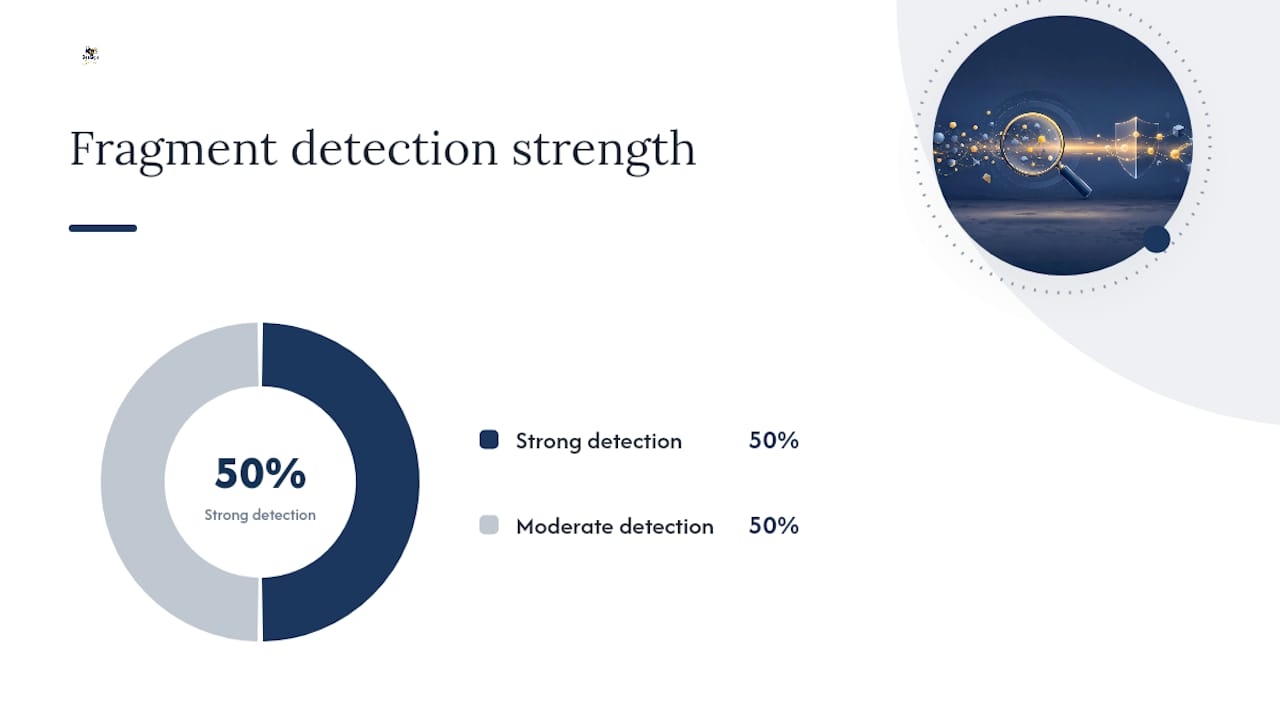
| Tool | Best For | Fragment Detection | Grammar & Style Coverage | Free Tier | Integrations |
|---|---|---|---|---|---|
| Grammarly | Everyday writing across email and web | Strong, real-time | Broad, includes tone | Yes, limited advanced features | Browser, Word, Docs, desktop |
| LanguageTool | Multilingual writers, quick checks | Strong | Good, rule-based | Yes, generous | Browser, Word, Docs |
| Hemingway Editor | Trimming dense, complex sentences | Moderate | Readability-focused, not grammar-deep | Yes, full web app free | Standalone app, no doc integration |
| ProWritingAid | Deep structural feedback | Strong, with reports | Very broad, multiple reports | Yes, capped word count | Browser, Word, Docs, Scrivener |
| Ginger | Desktop and mobile proofreading | Moderate | Good, includes paraphrasing | Yes, limited | Desktop, mobile, browser |
| Scribens | Budget-conscious basic checks | Moderate | Good, explanatory notes | Yes, unlimited on web | Browser extension only |
| QuillBot | Rephrasing plus quick grammar fixes | Moderate | Good, paraphrase-first | Yes, limited daily checks | Browser, web app |
| Trinka | Academic and technical English | Strong for academic tone | Deep, education-focused rules | Yes, limited | Microsoft Edge extension |
If you’re writing quick social copy or an email, Grammarly or Scribens will catch what you need without extra setup. For academic papers or technical writing where formal tone matters, Trinka is built specifically around those conventions. If you want to understand why your sentences feel clunky, not just that they’re wrong, ProWritingAid’s structural reports go further than a simple pass/fail check. And if your main problem is sentences that ramble, Hemingway Editor will show you exactly where.
What Will a Sentence Checker Actually Flag?
Understanding the categories of errors makes the suggestions less mysterious. Here’s what shows up most often, with quick before-and-after examples.
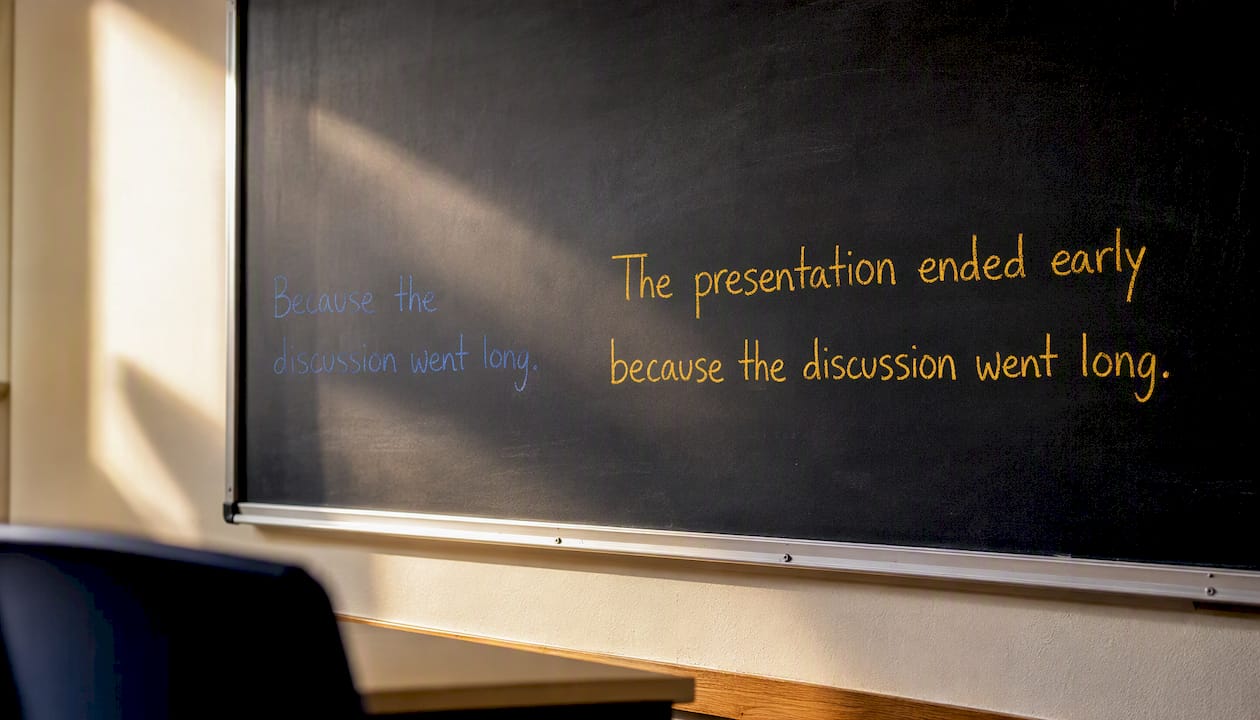
Fragments happen when a subject or predicate goes missing. “Because the meeting ran late.” looks like a sentence but isn’t; it’s a dependent clause with nowhere to land. Fixed: “The presentation was cut short because the meeting ran late.”
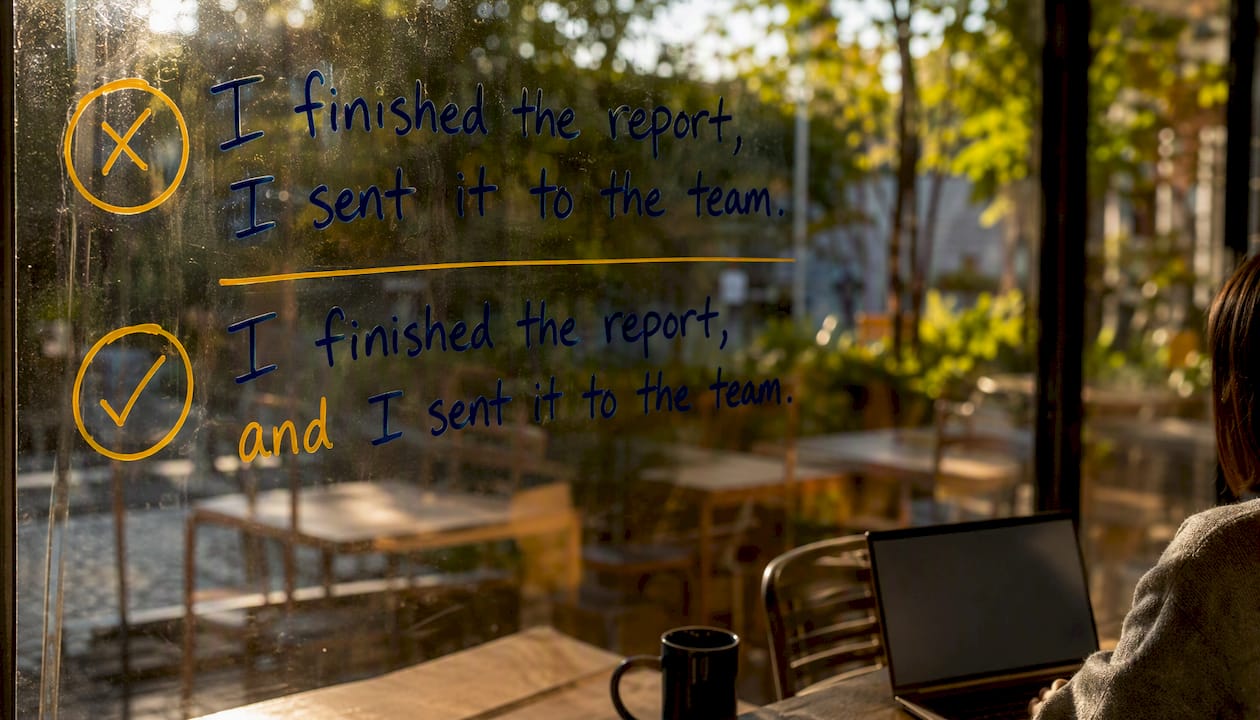
Run-ons and comma splices occur when two independent thoughts get mashed together. “I finished the report, I sent it to the team” is a comma splice. Fixed: “I finished the report, and I sent it to the team.” or split into two sentences entirely.
Punctuation errors cover missing commas, misplaced apostrophes, and incorrect end marks. These are usually the easiest fixes and safest to accept automatically.
Subject-verb agreement and pronoun reference issues are subtler. “The team are meeting tomorrow” reads oddly in American English, where “team” typically takes a singular verb: “The team is meeting tomorrow.”
Style and readability flags are a different category entirely, covering wordiness, passive voice, and tone mismatches rather than outright errors.
A grammar checker might flag a comma splice on the surface, but a syntactic parser goes further, showing you which clause is dependent and which is independent so you can decide whether to join the clauses, split them, or simply repunctuate. That distinction, between fixing a symptom and understanding the structure, is what separates a basic spell-check from a real writing assistant.
When Should You Trust Your Own Judgment Over a Checker?
Automated tools are fast, but they’re not always right, and knowing where they tend to stumble will save you from bad edits. Ambiguity is the biggest blind spot. A checker doesn’t know your audience, your brand voice, or the joke you’re trying to land, so it can flag perfectly intentional phrasing as an error.
Creative fragments are a common false positive. Writers use fragments on purpose all the time for emphasis: “Not today.” or “Just breathe.” A checker built on rigid subject-predicate rules may still flag these, even though skilled writers use fragments deliberately for rhythm and punch. Don’t let a tool talk you out of a fragment you chose on purpose.
Technical and domain-specific language trips up checkers too. Industry jargon, brand names, or specialized terminology often gets flagged as a spelling or style error simply because it’s uncommon.
- Marketing copy with intentional sentence fragments for punch
- Legal or contractual language with formal, dense phrasing that’s still grammatically correct
- Academic writing with domain-specific terms a general checker doesn’t recognize
- Dialogue or first-person narrative voice that breaks formal grammar rules on purpose
Modern grammar tools have quietly expanded into full writing assistants, layering in tone and readability scoring on top of basic error detection. That expansion is useful, but it also means more of what gets flagged is subjective judgment dressed up as a correction, not an objective grammar rule.
Reserve human review for anything with real stakes: contracts, legal filings, high-value client emails, or long-form academic work where a misjudged tone or a wrongly “corrected” clause could cost you credibility or money.
How Can You Tell If a Sentence Is Complete Without a Tool?
You can run this check mentally in about ten seconds, no software required.
- Find the main verb. Every complete sentence needs one action or state being described.
- Ask “who or what [verb]?” The answer is your subject. If you can’t answer that question, you’re likely looking at a fragment.
- Confirm the sentence finishes a thought. Read it out loud. Does it sound like it’s still waiting for the next part?
- Check your end punctuation. A period, question mark, or exclamation point should close it out cleanly.
- If you spot two separate ideas, check how they’re joined. A comma alone usually isn’t enough; you need a conjunction, a semicolon, or a full stop.
A few quick examples to test the logic:
- “Walking to the store in the rain.” → No main subject-verb pair tied together. Fragment.
- “She walked to the store in the rain.” → Subject (she), verb (walked), complete thought. Sentence.
- “He finished the project, he submitted it early.” → Two independent clauses, comma splice.
- “He finished the project, and he submitted it early.” → Properly joined. Sentence.
This checklist works everywhere, in an email, a text message, or a term paper, and it’s worth running before you ever touch a checker. It also makes you faster at spotting why a tool flagged something in the first place.
Can Sentence Structure Tools Actually Make You a Better Writer?
Fixing fragments and run-ons gets you to “correct.” Building actual sentence variety gets you to “readable.” These are different skills, and the tools that help with each aren’t always the same ones.
Sentence-variety reports, the kind ProWritingAid offers, show you how many of your sentences start with a subject versus an adverb or a subordinate clause, and how your sentence lengths distribute across a page. If every sentence in your paragraph starts with “The” and runs 15 to 18 words, that pattern gets monotonous fast, even if every sentence is technically flawless. Sentence variety keeps readers engaged in a way that pure grammatical correctness can’t.
Here’s the practical distinction worth knowing: a grammar checker is built to catch rule violations. A syntactic parser is built to show you structure. Both matter, but they answer different questions.
- During drafting: Run a structure analysis to spot clause-heavy, repetitive patterns before you polish anything.
- At the polish stage: Run a grammar check to catch fragments, agreement errors, and punctuation slips.
A quick exercise worth trying: take any paragraph you’ve written and count how many sentences start with the subject versus a transitional word, a clause, or a question.
Pro Tip: Combine tools deliberately instead of running everything through one checker. Use a structural report early for variety and flow, then a grammar-focused pass right before you finalize.
What Does a Working Editor Actually Prioritize?
Balancing correctness against voice is the real skill, not memorizing grammar rules. A sentence can pass every automated check and still sound flat, or it can trip a checker’s fragment alarm and be exactly right for the moment.
The practical rule I use: accept a suggestion outright when it fixes something mechanical, like a missing comma or a dangling modifier. Tweak it when the tool’s fix is technically correct but strips out your intended rhythm. Reject it entirely when a fragment or unconventional structure is doing real work, especially in anything persuasive or conversational, where a checker’s idea of “correct” would flatten the point you’re making.
Where Beesign Fits If You’re Managing Written Agreements
If the sentences you’re checking aren’t just emails or essays but the actual language inside contracts, approvals, or client agreements, the stakes shift. A grammar checker tells you whether a clause is complete. It won’t tell you whether that clause was signed by the right person, when, or whether the document has been tampered with since.
That’s a different problem, and it’s the one Beesign was built to solve. Instead of hunting through email threads for the latest signed version of a contract, Beesign centralizes document signing, templates, and identity verification in one platform, with audit trails that show exactly who touched a document and when. Businesses that need agreements to look and feel like their own brand can run the entire experience under their own domain, keeping data inside their own infrastructure rather than a third party’s servers. Sales teams closing deals with tight timelines use it to move contracts from draft to signature without the back-and-forth of tracked changes and manual approvals, a natural fit once your sales agreements are grammatically tight and ready to send. If your next step after polishing a document is getting it signed and stored securely, start a free trial at Beesign and see how quickly a clean draft becomes a closed deal.
Sources
- Sentence basics — OpenTextBooks (University of Arizona)
- Revise
- Universal Dependencies — MIT/Computational Linguistics
- Sentence Structure Checker — ProWritingAid
Recommended
Ready to transform your workflow?
Start using BeeSign today and experience the future of document signing