Audit Trail vs Digital Certificate: What Compliance Teams Need
Understand the key differences between an audit trail and a digital certificate to enhance compliance and protect valuable data. Click to learn more!

A digital certificate proves who signed, cryptographically. An audit trail proves what happened around the signature, contextually. If you only need one, most disputes come down to identity and intent, which makes the audit trail your primary evidence. If you’re handling high-value contracts, healthcare records, or anything likely to end up in front of a regulator, you need both.
Here’s what to know before you dig into implementation details:
- Courts routinely accept detailed audit logs as authentication evidence when they include timestamps, IP addresses, and identity tokens.
- A certificate proves cryptographic integrity (the document hasn’t changed, the key belongs to a verified identity). An audit trail proves operational events (who did what, when, from where).
- When both exist, you get a stronger defense than either alone. When you can only build one system well, build the audit trail first. It’s what shows up in litigation.
The rest of this guide breaks down what each artifact should contain, how to validate one you’re handed, and the vendor questions worth asking before you commit a regulated workflow to a signing platform.
Key Takeaways
Digital certificates prove cryptographic integrity and identity, while audit trails prove the operational context courts actually rely on to settle disputes.
| Point | Details |
|---|---|
| Different jobs | Certificates verify identity and document integrity; audit trails record the events and context around signing. |
| Courts favor context | Detailed audit logs with timestamps and IP data have repeatedly held up as authentication evidence. |
| Certificates alone aren’t enough | Real non-repudiation needs identity proofing, key custody, and reliable logs alongside the certificate. |
| Preserve the right artifacts | Save raw logs, certificate serial numbers, and CA policy documents if litigation is possible. |
| Beesign combines both | Beesign pairs certificate-backed signing with exportable audit logs, ID verification, and BYOC data custody for compliance-ready records. |
Table of Contents
- What Is an Audit Trail for Electronic Signatures?
- What Is a Digital Certificate in PKI Terms?
- What Fields Belong in a Complete Audit Trail?
- How Do Digital Certificates Work Inside a Signing Transaction?
- How Do Audit Trails and Certificates Work Together?
- Will Courts Accept an Audit Trail as Legal Proof?
- What Makes an Audit Trail Genuinely Tamper-Evident?
- How Should You Implement Both for Compliance?
- How Should Platforms Combine These Two Layers?
- How Beesign Handles Audit Trails and Certificates
- Frequently Asked Questions
- Sources
What Is an Audit Trail for Electronic Signatures?
An audit trail is a tamper-evident, chronological record of every event tied to a signing transaction. It’s not the signature itself. It’s the paper trail (digital, in this case) that shows how the signature came to exist: who received the document, when they opened it, how they proved their identity, and what device and network they used to sign.
Businesses keep audit trails for two reasons that rarely get separated but really should. The legal reason is dispute defense: if someone claims they never signed a contract, a detailed audit trail can show the exact IP address, timestamp, and authentication method tied to that signature event. The operational reason is process control: audit trails let compliance teams verify that a workflow actually happened the way policy says it should.
Most eSignature platforms package this information into a few standard artifacts:
- A certificate of completion, a human-readable summary generated after signing.
- A signature certificate, which sometimes overlaps with the completion certificate depending on the vendor’s naming.
- A raw audit-log export, typically the most granular and most useful in a legal proceeding.
Understanding how audit trails work in eSignature platforms matters because the completion certificate you hand a client is not the same file a litigator will want during discovery. Chain of custody depends on the raw log, not the summary.
What Is a Digital Certificate in PKI Terms?
A digital certificate binds a public key to a verified identity, issued and vouched for by a trusted certificate authority (CA). That’s the whole concept in one sentence, and it’s worth sitting with, because a lot of confusion in this space comes from treating the certificate as proof of an event rather than proof of an identity.
The basic public key infrastructure (PKI) flow works like this: a certificate authority verifies an applicant’s identity, issues a certificate linking that identity to a public/private key pair, and anyone receiving a signed document can use the public key (and the certificate chain back to the CA) to verify the signature came from that private key holder. No audit log required for that math to work. The math just proves the key, not the context.
Several certificate types show up in signing workflows, and they’re not interchangeable:
- S/MIME certificates, mostly used for email signing and encryption.
- X.509 signing certificates, the general-purpose standard behind most PKI-based signatures.
- CMS/PKCS#7 signatures, a container format for cryptographic signature data.
- PAdES, the PDF-specific standard for embedding certificate-based signatures directly into a document.
Pro Tip: The certificate file itself is the least interesting part of the system. What actually determines whether a signature holds up is the issuance policy behind it, whether the private key lived in a hardware security module (HSM) or a secure enclave, and how fast the issuer revokes a compromised certificate. A pristine-looking certificate issued under sloppy identity-proofing rules is worth less than it looks.
For more on how certificates get generated and verified in a signing platform context, the mechanics matter more than the file format.
What Fields Belong in a Complete Audit Trail?
A usable audit trail isn’t a vague activity feed. It has to include enough contextual detail that someone reviewing it six months later, possibly a judge, can reconstruct exactly what happened.
At minimum, expect these fields:
- Timestamp for every event (sent, opened, viewed, signed, completed).
- Event type and sequence order.
- Signer identity token or verified email address.
- Authentication method used (password, MFA, government ID capture, biometric match).
- IP address and device fingerprint at each step.
- Cryptographic hash of both the signature and the underlying document.
- Workflow or template version in effect at signing time.
- System or session identifiers tied to the platform instance.
A single realistic log entry might include details such as the event timestamp, signer identity, authentication method, IP address, document hash, and workflow version. Such detailed entries are what forensic reviewers look for.
Storage matters as much as content. Export formats should be portable (JSON or CSV, not locked in a proprietary viewer), storage should be tamper-evident, and access controls should log who pulled the record and when.
How Do Digital Certificates Work Inside a Signing Transaction?
Certificates don’t just sit in a file somewhere. They participate in a specific technical sequence every time a document gets signed, and understanding that sequence helps you know what to preserve.
- Key generation and issuance. A key pair is generated, and the certificate authority verifies the signer’s identity before issuing a certificate binding that identity to the public key.
- Signing. The signer’s private key is used to sign a cryptographic hash of the document, not the document itself. This is why even a single-character edit invalidates the signature.
- Embedding. The signature gets packaged into a standard container, commonly CMS/PKCS#7 for general documents or PAdES for PDFs, along with the certificate and chain information.
- Timestamping. A trusted timestamp authority (TSA) adds a cryptographically verifiable time marker, which matters enormously if the certificate is later revoked or expires. The timestamp proves the signature existed while the certificate was still valid.
- Verification. Anyone with the public certificate chain can independently verify the signature and confirm the document hasn’t changed since signing.
When you’re evaluating a verification tool, check that it validates the full certificate chain, not just the signature hash. A tool that skips chain validation will happily “verify” a signature made with a revoked certificate.
How Do Audit Trails and Certificates Work Together?
Most serious eSignature platforms don’t make you choose. They layer the two artifacts, and the combination pattern varies by vendor, so it’s worth knowing what you’re actually looking at.
A common approach pairs a separate audit log with a signed certificate of completion, where the completion certificate itself gets sealed with a digital signature so it can’t be quietly edited after the fact. A more rigorous version hashes the entire audit log and anchors that hash to a trusted timestamp, so any later tampering with the log becomes mathematically detectable. Some platforms go further and wrap the whole log in a digital certificate, effectively turning the operational record into a cryptographically verifiable object in its own right.
Here’s the practical division: the certificate proves the document and signature weren’t altered after signing. The audit trail proves who signed, how they proved identity, and what circumstances surrounded the event. Neither one substitutes for the other.
Pro Tip: When you receive a bundled artifact, don’t just eyeball the signature checkmark in your PDF reader. Verify the signature independently, check that the log hash matches what the platform reports, and inspect both the timestamp and the full certificate chain before treating it as court-ready evidence.
Will Courts Accept an Audit Trail as Legal Proof?
Yes, and detailed audit logs have repeatedly held up in U.S. courts as authentication evidence, particularly when they include timestamps, IP addresses, and identity verification data that corroborates the signer’s known location or device patterns. Legal counsel treats this contextual data as objective, which makes it harder for an opposing party to argue forgery.
If you’re building toward litigation readiness or regulator review, here’s the checklist that actually matters:
- Preserve timestamps in their original, unedited format, not a summary rendering.
- Retain the full certificate chain and current revocation status, not just a snapshot from signing day.
- Keep identity-proofing records (ID scans, biometric match results, MFA logs) tied to the specific signing event.
- Hold onto the certificate authority’s policy documents (the CP/CPS, or Certificate Policy and Certification Practice Statement) that governed issuance at the time.
The U.S. framework for signature validity rests on ESIGN and UETA, and for statutory language on evidence and procedure, U.S. Code remains the primary reference point. Cross-border deals add another layer: eIDAS governs electronic signatures in the European Union, and various ISO standards touch on records management and information security practices relevant to audit trail design.
If litigation looks likely, save raw logs (not exports), certificate serial numbers, CA policy documents, and any records showing how private keys were custodied. None of this is legal advice. Talk to counsel about your specific evidentiary needs.
What Makes an Audit Trail Genuinely Tamper-Evident?
Vendor marketing loves the word “immutable.” Whether that claim holds up depends on specific, checkable controls, not the word itself.

Look for cryptographic hashing applied to every record, append-only storage architecture, timestamp authorities that independently verify when events occurred, and hardware security modules protecting the private keys used in signing. Some platforms add WORM (write once, read many) storage or ledger-style anchoring for extra durability against tampering.
Here’s the limitation worth internalizing: a cryptographic signature alone tells you the document is intact. It says nothing about who the signer actually was in the real world, what pressure they were under, or whether the right person had access to the signing session. That’s the gap audit logs are built to close.
Pro Tip: Treat these as red flags during vendor evaluation: no ability to export raw logs (only PDF summaries), vague answers about where private keys live, and unclear or slow revocation processes. A platform combining HSM-protected keys with TSA-anchored timestamps gives you materially stronger evidentiary footing than either control alone.
How Should You Implement Both for Compliance?
Building a defensible signing process isn’t complicated, but it does require deliberate choices rather than accepting platform defaults.
- Classify document sensitivity. Not every NDA needs certificate-backed signing, but every healthcare record or real estate closing probably does.
- Require certificate-backed signatures for high-risk tiers. Reserve the strongest cryptographic guarantees for the transactions where disputes carry real cost.
- Enable MFA and identity proofing on every signing session tied to a sensitive document.
- Confirm exportable raw logs exist, and automate retention so nobody has to remember to save anything manually.
- Set up TSA anchoring for anything that might need to hold up years later, since certificates expire but timestamps preserve the moment of signing.
Retention timelines should map to your actual legal exposure. A standard commercial contract might need five to seven years; healthcare and financial records often carry longer statutory holds. Before signing with any vendor, ask directly: can we export raw logs in a portable format, where do private keys live, what’s your revocation process, and do you provide independent timestamp verification.
How Should Platforms Combine These Two Layers?
Defensible non-repudiation comes from combining certificate-backed signing, protected key custody, and granular audit logging into one system, not from picking whichever artifact looks more official on a compliance checklist. Certificates alone don’t guarantee business-grade non-repudiation; they need identity proofing and reliable logs standing behind them.
Beesign builds around that principle directly:
- White-label and bring-your-own-cloud (BYOC) deployment, so audit data never leaves your own infrastructure.
- API-based exports for raw audit logs, so compliance teams aren’t stuck with static PDF summaries.
- Identity verification through government ID capture and biometric face matching, paired with blockchain timestamp proof for long-term evidentiary confidence.
A real estate firm relying on ID-verified signing plus exportable, hash-anchored logs walks into a title dispute with a materially stronger position than one holding only a signed PDF.
One practical takeaway for compliance teams
If you’re evaluating vendors, the question isn’t “does this platform use certificates?” It’s whether the platform lets you export raw logs, control where your data lives, and prove identity at the level your risk profile demands. That’s the difference between compliance theater and an actual defensible record.
How Beesign Handles Audit Trails and Certificates
Beesign is built for compliance teams who need more than a checkmark on a PDF. The platform pairs certificate-backed signing options with complete, exportable audit trails, so you’re never stuck choosing between cryptographic proof and operational evidence.

Three things matter most for regulated workflows: identity verification through government ID capture and biometric matching before a signature is ever collected; blockchain timestamp proof anchoring every signature to a verifiable moment in time; and bring-your-own-cloud deployment, so your audit data stays inside infrastructure you control rather than a vendor’s shared servers. Beesign also exposes a full REST API for automated log exports, which matters when your legal team needs raw data on short notice, not a summary PDF.
If you’re running high-volume agreements through sales or operations teams, the white-label and BYOC option lets you run the entire signing experience under your own brand while keeping full data custody. Start a free trial or talk to the sales team about a compliance evaluation tailored to your document volume and risk tier.
Frequently Asked Questions
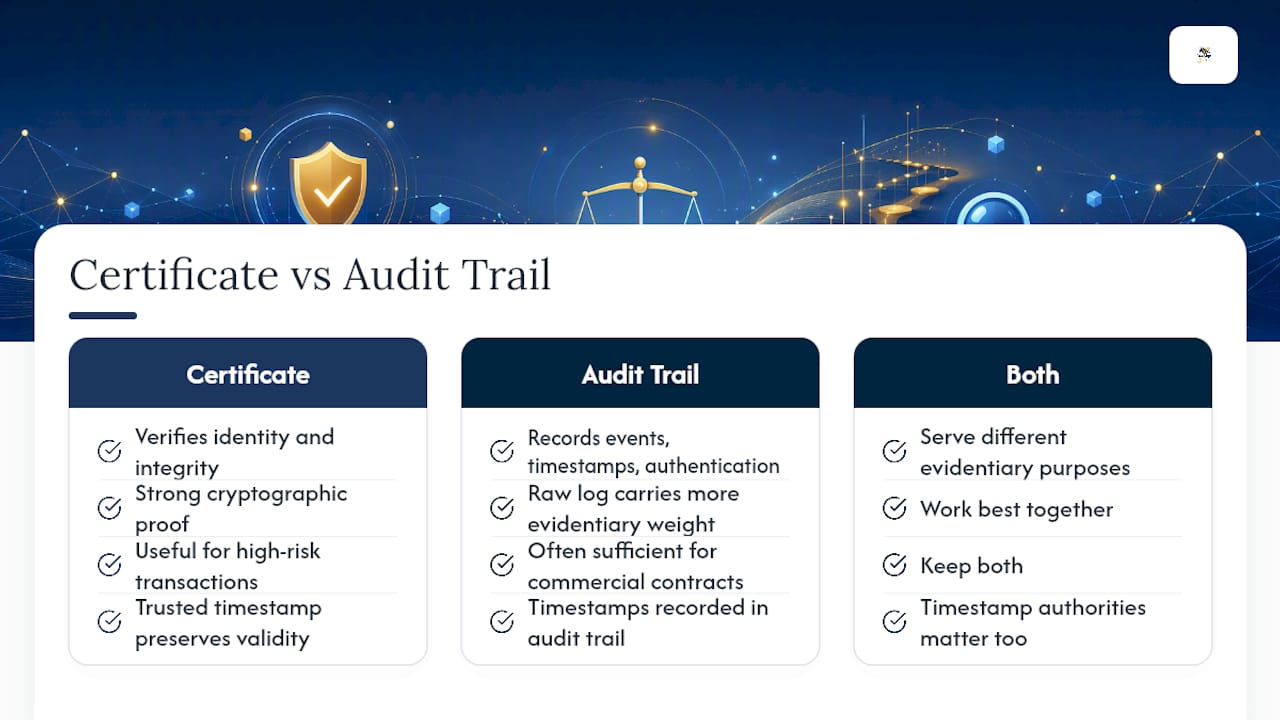
Is a digital certificate the same as an audit trail? No. A digital certificate cryptographically verifies identity and document integrity. An audit trail records the operational events, timestamps, and authentication methods surrounding the signature. They serve different evidentiary purposes and work best together.
Do I need a certificate of completion for eSignature compliance? A certificate of completion is useful as a readable summary, but the raw audit log underneath it carries more evidentiary weight in a dispute. Keep both, and make sure the raw log is exportable in a portable format.
Can an audit trail alone hold up in court without a digital certificate? Often, yes, particularly for standard commercial agreements where detailed audit logs with timestamps and identity data have satisfied authentication requirements. High-risk transactions still benefit from certificate-backed signing for stronger cryptographic proof.
What happens if a digital certificate is revoked after signing? A trusted timestamp applied at the time of signing typically preserves the validity of that specific signature, even if the certificate is later revoked. This is why timestamp authorities matter as much as the certificate itself.
How long should businesses retain audit trails and certificate records? Retention should match your legal exposure. Standard commercial contracts often need five to seven years, while healthcare and financial records frequently carry longer statutory retention requirements. Check your specific regulatory obligations before setting a policy.
This article is general information, not a substitute for advice from a qualified lawyer. Consult a qualified legal professional about your own circumstances before acting on anything here.
Sources
- Using E-Signatures in Court — The Value of an Audit Trail | Fenwick
- Implementing Effective Non-Repudiation With Digital Certificates – ITU Online IT Training
Recommended
Ready to transform your workflow?
Start using BeeSign today and experience the future of document signing