Can You Automate eSignatures with Zapier Integration?
Automate your eSignature workflow with Zapier integration, streamlining contracts and enhancing team efficiency effortlessly.

Yes. Zapier can automate almost every step of an eSignature workflow, from sending a contract to updating your CRM the moment the last signature lands. The right approach depends on what you’re connecting and what your compliance needs look like.
For most teams, a native Zapier app is the fastest path when your eSignature provider has one built. If your provider doesn’t, or you need more control over the data, Webhooks or a direct API connection give you that flexibility, at the cost of some developer time. And if your workflow touches identity verification, white-labeling, or strict audit requirements, BeeSign is built for exactly that, with a REST API and webhook support designed for automation from the ground up.
Here’s the quick breakdown by team:
- Sales teams closing deals fast: native Zapier app, triggered on “Agreement Signed,” pushing straight to your CRM.
- HR teams onboarding new hires: template-based document creation, with signed offer letters routed automatically to your HRIS.
- Legal and compliance teams: BeeSign’s API or webhook path, so audit trails, identity checks, and ESIGN/HIPAA compliance stay intact end to end.
Key Takeaways
Automating eSignatures with Zapier works best when you match the integration method, native app, webhook, or API, to your actual compliance and branding needs rather than defaulting to whichever is fastest to set up.
| Point | Details |
|---|---|
| Start with native apps | Use a native Zapier app first when your provider supports one; it’s the fastest path to a working automation. |
| Watch token expiry | OAuth refresh tokens can expire after periods of inactivity; schedule a keep-alive Zap to prevent silent disconnects. |
| Use granular triggers | Choose “signed by all” over “signature received” to avoid duplicate notifications and premature downstream updates. |
| Budget for rate limits | Providers like DocuSign cap API requests around 3,000 per hour; plan batching for high-volume signing periods. |
| Choose BeeSign for compliance-heavy workflows | BeeSign’s API, webhook support, identity verification, and BYOC storage fit teams that need audit-grade controls and white-labeling beyond what native Zapier apps offer alone. |
Table of Contents
- Ready-To-Use Zap Templates For eSignature Workflows
- How Does Zapier Connect To eSignature Platforms?
- How To Build And Test A Zap For eSignatures
- Is Automated eSignature Workflow Secure And Compliant?
- What Breaks eSignature Automations At Scale
- Comparing eSignature Providers For Zapier Integration
- What Does eSignature-Zapier Automation Actually Cost?
- How Rate Limits And Delays Affect Zapier Performance
- Managing Signer Authentication Inside Automated Workflows
- The Real Trade-Off Between Speed And Control
- Get Enterprise-Ready eSignature Automation With BeeSign
- Useful Docs And Links For Implementation
- Frequently Asked Questions
- Sources
Ready-To-Use Zap Templates For eSignature Workflows
You don’t need to build automations from scratch. Zapier’s eSignature integrations already document the most common triggers, including “Contract Sent to a Signer,” “Contract Signed,” and “Signature Received,” which cover the vast majority of workflows teams actually need.
Here are eight templates worth setting up first, organized by team:
- Sales: “Agreement signed by all” → create a deal-won record in your CRM and notify the account owner in Slack.
- Sales: “Contract sent to signer” → log the send date in a spreadsheet to track time-to-close.
- HR: “Document group completed” → generate the onboarding checklist and add the new hire to payroll software.
- HR: New offer letter template filled → auto-send for signature with role-based routing.
- Legal: “Signature received” → save the signed PDF to Google Drive or Dropbox with a standardized filename.
- Legal: “Contract signed” → append a row to an Airtable base for contract lifecycle tracking.
- Ops: Completed signature event → trigger an invoice creation in your accounting tool.
- Ops: Reminder-based workflow → send an automated signature reminder if a document sits unsigned past a set number of days.
A few of these, particularly template creation and role-based invite actions, require business-tier or API access on some platforms. SignNow’s Zapier integration, for example, lists granular actions like “Create Document From Template & Send Invite” that assume you’re past the free tier.
How Does Zapier Connect To eSignature Platforms?
Every Zap runs on three building blocks: a trigger (something that happens, like “Contract Signed”), an action (something Zapier does in response, like creating a Drive file), and occasionally a search (looking up existing data before acting, like checking if a contact already exists in your CRM).
There are two ways to wire an eSignature platform into that structure:
- Native Zapier app connections use OAuth authentication and prebuilt triggers/actions. You click “Connect,” authorize access, and pick from a menu. This is the easiest route and the one most business users should try first.
- Webhooks or direct API access skip the prebuilt menu entirely. You define exactly what data moves and when, which is necessary for platforms without a full native app, or when you need custom field mapping.
OAuth connections aren’t permanent by default. Refresh tokens can expire, and Adobe Acrobat Sign’s integration notes a 60-day refresh token lifespan as one example, plus a requirement for a Business plan or trial before API-based actions even work.
How To Build And Test A Zap For eSignatures
Setting up your first automation is straightforward if you follow the sequence in order rather than jumping straight to the action step.
For a native Zapier app (most providers):
- Go to your Zapier dashboard and connect the eSignature app under Apps.
- Choose your trigger, such as “Contract Signed” or “Signature Received.”
- Add filters or a formatter step if you only want the Zap to fire under certain conditions (a specific document type, for instance).
- Choose your action app: CRM, cloud storage, Slack, or an accounting tool.
- Map the fields (signer name, document ID, signed date) to the right destination fields.
- Send a test document through the flow before turning the Zap on.
- Activate the Zap and monitor the first few real runs closely.
For BeeSign via webhooks or the REST API (when no native app fits your case):
- Create your document template in BeeSign and note the template ID.
- Generate an API key from your BeeSign account settings, and treat that key exactly like a password: never paste it into a shared doc or client-side code.
- Set up a webhook endpoint (or use Zapier’s “Catch Hook” trigger) to receive signature completion events.
- Map the payload fields (signer email, timestamp, document status) to your downstream Zap actions.
- Test the callback with a sample document before connecting it to production data.
Run your test cases with a real mix: one document with a single signer, one with multiple signers in sequence, one intentionally bounced email to confirm failure handling, and one that triggers a reminder.
Pro Tip: Set up a low-frequency “keep-alive” Zap, even a simple daily check, to prevent OAuth tokens from going idle and disconnecting your integration without warning.
Is Automated eSignature Workflow Secure And Compliant?
Automation doesn’t lower your compliance bar. It just moves the checkpoints. Before you flip a Zap live, confirm the following holds true end to end:
- Tamper-evident audit trails are generated and stored, not just visible in a dashboard.
- Identity verification (government ID capture, biometric matching) is available for higher-risk signers.
- Signed documents land in storage you control, ideally with bring-your-own-cloud (BYOC) options.
- The platform states compliance with ESIGN, UETA, eIDAS, and HIPAA where relevant to your industry.
- SOC 2 or equivalent security attestations are documented, not just claimed.
Automation adds a wrinkle worth understanding: every Zap step that touches a signed document is a potential audit gap if you don’t also store the completed PDF and its log downstream. Don’t rely on Zapier’s task history as your compliance record.
Token expiry and rate limits also matter here. If your OAuth connection silently drops, your audit trail has a hole in it exactly when you need it most, and DocuSign’s rate limits, for example, cap accounts around 3,000 API requests per hour, which matters if you’re running high volume.
What Breaks eSignature Automations At Scale
Most Zap failures aren’t dramatic. They’re quiet, and that’s what makes them dangerous. Here’s what tends to go wrong once volume picks up:
- Duplicate notifications, usually from a trigger firing on “signature received” instead of “signed by all.”
- Missing or delayed triggers when a connection has gone stale.
- Disconnected OAuth tokens from inactivity.
- API rate limits throttling bursts of activity during month-end signing pushes.
- Mismatched field mappings that quietly send wrong data downstream.
The fix for most of these is choosing granular triggers over broad ones. Experts who work with Zapier’s eSign integrations specifically recommend using “signed by all” instead of “signature received” to avoid premature downstream updates. Add status checks before your action step fires, and set alerts for failed Zap runs so you catch problems in hours, not weeks.
Pro Tip: Test new Zaps with production-like documents, real field counts, real signer roles, not a stripped-down sample. That’s where mapping errors actually surface.
Comparing eSignature Providers For Zapier Integration
The provider you pick shapes how much setup friction you’ll deal with. Here’s how the major options stack up on Zapier specifically.
Adobe Acrobat Sign requires a Business plan or trial before API-based Zapier actions unlock, and its refresh tokens expire after roughly 60 days of inactivity, so idle integrations need a keep-alive routine.
DocuSign needs an active account with the right permissions, and its Zapier integration enforces rate limits, commonly cited around 3,000 requests per hour, plus its own refresh token expiry window.
Dropbox Sign and SignNow both offer relatively granular triggers. SignNow in particular lists actions like “Upload Document & Extract Fields” and “Create Document From Template & Send Invite” that go beyond basic signature notifications, useful if you’re building template-heavy workflows.
Blueink rounds out the field with a lighter footprint, often a fit for smaller teams that want native Zapier support without enterprise account tiers.
BeeSign takes a different path: it leans on a REST API and webhook support rather than only prebuilt triggers, which costs a bit more setup time upfront but buys you identity verification, white-labeling, and BYOC storage that the general-purpose providers above don’t offer as standard.
If your workflow is simple, sales notifications, a Slack ping, a Drive save, any provider with a solid native app will do the job. If you need audit-grade compliance or your own branding on every signing page, that’s where the calculus shifts.
What Does eSignature-Zapier Automation Actually Cost?
Pricing has two layers most teams miss until the invoice arrives: the Zapier plan and the eSignature platform’s own tier.
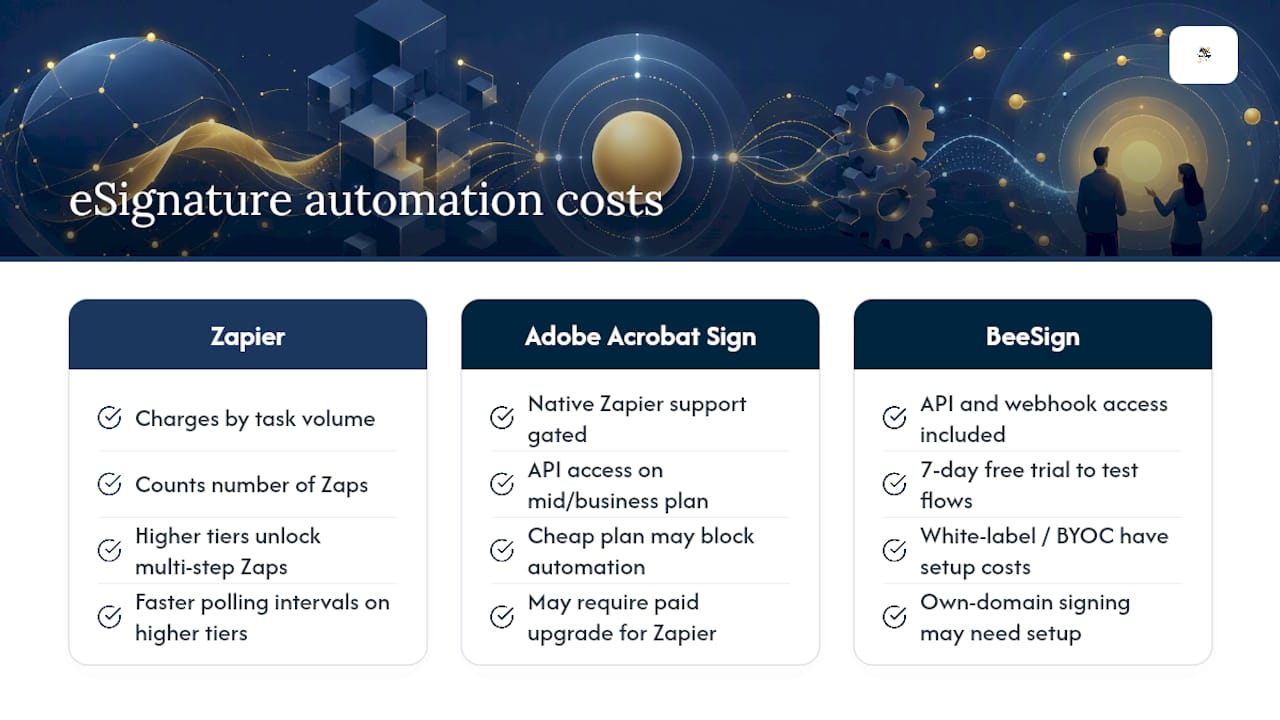
Zapier itself charges based on task volume and the number of Zaps you run, and higher tiers unlock multi-step Zaps and faster polling intervals. Simple one-trigger, one-action workflows often fit comfortably in Zapier’s lower tiers, while multi-branch approval workflows with several downstream actions burn through tasks faster than expected.
The eSignature platform side is where costs diverge more sharply. Native Zapier support is sometimes gated behind a mid-tier or business plan, as with Adobe Acrobat Sign’s API access requirement. That means the “cheap” eSignature plan on paper might not actually support the automation you want without an upgrade.
BeeSign’s subscription model includes API and webhook access as part of the core offering rather than as a locked upsell, with a 7-day free trial to test whether your workflow maps cleanly before committing. White-label and BYOC deployments carry optional setup costs, which matters if you’re planning to run signing under your own domain from day one rather than bolting it on later.
The practical takeaway: price out the automation you actually need, not the base subscription. A plan that looks affordable but blocks API access will cost you more in workarounds than the upgrade would have.
How Rate Limits And Delays Affect Zapier Performance
Zapier isn’t instant, and eSignature platforms aren’t either. Two separate systems mean two separate places for lag to creep in.
Polling-based triggers on lower Zapier plans check for new events every few minutes rather than instantly, which is fine for most contract workflows but noticeable if you’re expecting a real-time Slack ping the second ink hits the page. Instant triggers, where the eSignature platform pushes data to Zapier via webhook, close that gap, but not every provider supports them for every event type.
Concurrent executions matter more as volume grows. If your business runs dozens of contracts through the same Zap simultaneously, especially during month-end or open enrollment, you can hit both Zapier’s task concurrency limits and the eSignature platform’s API rate limits at the same time. DocuSign’s documented cap of roughly 3,000 API requests per hour is a useful benchmark: fine for most mid-sized teams, tight for high-volume signing operations without batching logic.
Build in slack for these limits rather than discovering them during a busy week. Stagger bulk sends where you can, and if your workflow depends on immediate downstream action, confirm your provider supports instant webhook triggers before you build around polling intervals that won’t deliver the speed you need.
Managing Signer Authentication Inside Automated Workflows
Automation makes it easy to forget that a signature is a legal act, not just a data point moving through a pipeline. Signer authentication needs to hold up on its own, independent of how fast your Zap runs.

Start with the verification level that matches the stakes: email-based access is fine for a low-risk internal form, but a real estate closing or an HR document with sensitive data warrants stronger checks, government ID capture or biometric face matching among them. Don’t let automation speed push you toward the weakest authentication option just because it’s the fastest to wire up.
Build your Zap so identity verification happens before the document is considered signed, not as an afterthought logged separately. If your eSignature platform supports identity verification natively, route that verification status into your downstream systems alongside the signature event, so your CRM or HRIS reflects not just that a document was signed, but by a confirmed identity.
Keep authentication method choices consistent across similar document types. Mixing verification levels for otherwise identical contracts creates inconsistent audit trails, exactly the kind of thing that surfaces as a problem during a compliance review rather than during setup.
The Real Trade-Off Between Speed And Control
Native Zapier apps win on speed. You’ll have a working automation in twenty minutes with almost no technical lift. But that speed comes from someone else’s decisions about what data moves and how identity gets verified, decisions that may not match what your legal or compliance team actually needs.
BeeSign is the better fit when identity verification, white-labeled signing pages, or audit-grade controls matter more than a five-minute setup, because its API and webhook architecture were built around those requirements rather than bolted on afterward.
Get Enterprise-Ready eSignature Automation With BeeSign
If you’ve made it this far, you already know the gap: native Zapier apps get you moving fast, but they weren’t built with identity verification, white-labeled signing pages, or bring-your-own-cloud storage as the starting point. BeeSign was.

BeeSign gives your automated workflows four things the generic path doesn’t hand you by default:
- A REST API and webhook support built for Zapier connections and custom automations alike.
- Government ID capture and biometric face matching for signers who need more than an email link.
- White-label signing pages with your own domain, plus BYOC storage that keeps compliance data inside your own infrastructure.
- Full audit trails with blockchain timestamp proof, so every automated signature holds up under review.
Start with the BeeSign platform directly, or head to the white-label and BYOC page if branding and data residency are the deciding factors for your team. A 7-day free trial gets you far enough to test your actual workflow before you commit.
Useful Docs And Links For Implementation
Bookmark these before you start building:
- Zapier eSignature integrations — full list of supported triggers and actions across providers.
- Adobe Acrobat Sign on Zapier — plan requirements and token expiry notes.
- DocuSign on Zapier — account permissions and API rate limit details.
- SignNow Zapier integration — granular trigger and action reference.
- BeeSign API Reference — webhook and REST API documentation for custom builds.
- How to add signature fields correctly — avoid common field-mapping errors before they hit production.
Frequently Asked Questions
Does Zapier work with every eSignature platform? No. Zapier supports native apps for many major providers, but platforms without one require a webhook or API-based connection instead, which needs more setup but offers more flexibility.
Do I need a developer to connect BeeSign through Zapier? Not necessarily for basic webhook triggers, but template-based automations with custom field mapping usually go faster with some technical help, especially for embedded signing flows.
Why did my Zap stop triggering after weeks of working fine? This is almost always an expired OAuth token from inactivity. A scheduled keep-alive Zap prevents this from recurring.
Is automated eSignature workflow still legally compliant? Yes, as long as the underlying platform maintains ESIGN, UETA, or eIDAS compliance and you preserve the audit trail and signed document in your own storage, not just in Zapier’s task history.
What’s the difference between “Signature Received” and “Signed By All” triggers? “Signature Received” fires per signer, which can cause premature or duplicate downstream actions on multi-signer documents. “Signed By All” waits until every party has completed the document.
Sources
- How to get started with Adobe Acrobat Sign on Zapier
- How to get started with Docusign on Zapier
- eSignatures Integrations | Connect Your Apps with Zapier
- eSignatures SignNow Integration - Quick Connect - Zapier
Recommended
Ready to transform your workflow?
Start using BeeSign today and experience the future of document signing