How to Track Document Signing Real-Time in 2026
Discover how to track document signing real-time in 2026. Gain instant visibility into signatures and enhance your workflow with e-signature tracking.

Tracking document signing in real time is the process of monitoring each step of the signing workflow as it happens, giving you instant visibility into who is viewing, engaging with, and signing your documents. The industry term for this capability is e-signature real-time tracking, and it sits at the intersection of workflow automation, compliance management, and contract operations. Platforms like Beesign deliver this through live dashboards, automated alerts, and audit trails that capture every interaction under standards including ESIGN, eIDAS, and HIPAA. For business teams closing deals, managing contracts, or meeting regulatory requirements, the ability to monitor document signatures as they occur is no longer optional. It is the operational baseline for 2026.
How to track document signing real-time: tools and technologies
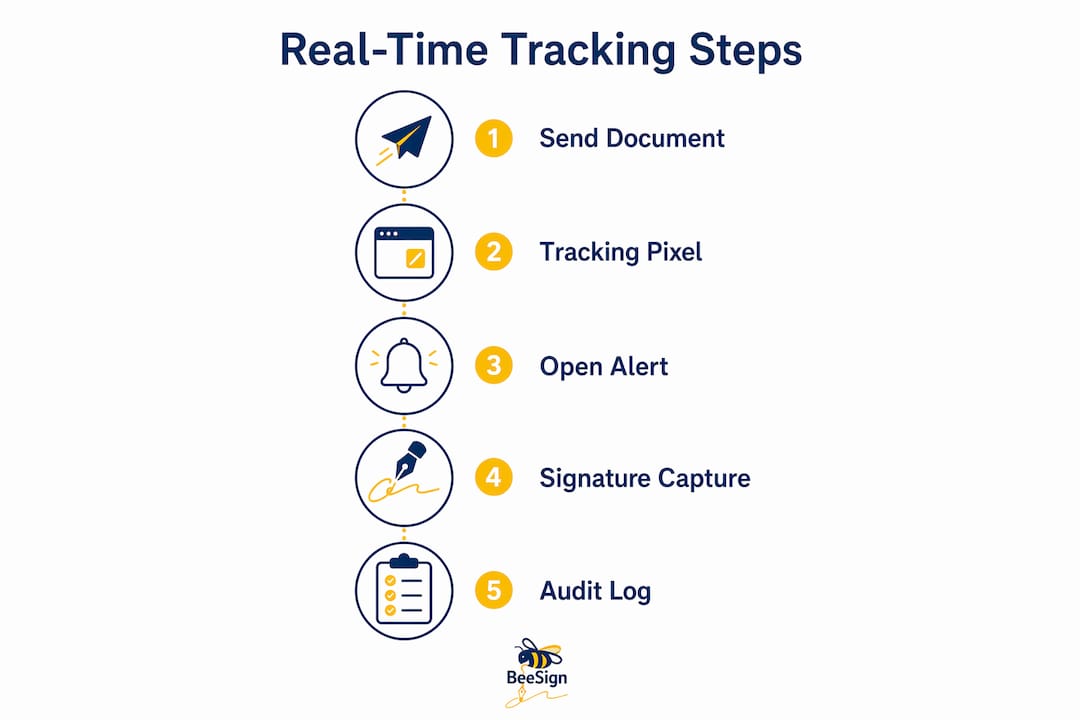
The technical foundation of real-time document tracking rests on three mechanisms: tracking pixels, unique document links, and event-streaming protocols.
Tracking pixels embedded invisibly in document pages generate a log entry each time a page loads. These logs reconstruct a detailed session timeline showing time spent per page, navigation patterns, and how many times a recipient opened the document. That level of detail goes far beyond a simple “opened” notification. You see exactly which clause a signer spent three minutes on and which pages they skipped entirely.

Unique document links work alongside tracking pixels. Each recipient receives a distinct URL tied to their identity. When they click, the platform records the event against their profile. This means you can distinguish between two signers on the same contract without any ambiguity.
For event delivery, platforms choose between two protocols:
- Webhooks send an HTTP POST request to your server the moment a defined event occurs, such as a document being signed. No persistent connection is required. This makes Webhooks ideal for backend automation, like triggering a CRM update or sending a follow-up email.
- WebSockets maintain a persistent connection between the platform and your browser. GraphQL subscriptions use WebSocket connections to stream events like signing completion directly to a live dashboard without a page refresh.
Many platforms use both. Webhooks handle server-side automation while WebSockets power the live UI your team watches.
One more technology deserves attention: confidence scoring. Confidence scoring filters out bot activity by analyzing metadata to determine whether an open came from a human or an automated security scanner. Without it, your team chases false positive alerts and wastes time on documents that no real person has touched.
Pro Tip: When evaluating a platform, ask specifically whether it uses confidence scoring. Platforms that do not will flood your notification feed with bot-triggered opens, making the data unreliable.
How to implement real-time tracking in your document workflow
Setting up e-signature real-time tracking takes fewer steps than most teams expect. The key is choosing the right platform before you configure anything else.
Selecting the right platform
Your platform must meet four criteria before you commit:
- Native support for audit trails that capture user IDs, timestamps, and IP addresses
- Compliance with at least one recognized legal standard (ESIGN, eIDAS, or HIPAA)
- Webhook or API support for integration with your existing tools
- A live dashboard that shows signing status without manual refresh
Beesign meets all four. Its document signature tracking features include real-time status updates, per-signer progress views, and a full audit log for every document.
Step-by-step setup
- Upload your document. Import the contract or agreement into the platform. Most platforms accept PDF, DOCX, and common office formats.
- Add recipients and assign roles. Specify who signs, who approves, and who receives a copy. Each recipient gets a unique tracked link.
- Place signature fields. Drag and drop signature, date, and initials fields onto the correct pages. This also defines the signing order if sequential signing is required.
- Configure notifications. Set alerts for document opened, page viewed, signature completed, and document declined. Route these alerts to email, Slack, or your CRM via Webhook.
- Send and monitor. Once sent, your dashboard shows live status: pending, in progress, or signed. You can see exactly which recipient is active at any moment.
- Review the audit trail. After signing, download the audit log. It records every interaction with timestamps and IP addresses, creating legally defensible proof for compliance and dispute resolution.
Integrating with your CRM is the step most teams skip, and it is the one that delivers the most value. Real-time tracking platforms support CRM integration that triggers automated follow-ups the moment a document is opened or signed. A sales rep no longer needs to manually check signing status. The CRM updates itself and queues the next action automatically.
Pro Tip: Set up a Webhook that fires when a document is opened but not signed within 24 hours. Route it to your sales team as a follow-up task. This single automation recovers a measurable number of stalled deals.
Common mistakes when tracking document signing
The most common mistake teams make is trusting raw open data without filtering. Automated link-checkers and security scanners trigger open events before a human ever sees the document. If your platform does not apply confidence scoring, your team will follow up on documents that no recipient has actually read.
A second mistake is treating the audit trail as a backup rather than an active tool. Audit trails provide legally defensible evidence of every document interaction, including whether a signer reviewed a specific clause before signing. Teams that ignore this data miss a critical layer of contract risk management.
Here are the most frequent errors and how to correct them:
- Relying on email open rates instead of document-level tracking. Email opens tell you nothing about whether the recipient read the contract. Use page-level tracking instead.
- Failing to revoke access after a deal falls through. Tracked links can be disabled instantly, cutting off access to sensitive documents without needing to recall emails.
- Ignoring session duration data. A signer who spent 12 seconds on a 20-page contract almost certainly did not read it. That data matters for compliance and for your follow-up strategy.
- Not testing Webhook endpoints before going live. A misconfigured Webhook silently fails. Test every endpoint with a sample payload before sending real documents.
Understanding the legal dimension of audit trails is also non-negotiable. Under eIDAS and ESIGN, a valid electronic signature requires proof that the signer intended to sign and that the document was not altered afterward. A complete audit trail, including timestamps, IP addresses, and signer identity verification, satisfies both requirements. Platforms that do not capture this data expose your organization to contract disputes you cannot win.
How to use tracking data to improve business outcomes
Real-time tracking data does more than confirm a document was signed. It tells you how to run your business better.
Session timelines reveal the exact moment a recipient engages with a document. This transforms document status from a black box into a precise, session-based picture of recipient behavior. A sales team that knows a prospect just spent eight minutes on the pricing page can call within minutes, while the conversation is still relevant.
Here is how to put tracking data to work across your operations:
- Time your follow-ups precisely. Send a follow-up call or message within 30 minutes of a document open. Engagement is highest immediately after the first view.
- Confirm full document review before signing. If session data shows a signer skipped the liability clause, flag it before the signature is collected. This protects both parties.
- Use audit logs for risk mitigation. Audit trails preempt contract disputes by proving whether recipients reviewed critical clauses and signed within agreed timelines.
- Measure turnaround times by document type. Track how long each contract category takes from send to signature. Identify bottlenecks and set realistic SLAs for your team.
- Monitor signing delays proactively. Live dashboard updates show pending signers and delays in real time, so you can intervene before a deal stalls.
The teams that get the most value from real-time tracking are the ones that build it into their review process, not just their sending process. Reviewing session data after every signed contract creates a feedback loop that continuously improves your document design, your follow-up timing, and your compliance posture.
Key Takeaways
Real-time e-signature tracking gives business teams complete visibility into signing workflows, reduces contract cycle times, and creates legally defensible audit records that satisfy ESIGN and eIDAS requirements.
| Point | Details |
|---|---|
| Use confidence scoring | Filter bot-triggered opens to get reliable engagement data from real recipients. |
| Build Webhook automations | Trigger CRM updates and follow-up tasks the moment a document is opened or signed. |
| Treat audit trails as risk tools | Audit logs with timestamps and IP addresses provide legally defensible proof under ESIGN and eIDAS. |
| Act on session timeline data | Use page-level engagement data to time follow-ups and confirm full document review before signing. |
| Revoke access when needed | Disable tracked links instantly to prevent unauthorized access after a deal changes. |
Why transparent tracking changes how I think about contract risk
By Mustafa Abusharkh
Most teams I talk to think of document tracking as a convenience feature. They want to know when something is signed so they can move on. That framing undersells what the data actually gives you.
The moment I started treating session timelines as contract intelligence rather than notification logs, the way I managed agreements changed completely. Knowing that a counterparty spent 45 seconds on a 30-page contract before signing is not just a curiosity. It is a risk signal. It tells you whether to proceed, whether to follow up, and sometimes whether to reopen a conversation before a dispute becomes inevitable.
The compliance angle is equally underappreciated. Teams that rely on a signed PDF as their only proof of agreement are one dispute away from a very expensive lesson. A complete audit trail, with IP addresses, timestamps, and page-level interaction data, is the difference between a contract you can defend and one you cannot. Under eIDAS and ESIGN, that data is not optional. It is the legal foundation of the signature itself.
My honest view is that real-time tracking will become table stakes for any team managing more than a handful of contracts per month. The technology is mature, the compliance requirements are clear, and the operational benefits are measurable. The only question is how long your team waits before treating it as standard practice.
— Mustafa Abusharkh
Beesign brings real-time e-signature tracking to your team
Beesign centralizes contracts, templates, and identity verification in one platform built for compliance and speed. Its electronic signature tools include live signing status dashboards, per-signer progress tracking, and full audit trails that satisfy ESIGN, eIDAS, and HIPAA requirements. Teams get instant document signing alerts via email or API, and Webhook support connects Beesign directly to your CRM or workflow tools.

Beesign also offers a white-label option with custom domains and bring-your-own-cloud storage, keeping your data inside your own infrastructure. Whether you manage sales contracts, legal agreements, or vendor onboarding, Beesign’s secure eSignature platform gives your team the real-time visibility and compliance coverage to close agreements with confidence.
FAQ
What is real-time document signing tracking?
Real-time document signing tracking is the process of monitoring each step of a signing workflow as it occurs, including document opens, page views, and signature completions. Platforms capture this data through tracking pixels, unique links, and event-streaming protocols like Webhooks and WebSockets.
How do audit trails support legal compliance?
Audit trails record user IDs, timestamps, and IP addresses for every document interaction, creating legally defensible proof under ESIGN and eIDAS. This evidence confirms that signers reviewed and intentionally signed the document, which is required for a valid electronic signature.
What causes false positive tracking alerts?
Automated security scanners and link-checking bots trigger open events before any human views a document. Platforms that use confidence scoring analyze metadata to filter out these non-human interactions, so your team only receives alerts from genuine recipient engagement.
Can I integrate document tracking with my CRM?
Yes. Most real-time tracking platforms support Webhook integrations that fire automatically when a document is opened or signed, updating your CRM and triggering follow-up tasks without manual input.
How do I stop access to a document after sending it?
You can disable the tracked link for any document instantly through your platform dashboard. This cuts off recipient access immediately without requiring you to recall or delete the original email.
Recommended
Ready to transform your workflow?
Start using BeeSign today and experience the future of document signing