Workplace Communication for Teams: Cut Noise, Move Faster
Transform your team's efficiency with clear workplace communication. Set rules, document decisions, and speed up collaboration today!

Workplace communication is the structured exchange of information across spoken, written, nonverbal, and visual channels — both synchronous and asynchronous — that lets teams decide, coordinate, and move work forward. The single highest-impact step you can take right now: write down which channel belongs to which type of message, share it with your team, and enforce it for two weeks. That one rule alone cuts the constant context-switching that burns hours every day.
TL;DR: Set channel-to-purpose rules, document every decision in writing, and define response-time norms. Teams that do all three report less rework, fewer status-check meetings, and faster decisions.
- Set channel rules today. Decide what belongs in chat, what goes in a doc, and what warrants a meeting. Post the rules where everyone can see them.
- Document decisions in writing. Every resolved question should live in a shared doc, not in someone’s memory or a buried chat thread.
- Define response-time norms. “Reply within 4 hours on Slack, 24 hours on email” removes the anxiety that drives unnecessary pings.
Miscommunication costs U.S. businesses hundreds of billions of dollars annually in lost productivity, much of it traced directly to unclear written messages and missing channel norms.
Table of Contents
- What does workplace communication actually cover?
- What are the core types of workplace communication?
- What principles make communication actually work?
- Why does poor communication cost so much?
- Five strategies that actually improve team communication
- How do you measure communication effectiveness?
- How do you build communication skills that stick?
- What does the research say about what actually works?
- Key Takeaways
- The part most teams skip entirely
- Fewer meetings, faster decisions: how Beesign fits in
- Useful sources
What does workplace communication actually cover?
Workplace communication covers every exchange of information that moves work forward: one-on-one conversations, team meetings, email, chat, async video, written documentation, and visual assets like slides and dashboards. It spans the full range of daily coordination, from a quick Slack message clarifying a deadline to a formal project brief that onboards a new hire.
A few concrete mappings help here. Onboarding a new team member calls for structured documentation: a written guide, a checklist, a recorded walkthrough. An urgent production incident calls for a synchronous huddle where everyone is in the room (or on the call) at the same time. A recurring status update, on the other hand, belongs in a shared doc or async video, not a weekly meeting that interrupts deep work.
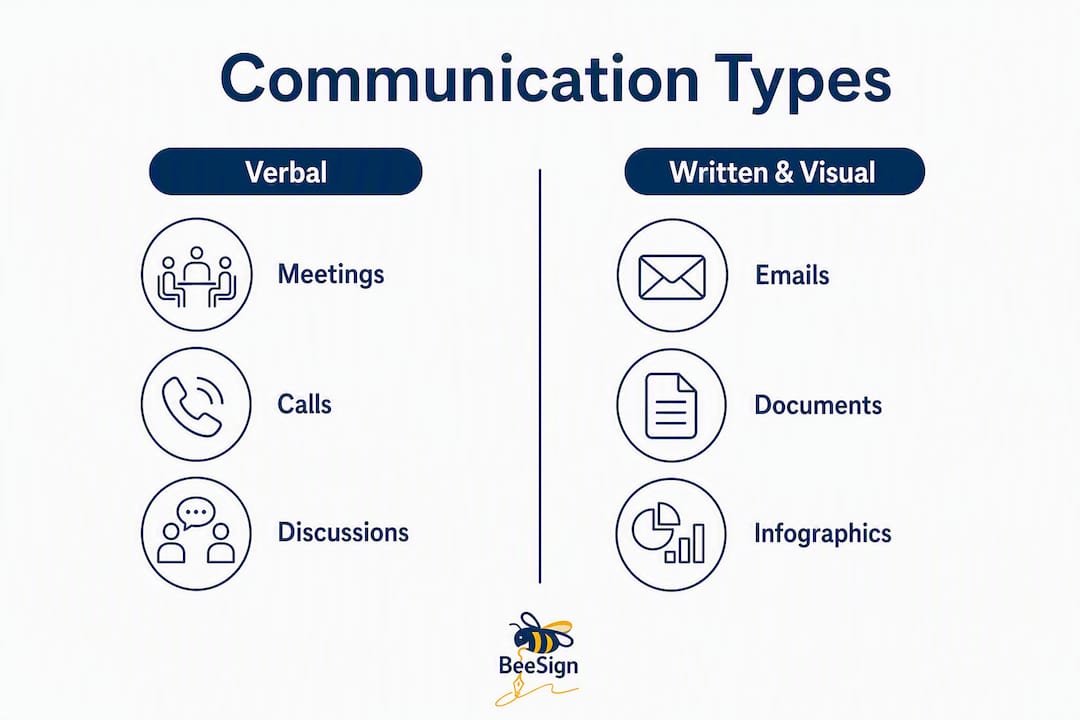
Coursera’s overview of workplace communication identifies four primary types: verbal, nonverbal, written, and visual. Each channel has a natural home in the workflow, and the problems start when teams use the wrong one for the job.
This guide focuses on the operational side: how to choose channels, build norms, measure effectiveness, and develop skills. It does not cover deep interpersonal therapy, labor law specifics, or HR compliance frameworks — those require qualified professionals.
What are the core types of workplace communication?
Workplace communication breaks into four types, each with distinct strengths and failure modes.
- Verbal (spoken): Real-time conversation, whether in person or on a video call. Best for nuanced discussions, brainstorming, and situations where tone and immediate feedback matter. Failure mode: no record exists afterward.
- Nonverbal: Body language, facial expression, tone of voice, and eye contact. Carries a large share of emotional meaning in any spoken exchange. Failure mode: easy to misread in text-only or cross-cultural contexts.
- Written: Email, chat messages, memos, reports, and documentation. Scalable, searchable, and asynchronous by default. Failure mode: vague language that forces follow-up questions.
- Visual: Charts, slides, diagrams, and dashboards. Compresses complex data into a format that is faster to scan than prose. Failure mode: visuals without context mislead as often as they clarify.
Synchronous vs. asynchronous: choosing the right default
Synchronous communication (meetings, live calls, real-time chat) is high-bandwidth but expensive. Everyone must be available at the same moment, which fragments focus and creates scheduling friction across time zones.
An async-first hierarchy solves this: use documentation for persistent information, async messages for quick interactions, and synchronous meetings only for high-stakes collaboration. The payoff is fewer interruptions, a built-in record, and better-quality thinking because people respond when they are ready, not when they are startled.
Concrete channel-to-purpose examples:
- Chat (Slack, Teams): Quick clarifying questions with a short answer. Not for decisions.
- Email: Formal requests, external communication, anything that needs a paper trail.
- Shared docs (Notion, Confluence): Decisions, processes, project context, onboarding guides.
- Short recorded video (Loom): Walkthroughs and feedback that need tone but do not need a live meeting.
- Synchronous meeting: High-stakes decisions, conflict resolution, creative brainstorming where real-time back-and-forth is genuinely necessary.
Pro Tip: Before scheduling a meeting, ask: “Could this be a doc?” If the answer is yes, write the doc. Reserve live time for conversations where the back-and-forth itself is the value.
What principles make communication actually work?
The 7 C’s of communication (clear, concise, concrete, correct, coherent, complete, and courteous) are a useful audit checklist, but the principles that move the needle in practice are slightly different.

Clarity means one message, one meaning. Every sentence should have a subject, a verb, and a point. If a reader has to guess what you want, the message failed.
Concision is not about being brief for its own sake. It is about removing the words that make the reader work harder without giving them more information. A three-sentence message that answers who, what, and by when beats a paragraph that buries the ask.
Context is what most messages skip. When you send a request without explaining why it matters, the recipient has to fill in the gap — often incorrectly. One sentence of context cuts follow-up questions in half.
Documented decisions are the most underused principle. High-performance teams treat documented decision-making as a productivity tool, reducing the need for gatekeepers and constant status checks. When a decision lives in a shared doc, anyone can find it without pinging the person who made it.
Channel fit means matching the message to the medium. Sending a complex decision over chat, or calling a meeting to share information that could be a doc, creates noise rather than clarity.
Common communication styles and when to use them
Teams include people who default to different styles: direct (get to the point fast), diplomatic (relationship-first, careful framing), analytical (data and evidence before conclusions), and relational (emotional context and team cohesion). None is wrong. Problems arise when a direct sender and a relational receiver interpret the same message as cold or as rambling, respectively.
The practical fix: name your default style in team norms and agree on a shared written format for requests (what, why, by when, from whom). That structure works across styles because it gives the direct person the clarity they need and gives the relational person the context they want.
Psychological safety is the foundation under all of this. When people fear that speaking up will be penalized, no communication framework compensates. Leaders build safety by responding predictably when disagreements surface: acknowledging the concern, separating the idea from the person, and following through on what they said they would do.
Pro Tip: In written messages, read your draft once from the recipient’s perspective before sending. Ask: “Does this tell them what I need, why it matters, and when?” If any answer is missing, add it in one sentence.
Why does poor communication cost so much?
Miscommunication is a material business problem: studies show U.S. productivity losses in the hundreds of billions annually, with a significant share traced to unclear written messages and missing norms. Workers report spending meaningful time decoding vague requests and redoing work that was based on misunderstood instructions.
Better communication improves decision speed because fewer clarifying rounds are needed before action can start. It improves team alignment because everyone is working from the same documented understanding of priorities and context. And it directly supports psychological safety: when people know how to raise concerns and where decisions are recorded, they spend less energy on political navigation and more on the actual work.
The organizational pain points that trace back to communication failures are predictable: missed deadlines caused by unclear handoffs, burnout from constant interruptions and status-check meetings, and high turnover on teams where people feel uninformed or unheard. Leaders who fail to set clear communication norms create collaborative overload — a state where the coordination work itself becomes the job.
Five strategies that actually improve team communication
These five moves are ordered by impact. Start with the first two; the others compound on top of them.
-
Build a channel matrix. Write down which channel handles which type of message, and post it in your team wiki. A simple version: chat for questions with short answers, email for external and formal communication, docs for decisions and processes, meetings for high-stakes collaboration only. An async-first hierarchy reduces interruptions, spans time zones, and creates a searchable record.
-
Write the meeting before you hold it. Before scheduling any meeting, write a one-paragraph decision record: what decision needs to be made, what options exist, and what you recommend. This practice shortens meeting length by roughly one-third by surfacing objections before the room fills up. Paste it into the calendar invite.
-
Use a request template. Every message that asks someone to do something should answer four questions: What do you need? Why does it matter? By when do you need it? From whom specifically? This format works in chat, email, and ticket descriptions equally well.
-
Capture decisions in a shared doc. After any meeting or async thread where a decision was reached, write one paragraph: the decision, the reasoning, and who owns the next step. Documentation is the most scalable communication channel because it works for people who were not in the room and for the team six months from now.
-
Run a monthly feedback ritual. A 30-minute 1:1 cadence with a structured format (what is working, what is not, one specific request) prevents small friction from becoming conflict. Pair it with a team-level psychological-safety check-in every quarter.
Meeting rules that cut waste
| Rule | Why it works |
|---|---|
| Agenda shared 24 hours in advance | Participants arrive prepared; fewer “wait, what are we deciding?” moments |
| One designated facilitator | Keeps discussion on track and ensures every voice is heard |
| Invite only decision-makers and contributors | Observers can read the notes; their presence adds cost without adding value |
| Capture decisions and action items in real time | Eliminates the “what did we actually decide?” follow-up thread |
| End 5 minutes early | Gives people transition time and signals respect for their schedule |
Pro Tip: Paste this meeting template into every calendar invite: (1) Goal: what we are deciding. (2) Pre-read: link to the decision record. (3) Roles: facilitator, note-taker. (4) Outcome: decision + action items captured in [doc link].
How do you measure communication effectiveness?
You cannot improve what you do not track. The good news: most of the metrics that matter are already available in tools your team uses every day.
| Metric | What it measures | How to collect it | Review frequency |
|---|---|---|---|
| Rework rate | % of tasks returned for revision due to unclear instructions | Task/ticket system (Jira, Asana, Linear) | Monthly |
| Time in meetings | Hours per person per week in scheduled meetings | Calendar analytics (Google Workspace, Outlook) | Weekly |
| Response-time compliance | % of messages answered within the agreed norm | Slack analytics or manual spot-check | Monthly |
| Decision lag | Days from “decision needed” to “decision recorded” | Project management tool or doc audit | Per project |
| Meeting effectiveness rating | Team’s perceived value of meetings (1–5 scale) | Pulse survey (Typeform, Google Forms) | Monthly |
Communication strategies that work are short, written down, and updated as the team changes. The same applies to your metrics: pick two or three to start, review them on a fixed cadence, and adjust the norms when the data shows a pattern.
Explicit response-time norms and channel rules are among the fastest levers to reduce collaborative overload. Once you have a norm, measuring compliance tells you whether the team has actually adopted it or whether the rule exists only on paper.
Pulse surveys are the simplest tool for qualitative signal. A three-question monthly survey (“Do you have the information you need to do your job? Do meetings feel worth your time? Do you know where to find decisions after they are made?”) surfaces problems before they show up in turnover data.
How do you build communication skills that stick?
Skills become habits through repetition, not through reading. These practices are designed to be short enough to fit into a normal workweek.
Individual practices
- Two-week writing clarity challenge. For 14 days, before sending any message longer than three sentences, read it once and cut every word that does not add meaning. Track how often recipients ask follow-up questions. Most people see a measurable drop by day 10.
- Active-listening drill. In your next three meetings, take notes only on what the other person says, not on your own responses. After each speaker finishes, summarize their point in one sentence before you respond. This forces comprehension before reaction.
- Three-second pause. Before replying to any message that triggers a strong reaction, wait three seconds. This is not about suppressing your view; it is about separating the emotional response from the substantive one. Emotional regulation is one of the highest-impact interpersonal skills in the workplace today.
Team practices
- Monthly psychological-safety check-in. Ask the team one question at the end of a regular meeting: “Was there anything you wanted to say this month but did not feel comfortable saying?” Responses can be anonymous. The act of asking changes the culture over time.
- Write-the-meeting-before-you-hold-it routine. Make the one-paragraph decision record a team norm, not a personal habit. Rotate who writes it so the skill spreads.
- Shared doc ownership cadence. Assign a named owner to every living document (process guides, decision logs, onboarding materials). That person reviews and updates it quarterly. Documentation serves as the most scalable communication channel only when it stays current.
Templates to copy and use
Message template: One-paragraph decision record: Feedback script:
What does the research say about what actually works?
The most cited finding in team performance research comes from Google’s Project Aristotle, a multi-year study of hundreds of internal teams. The study found that psychological safety — the belief that you can speak up without being penalized — was the single strongest predictor of team effectiveness, outperforming factors like individual talent, seniority, and team composition.
The practical implication: if your team is underperforming, the first question is not “do we have the right people?” It is “do people feel safe enough to say what they actually think?”
Written clarity, conflict navigation, and emotional regulation are the highest-impact interpersonal skills in 2026. Written clarity matters because most workplace coordination now happens in text, and a vague message creates a chain of follow-ups that costs more time than writing the clear version would have. Conflict navigation matters because unresolved friction accumulates into disengagement and turnover. Emotional regulation matters because the person who can stay constructive under pressure sets the tone for everyone around them.
High-performance teams treat clarity as a productivity tool and rely on documented decision-making to reduce the need for gatekeepers. When status and capacity live in a shared system, team conversations shift from debating facts to solving problems. That shift is where the real productivity gain lives.
The one-paragraph decision record deserves special mention. Writing it 24 hours before a meeting shortens meeting length by roughly one-third by surfacing objections early, before group dynamics suppress important feedback. It also raises decision quality because the person writing it is forced to think the problem through before the room fills up with opinions.
Key Takeaways
Effective workplace communication comes down to three moves: set channel rules, document decisions, and measure what you track.
| Point | Details |
|---|---|
| Set channel rules first | A written channel matrix cuts context-switching and reduces unnecessary pings within days of adoption. |
| Document every decision | A one-paragraph decision record in a shared doc eliminates status-check meetings and gives future team members context they would otherwise have to chase. |
| Write the meeting before you hold it | A pre-meeting decision record shortens meeting length by roughly one-third by surfacing objections early. |
| Measure two or three metrics | Track rework rate, time in meetings, and response-time compliance monthly to see whether norms are actually working. |
| Beesign centralizes document workflows | Teams using Beesign reduce recurring coordination meetings by keeping templates, approvals, and decision records in one auditable place. |
The part most teams skip entirely
Most teams that struggle with communication are not struggling with skills. They are struggling with visibility. When no one knows where decisions live, what the current status of a project is, or who owns a given document, every conversation becomes a status check. The fix is not a training program. It is a shared system.
The conventional advice is to “communicate more clearly” or “run better meetings.” Both are fine, but they treat symptoms. The root cause is usually that information lives in the wrong place: in someone’s inbox, in a chat thread that scrolled off the screen three weeks ago, or in a meeting that half the team could not attend. When you move that information into a shared, searchable, maintained doc, the quality of every conversation improves automatically because people arrive with context instead of questions.
The teams I see make the fastest progress are the ones that start small: one channel matrix, one decision log, one meeting template. They do not try to overhaul culture in a quarter. They pick one visible friction point, fix it in writing, and let the win build momentum for the next change. The pilot approach also makes adoption easier because skeptics can see results before they are asked to change their habits.
The other thing worth saying plainly: psychological safety is not a soft skill. It is a structural outcome. It is built by what leaders do when someone raises a concern, not by what they say in an all-hands. If the response to a dissenting view is dismissal or silence, no communication framework compensates. The framework only works when the culture underneath it is safe enough for people to use it honestly.
Fewer meetings, faster decisions: how Beesign fits in
When your team agrees to document decisions and centralize templates, the next question is where those documents actually live and who can access them. Scattered files across email threads and personal drives undo the channel rules you just set.

Beesign gives teams a single, auditable home for the documents that drive decisions: contracts, approval workflows, onboarding paperwork, and reusable templates. Instead of chasing signatures over email or holding a meeting to confirm who approved what, you get real-time tracking, a complete audit trail, and blockchain timestamp proof for every document. HR teams using Beesign’s onboarding and operations workflows report cutting recurring coordination meetings around paperwork because every step is visible and automated. For teams that need branded workflows or bring-your-own-cloud storage for compliance with ESIGN, UETA, HIPAA, or GDPR, Beesign’s white-label and BYOC options keep data inside your own infrastructure.
Start a 7-day free trial at beesign.net and see how much coordination overhead disappears when approvals and decision records have a permanent, searchable home.
Useful sources
- Workplace Communication: What Is It & Why Is It Important? | Coursera — Covers the four primary types of workplace communication with clear definitions; useful for foundational framing.
- It’s time to streamline how we communicate at work | HBR — Practitioner-focused piece on how unclear norms create collaborative overload; strong evidence for channel rules and response-time norms.
- How to get your team unstuck from constant miscommunication | Atlassian — Quantifies the productivity cost of miscommunication and offers practical team-level fixes.
- Team Communication Guide: Async, Meetings, Documentation | Vact — Detailed guide to the async-first hierarchy and documentation as a scalable channel; the most practically structured source in this list.
- Interpersonal skills at work in 2026 | Tempo — Covers psychological safety, Project Aristotle, and the highest-impact skills for 2026 including written clarity and emotional regulation.
- Team communication | monday.com blog — Explains how high-performance teams use documented decisions to reduce gatekeeping and status-check friction.
- Effective Communication Strategies for Teams (2026) | Rock — Practical framework for building a team communication strategy that maps channel, frequency, audience, and decision ownership.
- Effective communication in the workplace | OpenLearn, Open University — Academic-quality overview of communication principles and their organizational impact; useful for grounding the 7 C’s and psychological safety discussion.
Recommended
Ready to transform your workflow?
Start using BeeSign today and experience the future of document signing