Before Your Next Audit: ESIGN Consent Requirements for U.S. Teams
U.S. focused checklist that turns 15 U.S.C. § 7001 into testable steps: affirmative opt in, demonstrable access, retention controls, plus a BeeSign...

Under the ESIGN Act, you must obtain affirmative consumer consent, paired with clear and conspicuous disclosures, a hardware and software statement, and demonstrable-access confirmation, before an electronic record satisfies any legal writing requirement. You also need retention and accessibility controls that hold up under audit. Miss any piece, and the electronic record’s legal standing gets shaky fast.
TL;DR:
- Consumers must actively opt in and receive clear disclosures about their rights, fees, and withdrawal procedures before signing electronically.
- Proof of demonstrable access requires verified testing showing the consumer can open, save, and print the record in the disclosed format.
- An audit trail must include timestamps, IP addresses, authentication events, and document hashes to establish proof and support legal enforceability.
- Any significant change to hardware or software requirements triggers a need to re-obtain consumer consent and re-test access capabilities.
- Compliance gaps most often involve missing or weak access proof, unclear withdrawal procedures, undisclosed fees, and inadequate audit logging.
Table of Contents
- What Are the ESIGN Consent Requirements?
- What Does 15 U.S.C. § 7001 Actually Require?
- How Do You Prove Demonstrable Access?
- What Evidence Proves a Signer’s Intent?
- When Does UETA Apply Instead of ESIGN?
- What Are the Most Common ESIGN Compliance Failures?
- How Does an eSignature Platform Like BeeSign Operationalize These Rules?
- Why Demonstrable Access Deserves More Attention Than It Gets
- Where to Evaluate BeeSign’s Compliance Features
- Primary Sources Worth Bookmarking
- Sources
What Are the ESIGN Consent Requirements?
Here’s the checklist you can hand to an engineering team without translation. Every consumer-facing consent flow governed by 15 U.S.C. § 7001 needs these pieces in place before the “I agree” click means anything legally.
- Affirmative opt-in. The consumer must actively consent to electronic delivery, and you must label whether that consent covers one transaction or a whole category of records.
- Clear and conspicuous disclosures. Cover the right to receive paper, how to withdraw consent, any fees tied to paper copies, and the exact process for requesting them.
- Hardware/software statement. Spell out what the consumer needs to access, print, and save the record, and make that statement easy to find, not buried in a terms page.
- Demonstrable-access test. Before consent is final, confirm the consumer can actually open and retain the record in the disclosed format.
- Retention and accessibility. Records need to stay retrievable in their original form for as long as retention rules require.
Pro Tip: Run the demonstrable-access step as a logged event, not a checkbox. If a regulator asks for proof three years later, “we assumed they could open it” won’t hold up.
What Does 15 U.S.C. § 7001 Actually Require?
The statute reads like dense legal prose, but each clause solves a specific real-world problem. Breaking down 15 U.S.C. § 7001 clause by clause makes the compliance logic obvious.
- Consent must be affirmative, not assumed. A consumer has to take a clear action opting into electronic records. Silence or a pre-checked box doesn’t count as consent under most interpretations of the statute’s intent.
- Disclosures must be clear and conspicuous. This isn’t decorative language. Regulators expect the paper-copy right, the withdrawal method, and any associated fees to be stated plainly, not tucked into a footnote.
- The hardware/software statement exists so consumers aren’t blindsided. If your platform requires a specific PDF reader or a minimum browser version, the consumer needs to know that before they consent, not after they’ve already signed something they can’t reopen.
- Demonstrable access closes the loop. The law doesn’t just want a disclosure. It wants proof the consumer could actually access the record in that format.
Two things survive untouched: existing consumer protections stay intact, and failure to obtain proper consent does not automatically void the underlying contract. It does, however, strip away the electronic record’s presumption of validity, which is a much worse position to defend in a dispute. Retention and accuracy obligations translate directly into system requirements: your storage layer needs to preserve the record exactly as delivered, for as long as the applicable retention period runs, and it needs to be retrievable on demand.
How Do You Prove Demonstrable Access?
The hardware/software statement is only half the job. You also need a repeatable way to prove a consumer could open, print, and save the record before they consented, and examiners increasingly want to see how that test was run, not just that a policy mentions it.
The disclosure itself should specify:
- Accepted file types (PDF is standard; note if you support others).
- Minimum browser versions or operating systems.
- Required software, such as a specific PDF reader.
- Print and save instructions, written in plain language.
For the test itself, a few methods hold up well under scrutiny:
- Serve a sample document and require the consumer to open and view it before the consent button activates.
- Provide a test download link and confirm the file lands successfully.
- Send a sample email attachment and require a save-to-disk confirmation.
- Use an on-page viewer and log a successful render event.
Pro Tip: Document every exception, not just every success. If a consumer’s browser fails the access test, log why, and route them to a paper alternative rather than forcing the flow through.
Material technical changes, like dropping support for an old PDF format, trigger a duty to renotify and re-obtain consent, according to the ESIGN Act’s text on hardware and software changes.
What Evidence Proves a Signer’s Intent?
Consent gets you in the door. Intent to sign, and proof that the signature is tied to a specific record, is what makes the document enforceable later. Legal commentary from Mayer Brown frames intent as a factual question courts answer by looking at circumstantial evidence, which means your audit trail is doing the heavy lifting.
A defensible audit trail retains:
- Timestamps for every consent and signature event.
- IP address and user agent at the moment of signing.
- Authentication events (login, OTP verification, ID checks).
- A cryptographic hash of the document at signing time.
Match authentication to risk. A low-stakes internal approval might only need a password. A real estate closing or loan document usually calls for one-time passcodes or government ID verification with biometric matching.
Association matters just as much as authentication: embedding the signature metadata directly into the signed PDF, and storing the signed hash alongside the audit log, creates a chain of custody an examiner can follow without guesswork. That combination, audit trails plus multi-factor authentication, is what strengthens the evidentiary record most when a signature gets challenged.
When Does UETA Apply Instead of ESIGN?
ESIGN is federal law, but most day-to-day e-signature questions actually route through state UETA statutes, since nearly every state has adopted a version of the Uniform Electronic Transactions Act. ESIGN generally governs interstate commerce and steps in as a floor when state law is silent or inconsistent; UETA governs intrastate transactions within states that have enacted it.
- Check state-specific exclusions. Wills, certain family law documents, and some court filings are commonly carved out from both statutes.
- Verify your industry’s rules. Mortgage transactions carry their own layered verification expectations that go beyond baseline ESIGN consent, as industry guidance on ESIGN and UETA for lenders lays out.
- Notarization can go electronic too. Remote online notarization statutes, now adopted in most states, let acknowledgments happen electronically, provided the notary follows that state’s specific identity-verification and recording rules.
What Are the Most Common ESIGN Compliance Failures?
Examiners tend to find the same handful of gaps repeatedly, according to guidance reflected in the FDIC’s compliance examination manual. Here’s the priority order for fixing them.
- Missing or weak demonstrable-access flow. If there’s no logged proof the consumer could open the record, fix this first. It’s the most-cited gap.
- Unclear withdrawal procedure. Consumers need a straightforward way to revoke consent, and that process needs to be as visible as the original opt-in.
- Charging fees for paper copies without disclosure. Any fee tied to paper delivery must be disclosed upfront, not discovered at request time.
- Thin audit logging. If your logs don’t capture authentication events and document hashes, you have consent without proof.
Pro Tip: When presenting remediation to examiners, show dated change logs alongside the fix. “We identified this gap on X date and deployed the fix on Y date” reads far better than a vague assurance that things are handled now.
How Does an eSignature Platform Like BeeSign Operationalize These Rules?
Translating statute into software is where most compliance programs stall. This is where a workflow-native platform earns its keep, by baking the statutory checklist directly into the signing flow instead of leaving it to a policy document nobody rereads.
Beesign maps directly to the elements above:
- Configurable disclosure templates that surface paper rights, withdrawal steps, and fee language before consent.
- Built-in demonstrable-access checks logged as part of the audit trail.
- Identity verification, including government ID capture and biometric face matching, for higher-risk signature events.
- Re-consent workflows that trigger automatically when hardware or software requirements change.
- White-label deployment and bring-your-own-cloud storage, so records stay inside your own infrastructure for retention control.
When a document’s audit trail, hash, and consent record are captured automatically at the point of signing, the evidentiary burden shifts from “prove it happened” to “show the log.”
For teams building this out, our guide to eSignature compliance requirements walks through the integration checklist compliance and engineering teams can run together before go-live.
Why Demonstrable Access Deserves More Attention Than It Gets
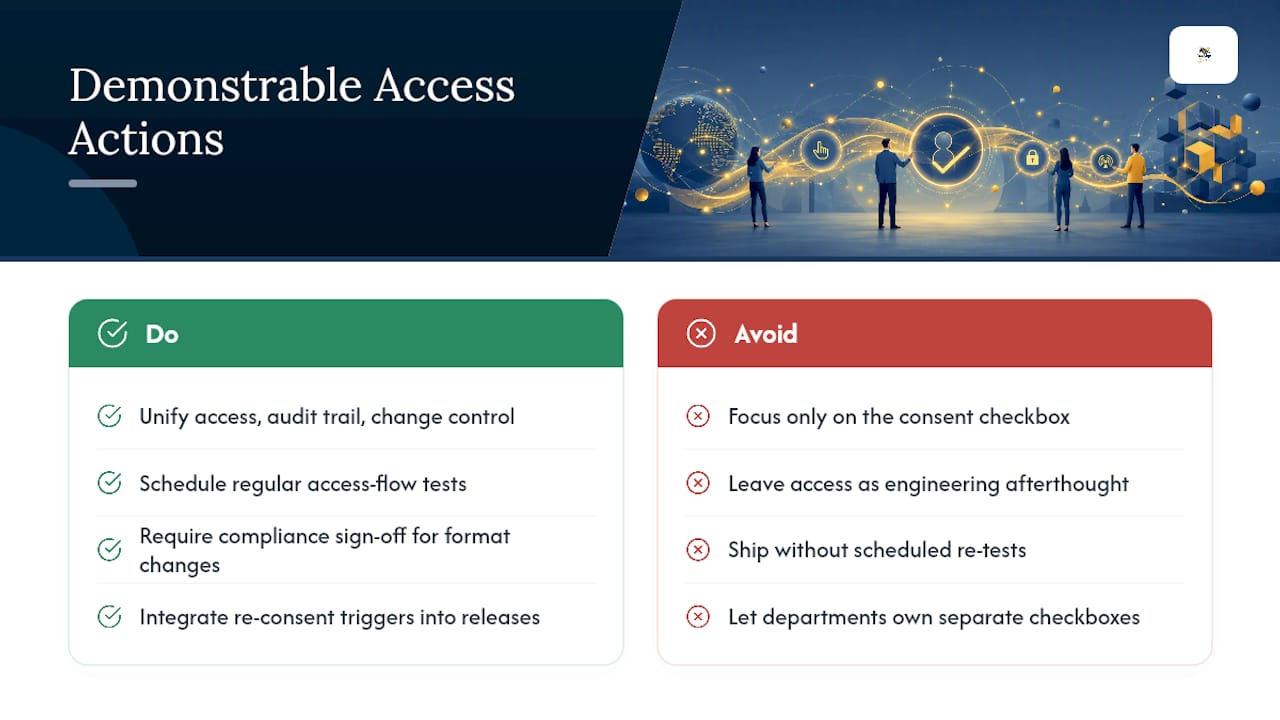
Most compliance conversations fixate on the consent checkbox and skip past demonstrable access, treating it as an engineering afterthought rather than a legal requirement with teeth. That’s backwards. A consumer who clicked “agree” but couldn’t actually open the PDF later has grounds to argue the record never satisfied the writing requirement in the first place, regardless of how clean your disclosure language reads.
Governance teams should treat demonstrable access, audit trail integrity, and change control as one connected discipline, not three separate checkboxes owned by three separate departments. That means testing the access flow on a schedule, not just at launch, and requiring sign-off from compliance whenever engineering touches file formats, viewers, or browser support. Build re-consent triggers into your release process now, before a support ticket forces the question.
— Mustafa Abusharkh
Where to Evaluate BeeSign’s Compliance Features
If you’ve been mapping your consent flow against this checklist and finding gaps, you don’t have to rebuild it from scratch. Beesign is built specifically to close the space between what ESIGN requires and what most signing tools actually log, with disclosure templates, demonstrable-access testing, and audit trails running as native parts of the workflow, not bolted-on add-ons.

The identity verification layer, including government ID capture and biometric matching, gives you a defensible authentication tier for higher-risk documents, while white-label and bring-your-own-cloud storage keep retained records inside infrastructure you control, which matters when an examiner asks where the data lives. Sales and operations teams looking to move faster on contracts can see how this plays out on the business workflow page. Start a trial on the Beesign platform and run your own consent flow through the demonstrable-access test this week, before your next audit cycle does it for you.
Primary Sources Worth Bookmarking
For anyone verifying the statutory language directly or briefing a compliance committee, these are the sources worth keeping on hand:
- 15 U.S.C. § 7001 text — govinfo
- NCUA compliance guidance on ESIGN
- FDIC examination manual, Section X-3
- Mayer Brown’s analysis on e-signature validity
This article is general information, not a substitute for advice from a qualified lawyer. Consult a qualified legal professional about your own circumstances before acting on anything here.
Sources
- U.S.C. Title 15 § 7001 (E‑Sign Act) — govinfo
- Electronic Signatures in Global and National Commerce Act (E‑Sign Act) — NCUA
- Is your electronic signature valid? — Mayer Brown
- X-3 The Electronic Signatures in Global and National Commerce Act (E‑Sign Act) — FDIC manual
Recommended
Ready to transform your workflow?
Start using BeeSign today and experience the future of document signing