U.S. Playbook: ESIGN, UETA & NASS for RON vs E-Signature
U.S. playbook to choose RON or an e-signature. Maps ESIGN, UETA, and NASS rules, gives a checklist, and shows how a single platform can help.

An e-signature captures a person’s intent to sign and creates an audit trail. Remote online notarization (RON) adds a licensed notary who verifies identity on live video and attaches a notarial certificate and seal. Use e-signatures for routine business agreements. Use RON when a document legally requires notarization, like a deed or a power of attorney. Federal law under the ESIGN Act supports both, but RON rules vary by state.
TL;DR:
- RON provides a live, video-recorded notarization with identity verification, sealing, and journal entry, making it essential for legally notarized documents like deeds and powers of attorney.
- E-signatures rely on asynchronous, platform-based identity checks and produce digital audit trails, suitable for most commercial agreements without notarization requirements.
- Federal law under ESIGN supports both e-signatures and electronic notarizations, but state RON rules vary and require confirmation of acceptance and compliance.
- Only certain states permit RON, and ever-changing legislation means legal acceptance depends on specific jurisdiction and document type, especially for real estate and estate planning.
- For high-risk legal documents, a hybrid approach of electronic signing for routine sections and RON for notarized parts minimizes cost and delays while ensuring legality.
Table of Contents
- Remote Online Notarization vs E-Signature: A Side-by-Side Look
- How ESIGN, UETA, and State Law Govern Validity
- What Evidence Each Process Actually Produces
- When You Need E-Signature, RON, or Both
- A Step-by-Step Checklist for Choosing the Right Workflow
- Where a Platform Like Beesign Fits Into This Checklist
- Why the RON-vs-E-Signature Debate Gets Framed Wrong
- Get Both Signature Workflows Without Switching Platforms
- Sources
- FAQ
Remote Online Notarization vs E-Signature: A Side-by-Side Look
The two processes solve different problems, and confusing them causes real delays for real estate closings, estate documents, and court filings.
An e-signature is a digital mark, click, or typed name that shows a person agreed to a document’s terms. It relies on platform-level identity checks, like email verification or a one-time passcode, and produces a digital audit trail showing who signed, when, and from what device. E-signatures work asynchronously. You send a document, the recipient opens it whenever convenient, signs, and the platform logs the event.
Remote online notarization is a notarial act. A commissioned notary confirms the signer’s identity, then witnesses the signing during a live audio-video session, according to the National Notary Association. The notary attaches an electronic seal and certificate, logs the transaction in a journal, and the session recording becomes part of the permanent record.
Here’s how the two stack up in practice:
- Process: E-signature is asynchronous and self-service. RON requires a scheduled, live session with a commissioned notary.
- Identity verification: E-signature typically uses email or SMS confirmation. RON layers in government ID scans, biometric checks, and knowledge-based questions.
- Evidence produced: E-signature generates a digital audit trail. RON adds a notarial certificate, a journal entry, and a recorded video session.
- Acceptance: E-signature works for most commercial agreements. RON is required for many real estates, estate planning, and court-related documents.
How ESIGN, UETA, and State Law Govern Validity
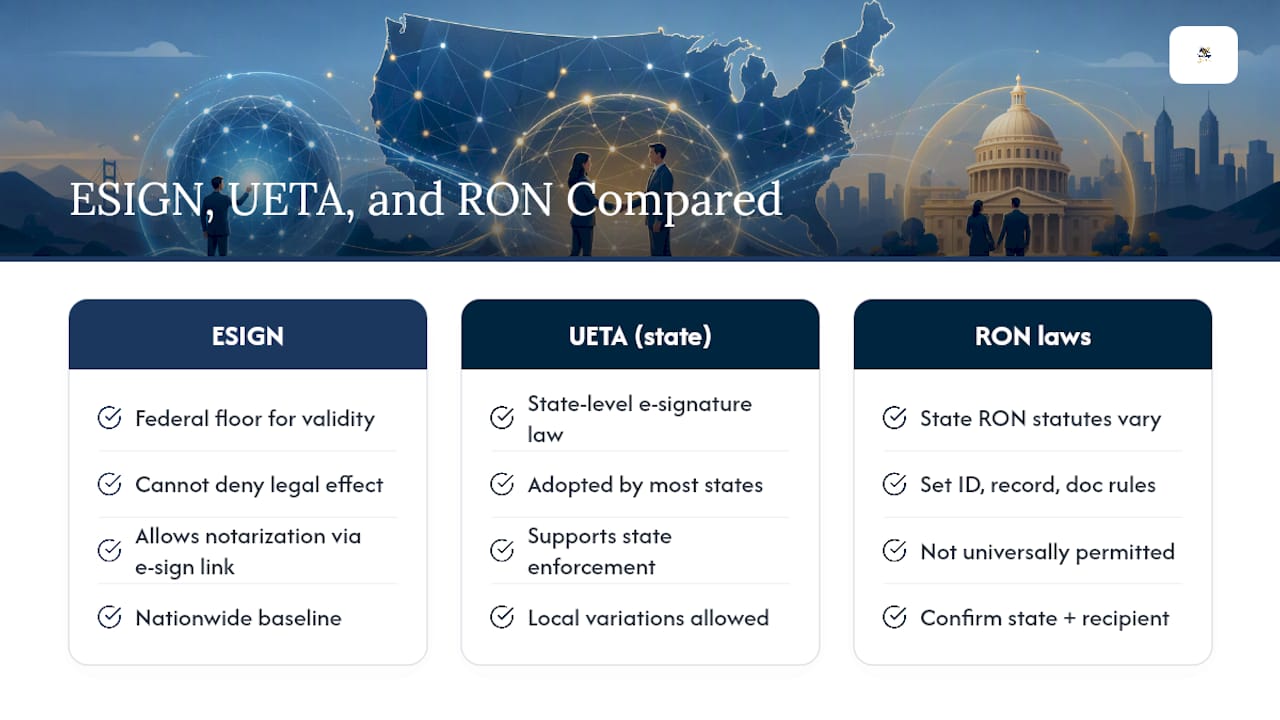
The ESIGN Act is the federal floor for electronic signature legal validity. It states that a signature or record cannot be denied legal effect solely because it exists in electronic form. That single sentence is why e-signatures hold up in court across nearly every industry, from lease agreements to vendor contracts.
ESIGN also addresses notarization directly. It permits notarization requirements to be satisfied when an authorized person’s electronic signature is attached to, or logically associated with, the record being notarized. That’s the legal hook that made electronic and remote notarization possible in the first place.
The Uniform Electronic Transactions Act (UETA) works alongside ESIGN at the state level, and most states have adopted a version of it. Some states layered their own remote notarization statutes on top, which is where things get complicated. Not every state permits RON, and the ones that do often set different rules for identity proofing, recording retention, and which document types qualify.
A Tennessee Secretary of State FAQ draws a clear line between e-notarization, which happens in person using electronic tools, and remote online notarization, which happens entirely over video. That distinction trips up a lot of people who assume the two terms mean the same thing.
State adoption isn’t static, either. Congress has considered federal legislation aimed at standardizing RON acceptance across state lines, though nothing has passed as of this writing. Until that changes, always confirm two things before you rely on RON: whether your state permits it, and whether the recipient, be it a county recorder, a lender, or a court clerk, accepts it for that specific document.
What Evidence Each Process Actually Produces
The paper trail behind a signature matters more than most people realize until a dispute lands in front of a judge, making secure document delivery crucial for proof and archival in legal processes like those explained at PerPageFax — send a fax online.
E-signature platforms build their case for enforceability through the audit trail: timestamps, IP addresses, device fingerprints, and a record of every action taken on the document. Some platforms add multi-factor identity checks, like requiring a signer to verify a phone number or upload a photo ID, before granting access to a document.
RON goes further by design. The NASS standards call for identity-proofing methods that combine credential analysis with knowledge-based authentication, plus a recorded audio-video session and a secure system architecture that prevents tampering after the fact. The notary’s certificate and seal get attached to the document under the same “logical association” standard ESIGN uses for electronic signatures, which is what makes the notarized document legally equivalent to a wet-ink, in-person notarization.
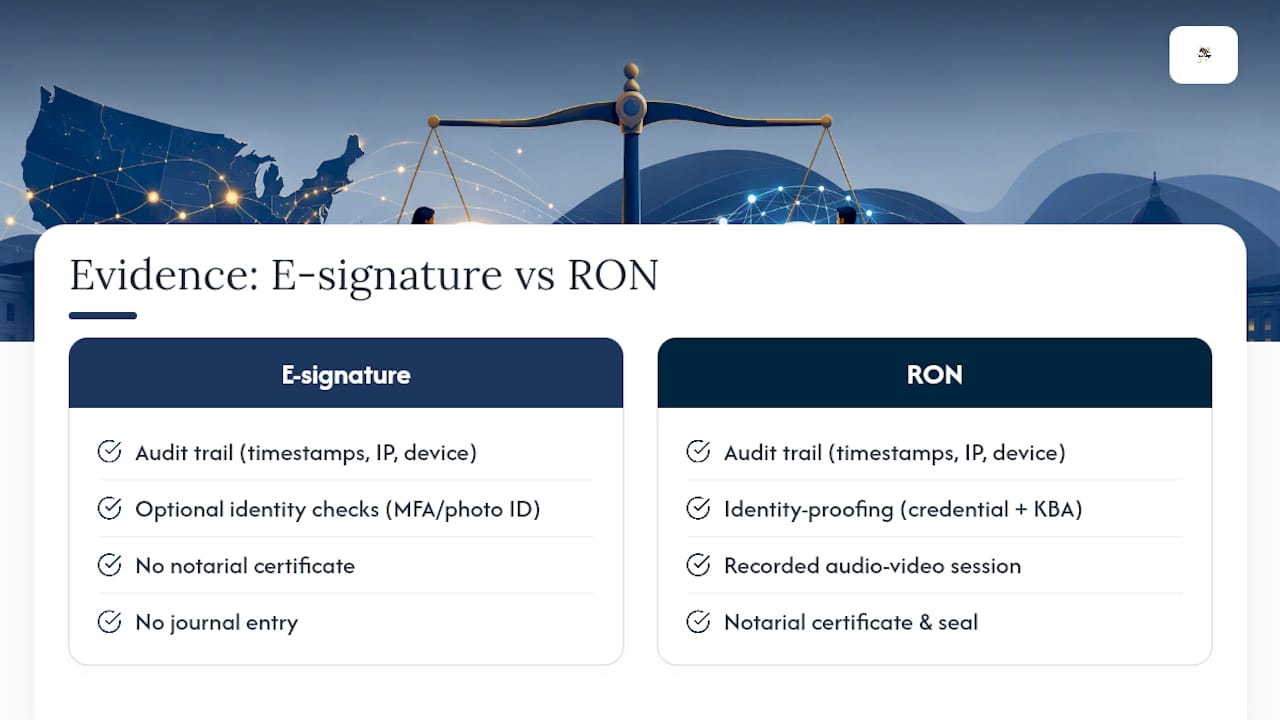
The journal entry is where RON pulls ahead for dispute resolution. It’s a permanent, often state-audited record showing exactly who appeared, what ID they presented, and when the notarial act occurred. If you ever need to defend a document’s validity in court, that combination of certificate, journal, and recording carries more evidentiary weight than a standard audit trail alone. Pro Tip: Before choosing a platform for either process, confirm you can export the full record, journal entry, recording, and audit trail included, in a format your recipient’s system will actually accept.
When You Need E-Signature, RON, or Both
Most day-to-day paperwork doesn’t need a notary anywhere near it. Employment offers, NDAs, sales contracts, vendor agreements, and consulting agreements all move faster and cheaper with a straightforward e-signature.
Notarization enters the picture when the law requires third-party verification of identity and intent. That list commonly includes:
- Real estate deeds and mortgage documents
- Powers of attorney
- Certain estate planning documents, like wills in some states
- Affidavits submitted to a court
- Documents heading to a county recorder’s office
A hybrid flow often works best for mixed-document packages. According to one industry breakdown of RON versus e-signature, the smart move is signing the routine sections electronically and reserving RON for the specific pages or exhibits that legally require it. That keeps signer friction low while still meeting the higher evidentiary bar where it counts. The trade-off is straightforward: e-signature wins on speed and cost, RON wins on legal certainty for documents where a notary’s attestation is non-negotiable.
A Step-by-Step Checklist for Choosing the Right Workflow
Before you pick a tool or a process, run through this sequence:
- Confirm whether notarization is legally required for the document, not just customary.
- Check your state’s RON rules and whether the recipient (recorder, lender, or court) accepts remote notarization for that document type.
- Match identity-proofing strength to risk. A low-value internal agreement doesn’t need the same rigor as a property transfer.
- Verify the platform exports a complete, audit-ready record, including any video recording and retention policy.
- Estimate signer friction and cost. RON sessions take longer and typically cost more per transaction than e-signature.
- Implement the minimal control that satisfies the requirement. Don’t notarize documents that only need a standard signature.
Pro Tip: Document your decision process once, then turn it into a standing policy. Most businesses handle the same document types repeatedly, so you shouldn’t have to re-litigate this checklist every time a contract lands on your desk.
Where a Platform Like Beesign Fits Into This Checklist
A platform that handles both ends of this spectrum saves you from stitching together separate tools for signing and identity verification. Beesign centralizes contracts, templates, and identity verification, including government ID capture and biometric face matching, alongside a complete, exportable audit trail with blockchain timestamp proof.
For businesses running white-label or bring-your-own-cloud deployments, that record stays inside your own infrastructure rather than a third party’s servers, which matters for HIPAA, eIDAS, and GDPR compliance across different departments. The audit trail feature covers most of the retention and exportability requirements in the checklist above, whether you’re running standard e-signature workflows or layering in stronger identity checks for higher-risk documents.
Why the RON-vs-E-Signature Debate Gets Framed Wrong
Most guidance on this topic treats e-signature and RON as competing products, as if picking one means rejecting the other. That framing misses the point entirely. The real question isn’t which technology is better. It’s which legal requirement applies to the specific document sitting in front of you.
Conventional advice also tends to oversell RON as the “more secure” default, when the honest read of the NASS standards is that RON exists to satisfy a notarial requirement, not to replace e-signature’s speed for the 90% of business documents that never needed a notary in the first place. Businesses that default to RON for everything waste money and slow down their signers for no legal benefit.
The priority I’d give any reader: confirm the legal requirement first, check state and recipient acceptance second, and only then evaluate vendors. Platform features are the last decision, not the first. Get the sequence backward and you’ll pay for notarization you didn’t need, or worse, skip it where a court or recorder demanded it.
— Mustafa Abusharkh
Get Both Signature Workflows Without Switching Platforms
Beesign is the alternative to juggling a separate e-signature tool and a separate identity-verification vendor. Instead of stitching together two systems and hoping the audit trails line up when a document gets challenged, you get document signing, identity verification, and audit trail generation inside one platform, with white-label and bring-your-own-cloud options that keep records on your own infrastructure.

That matters most for businesses juggling mixed document types, standard contracts that only need an electronic signature, and higher-risk agreements that call for stronger identity checks. The Individual plan starts at $9.99 per month, and enterprise pricing with custom integrations is available on request. If your business handles any document type that might require notarization, confirm your state’s RON rules and your recipient’s acceptance policy before you finalize a workflow. Start a trial at Beesign and map your document types to the checklist above before your next closing or filing deadline.
This article is general information, not a substitute for advice from a qualified lawyer. Consult a qualified legal professional about your own circumstances before acting on anything here.
Sources
- Electronic Signatures in Global and National Commerce Act (ESIGN) — 15 U.S.C. §7001
- NASS eNotarization/RON standards (NASS)
- Understanding Different Methods of Notarization — National Notary Association
FAQ
Which States Don’t Allow Remote Online Notarization?
State RON adoption changes as legislatures pass new laws, so there’s no fixed permanent list. Check your state’s Secretary of State website, like the Tennessee SOS, before assuming remote notarization is available where you or your signer are located.
What Is the Difference Between Electronic and Remote Notarization?
Electronic notarization (e-notarization) happens in person, with the notary and signer in the same room using electronic signatures and seals instead of pen and paper. Remote online notarization happens entirely over live audio-video, with identity verification and the notarial act performed remotely, according to the National Notary Association.
Is Remote Online Notary Worth It?
RON is worth it when your document legally requires notarization and you need to avoid an in-person appointment, particularly for real estate closings or documents involving out-of-state signers. For documents that don’t legally require a notary, a standard e-signature is faster and less expensive.
Can an E-Signature Be Notarized?
Yes. Under ESIGN, a notarization requirement can be satisfied when an authorized notary’s electronic signature is attached to or logically associated with the electronic record. That’s exactly how RON platforms produce a legally valid notarized document without ink or an in-person meeting.
Recommended
Ready to transform your workflow?
Start using BeeSign today and experience the future of document signing