How U.S. Lawyers and Businesses Prove Electronic Signatures in Court
How U.S. lawyers and businesses authenticate electronic signatures for court. A four‑step checklist for audit trails, identity proofing, and...

Yes, U.S. courts generally admit electronic signatures into evidence. The ESIGN Act and state UETA statutes make an e-signature legally equivalent to ink on paper, but admission is not the same as winning. Once you’re in court, you still have to prove the signature belongs to the person you say signed it, under evidentiary standards like Federal Rule of Evidence 901.
TL;DR:
- Courts consider circumstantial evidence such as login data, IP addresses, and device identifiers more crucial than witnesses when authenticating electronic signatures.
- A defensible audit trail should include timestamps, IP addresses, device info, authentication events, and long-term validation data to withstand legal scrutiny.
- State and federal laws exclude certain documents like wills, family law papers, and court orders from automatic e-signature validity, requiring review of specific rules.
- Handling high-stakes signatures involves obtaining documented consent, enforcing multi-factor authentication, and exporting comprehensive audit logs immediately after signing.
- Enterprise-level signing controls, including cloud storage and automated logs, significantly reduce evidence preservation risks for disputes over signed documents.
Table of Contents
- Are Electronic Signatures in Court Legally Valid Under ESIGN and UETA?
- How Do Courts Authenticate an Electronic Signature?
- What Makes an Audit Trail Defensible in Litigation?
- Which Court Filings Require Special Signature Formats?
- A Practical Checklist for Court-Ready Electronic Signatures
- Why Enterprise Signing Controls Matter More Than People Think
- How Beesign Helps You Build a Court-Ready Signing Process
- Sources
Are Electronic Signatures in Court Legally Valid Under ESIGN and UETA?
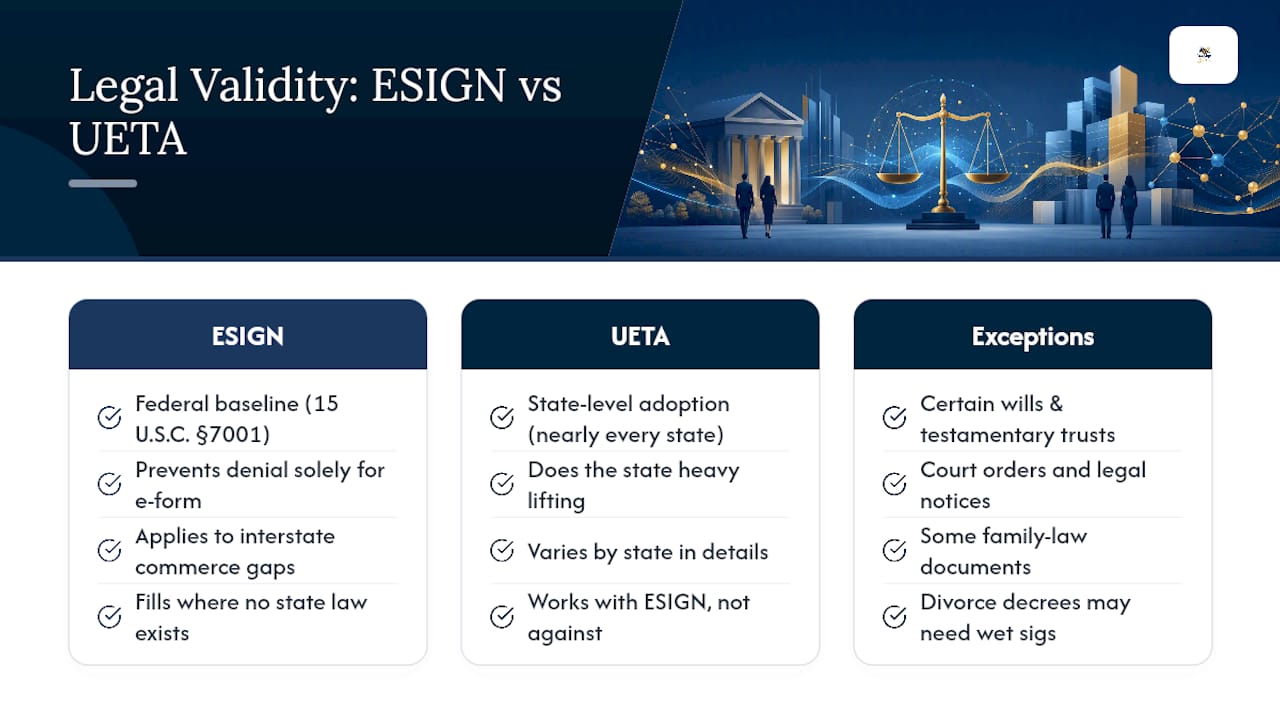
The federal ESIGN Act sets the baseline: a contract or signature can’t be denied legal effect “solely because it is in electronic form.” That single sentence, codified at 15 U.S.C. §7001, is the reason electronic signatures for court documents and commercial contracts function at all in the United States. It doesn’t mandate that anyone use e-signatures. It just removes the automatic disqualification that older courts sometimes applied to anything that wasn’t pen and paper.
UETA does the state-level heavy lifting. Nearly every state has adopted some version of the Uniform Electronic Transactions Act, and where a state hasn’t, ESIGN generally fills the gap for transactions affecting interstate commerce. The two statutes were built to work together, not compete, so you rarely need to pick one over the other.
Neither law is unconditional, though. The U.S. Code carves out specific categories where electronic signing doesn’t automatically apply, including certain wills, testamentary trusts, court orders and notices, and some family law documents. Divorce decrees, custody orders, and specific probate filings often still require wet signatures or judicial signature stamps under local rules. Before you rely on an e-signature for anything in these categories, check your state’s UETA exceptions list and the presiding court’s own filing rules. For businesses building signing workflows, it’s worth reading how e-signature compliance laws apply to your specific industry before you assume every document type qualifies.
How Do Courts Authenticate an Electronic Signature?
Getting a document into evidence and getting a judge to believe it are two different battles. FRE 901 requires the party offering evidence to produce enough proof that a reasonable person could conclude the item is what it’s claimed to be. For a signature, that means showing the mark on the document actually came from the person named, not just that a signature exists somewhere on the file.
Courts don’t require direct proof like a witness watching someone click “sign.” Circumstantial evidence carries the day in nearly every disputed case: login credentials, multi-factor authentication events, IP addresses, and device fingerprints tied to the signing session. The Texas Supreme Court’s Aerotek decision went further, holding that proving a platform’s security procedures were effective can conclusively establish attribution, shifting the burden to the person denying they signed.
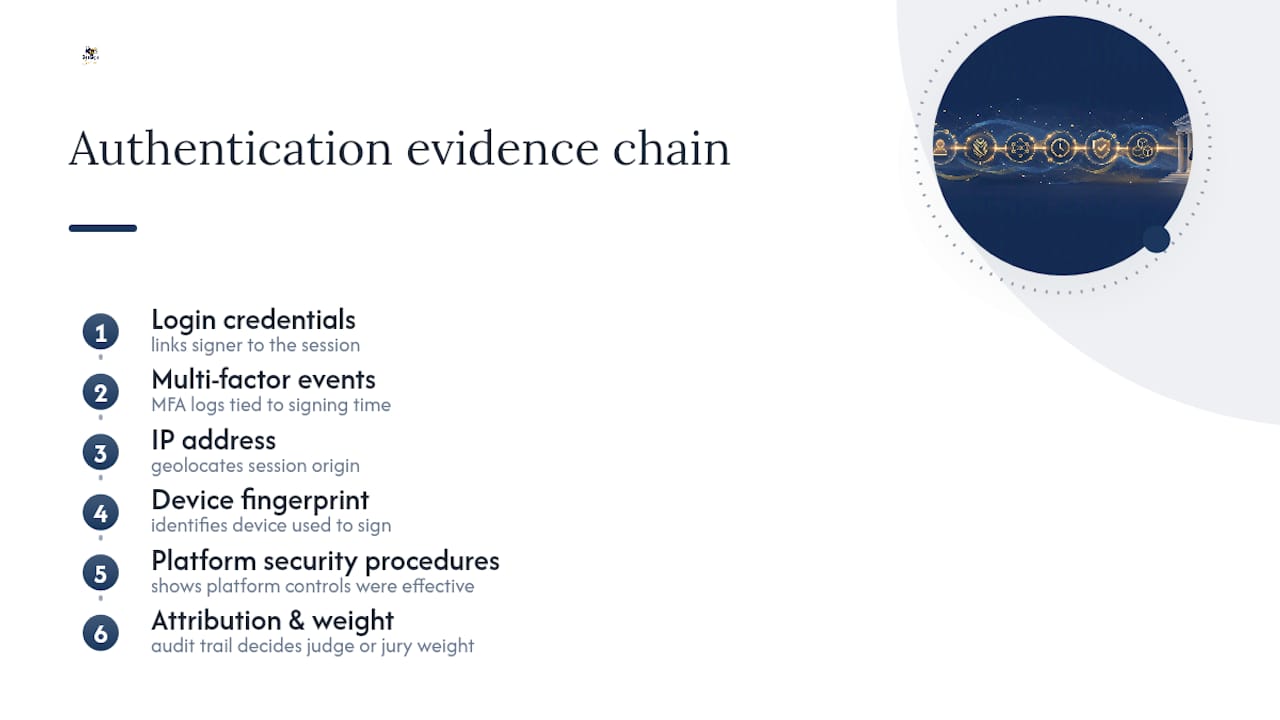
Other cases follow the same pattern. In Schrock v. Nomac Drilling and Obi v. Exeter Health Resources, courts leaned on detailed audit trails rather than eyewitness testimony to settle attribution disputes. Once that circumstantial case is strong, a bare denial from the signer usually isn’t enough to defeat it. Admissibility gets you through the door; the audit trail decides how much weight the judge or jury gives you once you’re inside.
What Makes an Audit Trail Defensible in Litigation?
An audit trail is your evidence file, not a nice-to-have feature. Practitioners describe a defensible trail as the modern equivalent of a wax seal: something that proves not just that a document was signed, but who signed it, from where, and under what security conditions.
A trail strong enough to survive cross-examination generally includes:
- Timestamps for every lifecycle event: document sent, opened, viewed, and signed
- IP addresses and device identifiers tied to each session
- Multi-factor authentication events and identity-proofing results
- Certificate metadata, including validity status at the time of signing
Identity proofing adds another layer. Government ID capture and biometric face matching create a record that goes beyond “someone with this email address clicked a button.” For high-value contracts or anything likely to be disputed, that extra proofing step is often the difference between a quick summary judgment and a drawn-out authentication fight.
For matters that might get reviewed years later, embedding long-term validation data, timestamp and revocation-status snapshots baked into the signed file itself, prevents gaps that show up when someone checks a certificate chain long after the certificate has expired. Audit trail guides that walk through export formats are worth reviewing before you standardize a retention process.
Pro Tip: Export your complete audit trail and store it separately from the signed document itself. If your e-signature vendor ever changes platforms or shuts down a legacy product, you don’t want your only proof locked inside a system you can no longer access.
Which Court Filings Require Special Signature Formats?
Court filings play by different rules than commercial contracts. Most federal courts operate under CM/ECF, and local rules typically accept a typed “/s/ Jane Smith” signature block for attorneys of record, treating it as equivalent to a handwritten signature on a paper filing. The Southern District of Indiana’s bankruptcy court is a good example of how specific these formats can get, right down to spacing requirements around the “/s/” designation.
Local rules vary enough between districts, and even between judges within the same district, that you should never assume one court’s filing conventions apply elsewhere. Some documents, notarized affidavits especially, may still require a wet signature or a physical original preserved for a set retention period even after electronic filing.
A Practical Checklist for Court-Ready Electronic Signatures
Treat every high-stakes signature like it might end up in front of a judge, because eventually one will.
- Before signing: Get documented consent to sign electronically, then match your identity-proofing method (MFA, government ID scan, biometric match) to how much is riding on the document.
- During signing: Enforce MFA, capture session-level logs, and record IP addresses and device IDs in real time rather than reconstructing them later.
- After signing: Export the full audit trail immediately and snapshot the certificate’s revocation status while it’s still verifiable.
- For discovery: Package the signed document, audit trail, and identity-proofing artifacts together so opposing counsel and the court can inspect a complete, verifiable chain rather than piecing one together from fragments.
Pro Tip: Build your export process before you need it for litigation. Reconstructing IP logs and MFA events six months after a dispute starts is far harder than pulling a pre-packaged export the day the document was signed.
Why Enterprise Signing Controls Matter More Than People Think
Most disputes over electronic signatures don’t turn on whether the law permits them. They turn on whether anyone bothered to preserve the evidence that proves who actually signed. Platform-level controls, white-label deployment with your own cloud storage, layered identity verification, and an API that logs every event automatically, exist precisely because manual record-keeping fails under pressure. When a case surfaces two years after signing, you need a system that already captured the details you didn’t know you’d need.
— Mustafa Abusharkh
How Beesign Helps You Build a Court-Ready Signing Process
Every checklist item above maps directly to capabilities available in modern e-signature platforms. Every document signed through Beesign generates a complete audit trail: timestamps, IP addresses, device data, and MFA events, exportable as a single package when you need it for discovery. Identity verification, including government ID capture and biometric face matching, is built into the signing flow rather than bolted on afterward.

For businesses with strict compliance requirements, Beesign’s white-label and bring-your-own-cloud options keep signed documents and audit data inside your own infrastructure, which matters when opposing counsel starts asking where your evidence actually lives. The developer API automates identity checks and log capture so nothing depends on someone remembering to hit “export” after a signature is collected.
If your team handles contracts that could end up disputed, whether that’s sales agreements, HR paperwork, or client onboarding documents, start a free trial with Beesign and see how the audit trail and identity verification tools work together before your next high-stakes signature goes out the door.
This article is general information, not a substitute for advice from a qualified lawyer. Consult a qualified legal professional about your own circumstances before acting on anything here.
Sources
- Electronic signature — Cornell Law School Legal Information Institute
- Using e-signatures in court — The value of an audit trail | Fenwick
- IN THE SUPREME COURT OF TEXAS — Aerotek opinion
- 15 U.S. Code Chapter 96 - ELECTRONIC SIGNATURES IN GLOBAL AND NATIONAL COMMERCE
Recommended
Ready to transform your workflow?
Start using BeeSign today and experience the future of document signing