What IT Must Verify Before Buying BYOC Self Hosted eSignature
Compliance-first BYOC and white label checklist for IT and procurement. Demand SOC 2 Type II, exportable audit trails, BYOK options, and pilot steps...

“Self hosted eSignature” means a white-label, bring-your-own-cloud (BYOC) eSignature platform, not on-premise software you install and run yourself. Any vendor you evaluate under this label should offer custom domains, identity verification, a tamper-evident audit trail, and documentation like a BAA or SOC 2 Type II report on request. BeeSign is built around exactly that checklist.
TL;DR:
- Vendors should support storage of signed documents in your own cloud regions with clear retention and deletion guarantees.
- They must provide encryption at rest and in transit, with a documented key rotation schedule, along with cryptographic hashing for tamper evidence.
- A signed document’s legal validity depends on intent, consent, and a verifiable association through identity verification and an audit trail.
- The total cost includes setup fees, internal engineering hours, ongoing compliance documentation, and cloud storage expenses, not just subscription fees.
- Proper planning involves requesting SOC 2 reports, testing with high-risk documents, and ensuring webhook delivery, backup, and disaster recovery are thoroughly validated.
Table of Contents
- What Should a Self-Hosted eSignature Checklist Include?
- How Do Legal Requirements Map to Product Features?
- What Technical Controls Prove a Signature’s Integrity?
- Embedded Signing or API: Which Integration Fits?
- What Do BYOC and White-Label Deployment Actually Require?
- How Should IT Run a Pilot and Go-Live Plan?
- Can a Self-Hosted eSignature Platform Handle Enterprise Volume?
- How Does BYOC eSignature Compare to Pure Cloud Platforms?
- What Makes the Signing Experience Actually Usable?
- What Drives the True Cost of a Self-Hosted eSignature Platform?
- Does eSignature Compliance Go Beyond HIPAA?
- How Should You Plan for Backup and Disaster Recovery?
- What Actually Trips Up Self-Hosted eSignature Rollouts?
- How Does BeeSign Meet This Checklist?
- Sources
What Should a Self-Hosted eSignature Checklist Include?
Before you sign a contract, get vendors to answer specific questions, not marketing claims. Here is what to check, in the order it usually matters most to procurement and IT.
- BYOC and data residency. Confirm the vendor supports storing signed documents in your own cloud environment, and ask which regions and storage providers they support.
- Encryption and key management. Data should be encrypted at rest and in transit, with a documented key rotation schedule.
- White-label features. Custom domains, branded emails, and a hosted signing experience under your own name, not the vendor’s.
- Identity verification. Ask which methods are supported (government ID capture, biometric face match) and whether you can require them per workflow.
- Audit trail contents. Every signed document needs a record tying the signer to the action, exportable in a machine-readable format.
- Security controls. TLS everywhere, scoped API keys, documented key rotation, and webhook signature verification.
- Compliance documentation. Request a Business Associate Agreement (BAA), a current SOC 2 Type II report, and written confirmation of ESIGN and eIDAS support.
- Developer features. REST API endpoints, webhooks, SDKs, and published rate limits, so your engineering team can plan integration work without guessing.
Pro Tip: Ask for the SOC 2 Type II report and a sample audit trail export before you sign anything. If a vendor stalls on either request, treat it as a red flag, not a formality.
How Do Legal Requirements Map to Product Features?
Enforceable electronic signatures rest on three legal pillars: intent to sign, consent to do business electronically, and association, meaning a verifiable link between the signer and the record. That standard applies whether you’re operating under the ESIGN Act or eIDAS Article 26, and it’s the lens procurement should use when comparing vendors.
Identity verification is what actually strengthens association. A checkbox that says “I agree” ties intent to a browser session. A government ID scan paired with a biometric match ties intent to a person. That distinction matters when a signed contract gets challenged years later.
- Intent: captured through explicit signing actions, not implied consent.
- Consent: documented acceptance of electronic process, ideally with a timestamped disclosure.
- Association: identity verification plus a tamper-evident audit trail.
If any document in your workflow can contain protected health information, HHS guidance is direct: the provider must be treated as a Business Associate, and you need a signed Business Associate Agreement (BAA). Technical safeguards alone don’t satisfy that obligation. A SOC 2 report is a strong trust signal, but it’s an audit opinion, not a legal substitute for a BAA or a contract clause.
What Technical Controls Prove a Signature’s Integrity?
Your security team should validate specific mechanics, not take “secure” at face value. A defensible audit trail needs signer email, an ISO 8601 timestamp, IP address, a SHA-256 document hash, signing method, and user agent, exportable in JSON or CSV for audits.
- Tamper-evidence through cryptographic hashing, with optional blockchain timestamp proof for extra assurance.
- API security built on scoped keys, OAuth, and a documented key rotation cadence.
- Webhook payloads verified with signature headers, timestamp checks, and replay protection.
- Encryption at rest and in transit as a baseline, not an add-on tier.
- BYOK or HSM options for organizations that need to control their own encryption keys.
Pro Tip: Test webhook signature verification in a sandbox before go-live. An unverified webhook endpoint is one of the most common gaps security reviews catch after the fact, not before.
Embedded Signing or API: Which Integration Fits?
Embedded signing drops the signing experience directly inside your product, which usually means a smoother experience for the signer. Server-side API envelopes give you more control over sequencing, retries, and data handling, at the cost of building more of the interface yourself. BeeSign documents both patterns so engineering teams can weigh UX against control before committing.
- Subscribe to core webhook events (document sent, viewed, signed, completed, voided) and validate each payload’s signature.
- Build and test against a sandbox environment before touching production documents.
- Use published SDKs and sample code to cut integration time, and watch documented rate limits closely.
- Set up monitoring on webhook delivery failures early. Silent failures here cause the most support tickets after launch.
What Do BYOC and White-Label Deployment Actually Require?
BYOC shifts the storage layer into your infrastructure, which changes what you should demand in the SLA.
- Confirm which cloud providers and regions your BYOC storage supports, and get retention and deletion guarantees in writing.
- Custom domain setup includes TLS certificate management. Ask who renews certificates and what happens if one expires.
- Branded emails need SPF, DKIM, and DMARC alignment, or your signing requests risk landing in spam.
- Key custody comes in two flavors: provider-managed keys, simpler to run, or BYOK/HSM, which adds control at the cost of more internal overhead.
The trade-off is straightforward: BYOC and BYOK buy you compliance posture and data control, but they add administrative work your IT team has to own. Weigh that against your actual regulatory exposure before defaulting to the most locked-down option.
How Should IT Run a Pilot and Go-Live Plan?
- Request the SOC 2 Type II report, a sample BAA, sandbox credentials, and a written onboarding SLA before committing budget.
- Pilot with real, representative documents, not test PDFs, and set explicit performance and error-handling targets.
- Confirm audit readiness: exportable proof-of-signature, documented retention policies, and role-based access controls.
- Before go-live, finish SSO setup, migrate templates, train signers and internal users, and configure retention settings to match policy.
Pro Tip: Run your pilot with the same document types that carry your highest legal or regulatory risk. A clean test on a low-stakes NDA tells you almost nothing about how the platform handles a signed healthcare consent form.
Can a Self-Hosted eSignature Platform Handle Enterprise Volume?
Volume problems in eSignature platforms rarely show up as outright failures. They show up as slow document rendering, delayed webhook delivery, or bottlenecks during month-end contract pushes. Ask vendors directly how their architecture handles concurrent signing sessions and large batch sends, not just their uptime number.
Three factors drive real-world performance. First, document rendering speed, especially for multi-page contracts with heavy formatting, since rendering happens both for the signer’s view and for the final signed PDF. Second, webhook throughput during peak periods, which matters most if your CRM or contract system depends on near-real-time status updates. Third, API rate limits, which determine whether your integration can handle a busy Monday morning without queuing requests.
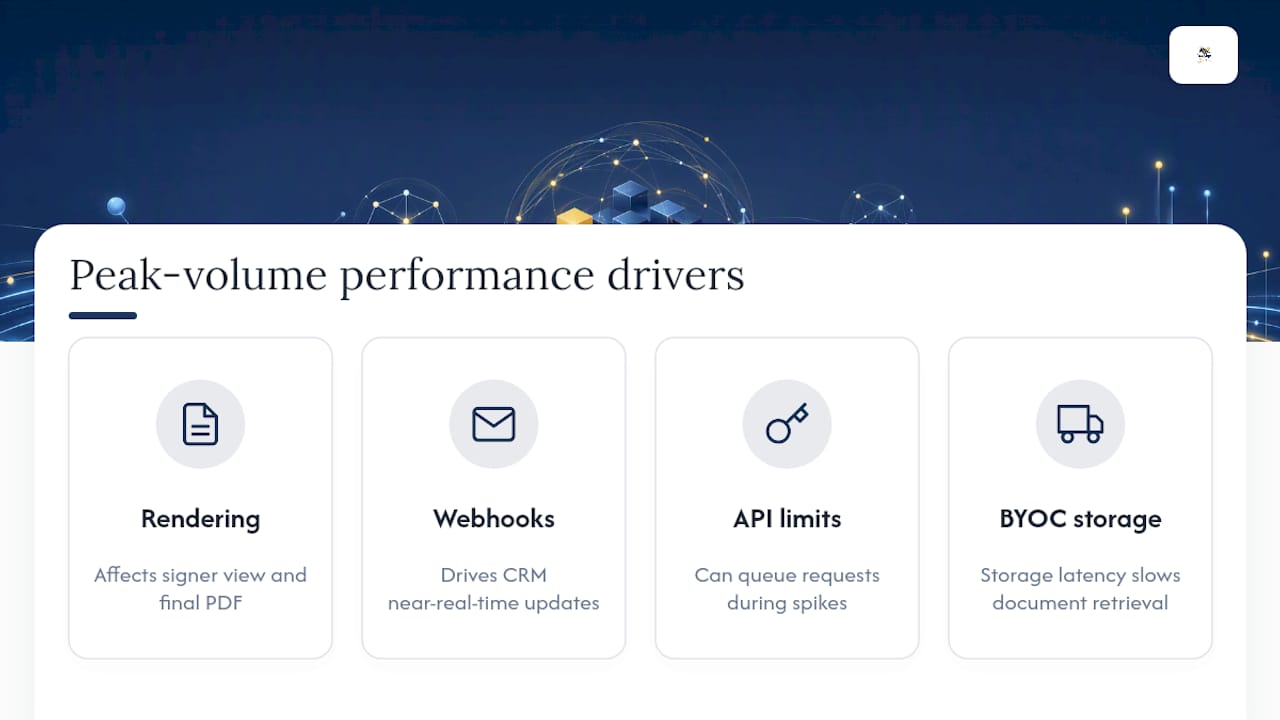
BYOC deployments add a variable most cloud-only platforms don’t have: your own storage backend’s performance now factors into the equation. If your cloud storage tier is underprovisioned, document retrieval slows down regardless of how fast the signing platform itself runs. Ask vendors what monitoring they expose for storage latency, and whether you can set alerts on it yourself.
Auto-scaling matters more during predictable spikes than average load. Real estate agencies see volume surges at month-end closings. HR departments spike during onboarding waves in January and after open enrollment. A platform that performs fine on a random Tuesday can still choke during your busiest week of the quarter, so ask specifically about peak-load testing, not just average throughput.
How Does BYOC eSignature Compare to Pure Cloud Platforms?
Pure cloud eSignature platforms store your documents on infrastructure the vendor owns and controls entirely. That’s simpler to set up, since there’s no storage configuration on your end, but it also means your compliance posture depends entirely on the vendor’s own certifications and contractual promises.
BYOC platforms like BeeSign keep signed documents inside cloud storage you already own, which gives your organization direct control over data residency, retention, and deletion. That matters a lot for regulated industries where data location is a legal question, not a preference.
The trade-off runs both directions. Pure cloud setups get you running faster with less internal configuration, which suits smaller teams without dedicated IT resources. BYOC setups take more setup work upfront, since someone has to configure storage permissions and manage the cloud relationship, but they hand you direct control that’s hard to get any other way.
| Factor | Pure cloud eSignature | BYOC eSignature |
|---|---|---|
| Setup speed | Faster, minimal configuration | Slower, requires cloud storage setup |
| Data control | Vendor-managed | Customer-managed |
| Compliance posture | Depends on vendor certifications | Backed by your own infrastructure controls |
| Best fit | Small teams, low regulatory exposure | Regulated industries, enterprise procurement |
Neither model is universally better. The right choice depends on how much your legal and compliance teams need to point to infrastructure you directly control, versus how much setup time you can afford before go-live.
What Makes the Signing Experience Actually Usable?
A compliant eSignature workflow that frustrates signers still costs you deals and slows down HR onboarding. User experience design for a white-label platform has to satisfy two audiences at once: the internal admin configuring templates, and the external signer who just wants to finish in under two minutes.
For signers, the biggest usability factor is mobile rendering. A contract that looks clean on a desktop screen but breaks into unreadable columns on a phone will generate support calls and abandoned signing sessions. Test every template on an actual phone, not just a browser window resized smaller.
For admins, template reuse and field mapping determine how much time your team spends per document. A platform that forces you to rebuild signature fields from scratch on every contract wastes hours a month that add up fast across a busy HR or sales team.
Branding consistency also affects trust. When a signing request arrives from your own domain, with your logo and colors, signers are less likely to flag it as suspicious or ignore it as spam. That’s not a cosmetic detail. It directly affects completion rates, especially for documents sent to external parties who have no existing relationship with your brand.
What Drives the True Cost of a Self-Hosted eSignature Platform?
Sticker price on a subscription tier rarely reflects what you’ll actually spend. Total cost of ownership includes the subscription itself, plus setup fees for white-label or BYOC configuration, plus the internal engineering and IT hours needed to integrate and maintain the deployment.
BYOC deployments shift some infrastructure cost onto your own cloud bill, since you’re now paying for the storage directly rather than folding it into a vendor’s flat rate. That can work out cheaper at scale, but it also means your storage costs move with your document volume in a way a flat subscription never would.
Custom domain and branded email setup usually carries a one-time configuration cost, plus ongoing certificate renewal that either your team or the vendor manages. Factor in the hours your IT staff spends on integration testing, webhook monitoring setup, and SSO configuration. Those hours are real cost even though they never appear on an invoice.
The cheapest plan on paper is rarely the cheapest deployment once you count engineering time, compliance documentation requests, and the support burden of a platform that doesn’t fit your workflow. Weigh the subscription against how much internal effort each option demands before comparing sticker prices.
Does eSignature Compliance Go Beyond HIPAA?
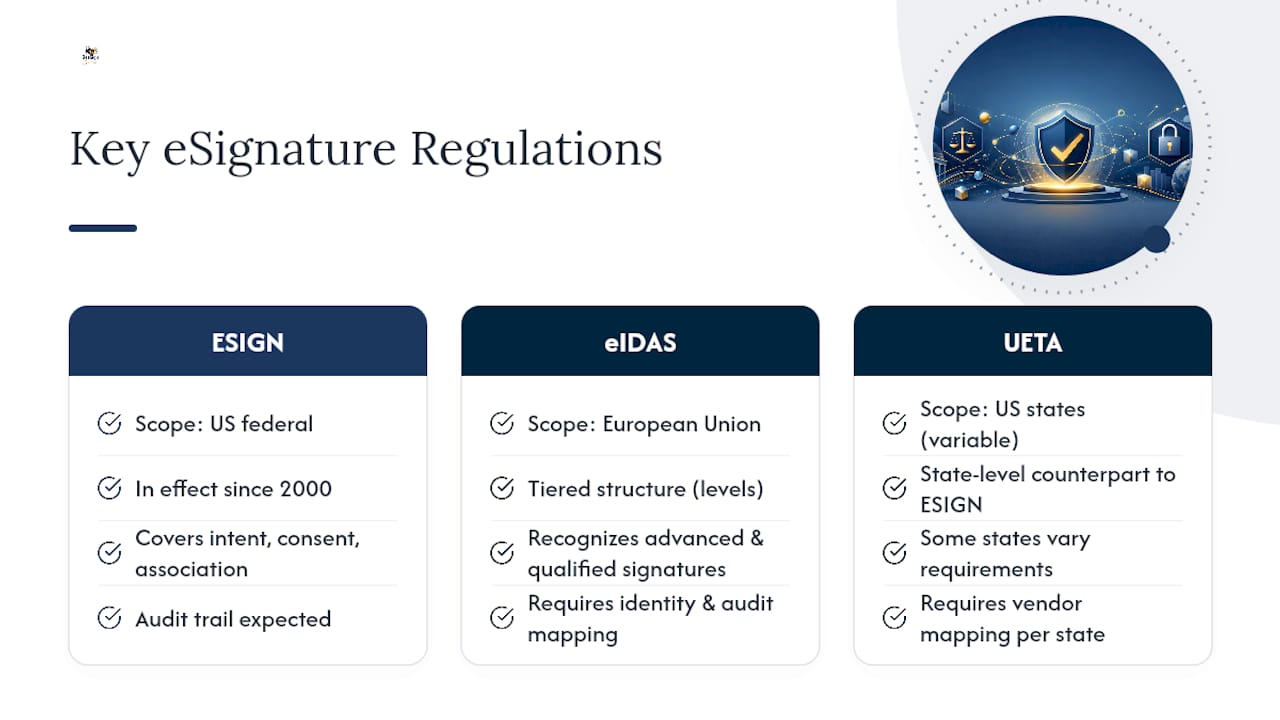
HIPAA and the BAA requirement get the most attention in procurement conversations, but ESIGN and eIDAS govern the baseline legal enforceability of every signature you collect, healthcare or not. The ESIGN Act, in effect since 2000, sets the US federal standard for intent, consent, and association. eIDAS Article 26 sets a comparable bar across the European Union, with a tiered structure that also recognizes advanced and qualified electronic signatures for higher-assurance use cases.
If your organization signs contracts with parties in multiple jurisdictions, ask your vendor which signature tiers they support and whether their audit trail structure satisfies both frameworks simultaneously, rather than assuming one compliance stack covers every region. BeeSign’s approach to eIDAS compliance maps identity verification and audit trail requirements directly to what the regulation demands, which is the kind of documentation your legal team should request from any vendor, not just BeeSign.
UETA, the state-level counterpart to ESIGN in the US, matters too if your organization operates across state lines, since a handful of states still apply their own variations. None of this requires you to become a compliance expert. It requires your vendor to hand you documentation that maps their product features to each framework’s specific legal language, so your legal counsel can sign off without guesswork.
How Should You Plan for Backup and Disaster Recovery?
A signed contract that disappears in a data loss event isn’t just an inconvenience. It can mean losing the legal proof you need if that agreement is ever challenged. Disaster recovery planning for a self-hosted eSignature deployment needs to cover both the signing platform itself and your BYOC storage layer separately.
Ask vendors what their recovery point objective and recovery time objective look like in practice, not just in a sales deck. Those two numbers tell you how much data you could lose and how long you’d be down in a real outage.
For BYOC deployments, backup responsibility often splits between you and the vendor. The platform may handle its own application-level redundancy, but your cloud storage backup policy is yours to configure and test. Don’t assume your cloud provider’s default settings meet your retention requirements without checking.
Test restoration, not just backup. A backup you’ve never restored from is a theory, not a plan. Build a recovery drill into your pilot phase, and confirm that exported audit trails and signed documents survive the restoration process intact, hash values and timestamps included.
What Actually Trips Up Self-Hosted eSignature Rollouts?
The pattern shows up again and again: teams under-test webhooks in staging, then discover during a real contract push that a failed delivery went unnoticed for days. Retention settings left on vendor defaults quietly conflict with internal policy until an audit surfaces the gap. And a healthcare or HR team skips the BAA conversation entirely, assuming SOC 2 alone covers PHI exposure. It doesn’t.
The rollouts that go smoothly share a pattern too: legal reviews the standard contract language before procurement gets deep into vendor calls, a scoped pilot runs on real high-risk documents, and someone on the team actually reads the SOC 2 report instead of filing it. None of that is complicated. It just requires doing the boring parts before go-live, not after.
— Mustafa Abusharkh
How Does BeeSign Meet This Checklist?
Everything covered here, BYOC storage, custom domains and branded emails, identity verification with government ID and biometric matching, and audit trails built for export, is what BeeSign runs on natively for enterprise customers. You get a platform that keeps your data in infrastructure you control while still delivering the workflow speed your sales and HR teams expect.

If your organization needs contracts signed under your own domain with a compliance trail your legal team can actually defend, the white-label and BYOC deployment options are built for exactly that scenario. Sales and operations teams looking to close agreements faster can see how the platform fits day-to-day deal flow on the sales and business solutions page. Start a trial, run your own pilot against the checklist above, and see whether the audit trail export holds up to your legal team’s standards before you commit to a full rollout.
Sources
- E-signatures legal requirements (Purdue Global Law School blog)
- Business associates guidance (U.S. Department of Health & Human Services)
Recommended
Ready to transform your workflow?
Start using BeeSign today and experience the future of document signing