What Is the Title Transfer Process for Compliant E-Signing?
Learn the title transfer process for compliant e-signing. Explore key steps and avoid common pitfalls to streamline your workflow.

The title transfer process is the legal act of conveying ownership by executing and delivering the required documents, then completing notarization and recording where the law demands it. Most of that work can now be done electronically, provided your workflow satisfies ESIGN and UETA, the Title II transferable-record rules, and whatever format the county recorder requires.
That last condition trips up more teams than the law itself. A signature can be perfectly legal and still get a deed bounced back from the recorder’s office because the file wasn’t tagged correctly.
Before you build or audit an electronic title transfer workflow, confirm you have:
- A document eligible for electronic execution (check for statutory carve-outs first)
- Clear signer intent, captured through consent to sign electronically
- Identity proofing appropriate to the document’s risk level
- Notarization or remote online notarization (RON) where state and county law require it
- A recording-ready file format with embedded metadata
- A complete, retrievable audit trail
The ESIGN Act confirms electronic records and signatures can’t be denied legal effect solely because they’re electronic. Skip ahead to the operational workflow section for the implementation sequence, or see how a platform like Beesign handles the technical side.
Key Takeaways
Electronic title transfer is legally valid nationwide under ESIGN and UETA, but recording success depends on matching county-level format and metadata requirements exactly.
| Point | Details |
|---|---|
| Legal basis is settled | ESIGN §7001 confirms electronic signatures and notarizations carry full legal effect when required information is attached to the record. |
| County readiness is the real gate | State RON authorization means nothing if the destination county recorder can’t process the file format. |
| Control defines transferable records | A single, unique, unalterable authoritative copy is required under Title II, not just a valid signature. |
| Audit trails must capture intent | Consent, document version, and identity-proofing method all need to be logged to defend the transfer later. |
| Beesign maps to the full checklist | RON-ready identity verification, tamper-evident seals, and API automation address most items on the vendor requirement list. |
Table of Contents
- Which Documents and Actors Does This Guide Cover?
- What Legal Framework Makes Electronic Title Transfers Valid?
- What Do Notarization and Recording Actually Require?
- What Technical Requirements Make a File Recording-Ready?
- How Do You Build a Compliant E-Sign Title Transfer Workflow?
- What Are the Most Common Pitfalls in Electronic Title Transfers?
- What Should You Require From an E-Sign Platform for Title Transfers?
- What Lessons Actually Matter Beyond the Technology Stack?
- How Beesign Supports Compliant Title Transfer Workflows
- Frequently Asked Questions
- Sources
Which Documents and Actors Does This Guide Cover?
Not every instrument in a closing package behaves the same way electronically. Deeds, assignment agreements, and bills of sale are typically strong candidates for full electronic execution and e-recording. Mortgages and related loan documents can qualify too, but usually only when RON is layered on top and the recorder’s office explicitly accepts it.
Four roles carry the weight of a compliant transfer:
- The signer, who must give informed consent to sign electronically
- The signing agent or closing coordinator, who assembles and routes documents
- The commissioned notary, who performs the notarial act (in person or remote)
- The title officer or recorder, who accepts or rejects the filing based on local format rules
Pro Tip: Run a legal inventory before you automate anything. Flag every document type that touches a statutory carve-out or a recorder policy quirk, so you’re not discovering the exception mid-closing. Guidance from the American Bar Association confirms some instruments still run into recording or wet-ink requirements depending on local policy.
What Legal Framework Makes Electronic Title Transfers Valid?
Electronic signatures and records can’t be denied legal effect just because they’re digital, and notarization requirements are satisfied when the notary’s electronic signature and required information are attached to or logically associated with the record, according to ESIGN §7001. That single provision is what makes an electronically notarized deed as legally sound as one signed with a pen.
Title II of ESIGN goes further, defining a “transferable record” and setting the conditions for maintaining “control” of the single authoritative electronic copy. Control means the copy is unique, identifiable, unalterable, and held by the party claiming authority over it, a standard confirmed in the compiled ESIGN text. Lose that uniqueness, and you lose your legal footing.
The transferable-record standard exists because ownership documents can’t have duplicate “originals” floating around. If two parties can each claim to hold the authoritative copy, the whole chain of title falls apart.
Four statutes and standards do the heavy lifting here:
- ESIGN §7001: electronic signatures and notarizations carry the same legal weight as paper equivalents
- Title II transferable records (§7021): sets the control test for a single authoritative electronic copy
- URPERA: governs how electronic notarial acts get recognized across state lines
- RULONA: the model act many states adapted to authorize remote online notarization
What Do Notarization and Recording Actually Require?
Remote online notarization is acceptable wherever state law and the destination county recorder both permit it. You need to verify both, because state authorization alone doesn’t guarantee your local recorder will accept the output.
A compliant RON session typically follows this sequence:
- Remote presentation of the signer before a commissioned notary via live audio-video connection
- Credential analysis, checking the signer’s government-issued ID against verification standards
- Identity proofing through knowledge-based authentication or biometric matching
- Recording of the full audio-video session for retention
- Application of a tamper-evident electronic notarial seal
- Entry into the notary’s electronic journal, retained per state-mandated periods
ALTA’s RON checklist recommends multifactor authentication combining possession, knowledge, and biometric elements, plus explicit notarial certificate language on the record itself. That combination is what makes a remotely notarized deed defensible if it’s ever challenged in court.
Recorder acceptance depends on three things stacking correctly: state authorization for the notarial method, the specific county’s e-recording capability, and a document formatted to that county’s metadata and layout specifications. PRIA guidance calls this “recording-ready” output, and it’s the piece most teams underestimate.
Pro Tip: Contact your target county recorder’s e-recording department before you build anything. Ask for their formatting specification and run one test filing through it. A rejected mock submission costs you an afternoon; a rejected live filing can delay a closing by weeks.
County-level readiness, not state law, is the hidden variable that stalls most rollouts. Two counties in the same state can accept completely different file formats for the same document type.
What Technical Requirements Make a File Recording-Ready?
Recorders don’t just check signatures. They check the file itself against a technical checklist that most signing platforms weren’t originally built to satisfy.
Expect to deliver:
- A single authoritative file, not multiple competing “final” versions
- Tamper-evident sealing that flags any post-signature alteration
- An embedded notarial certificate with the required statutory language
- Searchable metadata and data-tags identifying grantor, grantee, legal description, and parcel ID
- A recorder-accepted format, often PDF/A, correctly flattened rather than layered
- The complete audit trail attached to or referenced by the authoritative copy
System architects should map metadata fields before writing a single line of integration code: grantor and grantee names, legal description, parcel identifiers, and consistent filename and version conventions. A checksum or hash proof, with blockchain timestamping as an optional layer, gives you a defensible way to prove the file hasn’t changed since execution. Keep every permitted revision logged separately from the authoritative copy, so there’s never ambiguity about which version was actually recorded.
How Do You Build a Compliant E-Sign Title Transfer Workflow?
The end-to-end flow runs from legal inventory through post-recording reconciliation, with identity verification and notarization sitting at the center of the chain.
- Legal inventory: classify every document type as fully electronic, hybrid, or wet-ink only
- Policy and underwriter acceptance: confirm your title underwriter and lender will accept the method
- Recorder verification: check state authorization and the specific county’s e-recording specs
- Document preparation and data-tagging: format files to the recorder’s metadata requirements
- Signer onboarding: capture explicit consent to conduct the transaction electronically
- Identity proofing: run credential analysis and biometric or knowledge-based verification
- RON session or in-person notarization: execute with full audio-video recording where remote
- Sealing, journal entry, and audit-trail capture: lock the authoritative copy and log the notarial act
- E-recording submission: file with the recorder and monitor for acceptance or rejection
- Post-recording retention and reconciliation: archive the authoritative copy and confirm chain of title
Insert automated checks at three points: document validation before signer onboarding, metadata completeness before RON scheduling, and format verification before e-recording submission. API calls and webhooks at these checkpoints catch formatting errors before they become recorder rejections instead of after.
Pro Tip: Automating even one checkpoint, metadata validation before submission, tends to eliminate the single most common rejection reason. Beesign’s sales contract cycle time case study shows how automated validation steps compress cycle time when built into the signing workflow itself.
What Are the Most Common Pitfalls in Electronic Title Transfers?
Most rejected filings trace back to the same handful of avoidable mistakes.
- Skipping county readiness checks: confirm e-recording specs before building anything, not after
- Missing required metadata: map every field the recorder expects before document generation
- Weak identity proofing: match verification rigor to the document’s legal risk, not the cheapest option
- Thin audit trails: capture consent, document version, and proofing method every time
- Mismatched document versions: lock the authoritative copy the moment execution completes
- Inadequate retention: know your state’s notarial journal retention period before you need it
Keep a sandbox recorder account or a repeatable test-filing routine so you catch format drift before it hits a live closing.
What Should You Require From an E-Sign Platform for Title Transfers?
Vendor selection determines whether your workflow scales or breaks under its first edge case. Require these capabilities before signing a contract:
- RON support with credential-analysis integrations built in
- Recorded audio-video sessions with configurable retention periods
- Tamper-evident electronic seals applied automatically
- Single-authoritative-copy support with control-compliant handling
- Metadata tagging and PDF/A output matched to recorder specifications
- Chain-of-custody audit logs covering every step from consent to recording
- Developer APIs for validation, webhooks, and automation
During procurement, ask for:
- Sample evidence of actual recorder acceptances, not just marketing claims
- Real audit trail exports you can inspect for completeness
- Integration references from comparable document volumes
- Written retention guarantees tied to your state’s requirements
- White-label or bring-your-own-cloud options if data residency matters to you
Red flags include no RON support, no recorded sessions, and no way to export the authoritative copy independent of the platform.
What Lessons Actually Matter Beyond the Technology Stack?
The technical requirements get most of the attention, but the rollouts that stick share a different pattern: they start small. Teams that pilot electronic title transfers on low-risk document types, like assignment agreements before mortgages, build institutional confidence before tackling anything a recorder might scrutinize harder.

Early outreach to the target recorder’s office consistently pays off more than any platform feature. So does embedding legal review directly into document templates rather than treating it as a final checkpoint. Cross-functional governance, pulling legal, operations, and IT into the same rollout conversation, prevents the kind of siloed decision that gets a workflow built around requirements nobody actually confirmed.
How Beesign Supports Compliant Title Transfer Workflows
The checklist above, RON readiness, credential analysis, tamper-evident seals, single-authoritative-copy handling, is a lot to build from scratch. Beesign maps directly to it: identity verification with government ID capture and biometric face matching, complete audit trails, blockchain timestamp proof for the authoritative copy, and a developer REST API for wiring automated checks into your existing workflow.

Teams handling real estate, dealer, or fleet documents also need white-label control and data residency guarantees, which is why Beesign offers bring-your-own-cloud deployment alongside custom branding on the signing experience itself. If cycle time is your bottleneck, the sales contract case study shows what automated validation checkpoints did for one closing workflow. Start a technical evaluation on the Beesign platform to see how your document set maps to a recorder-ready output before you commit to a build.
Frequently Asked Questions
What is title transfer process in a legal sense? It’s the act of conveying ownership of property or other assets by executing required documents and, where applicable, completing notarization and recording with the appropriate government office.
How long does title transfer take when done electronically? Timelines vary by county and document type, but electronic workflows with RON and automated validation typically cut days off manual, wet-ink processes by eliminating physical mail and in-person scheduling delays.
Why is title transfer important to get right the first time? A rejected recording delays the entire chain of title, can expose parties to disputes over ownership, and often forces a costly re-execution of the original documents.
Can every document type in a title transfer be signed electronically? Most can, but some mortgages and deeds of trust still face recorder-specific requirements. Run a legal inventory first to flag exceptions before assuming full electronic eligibility.
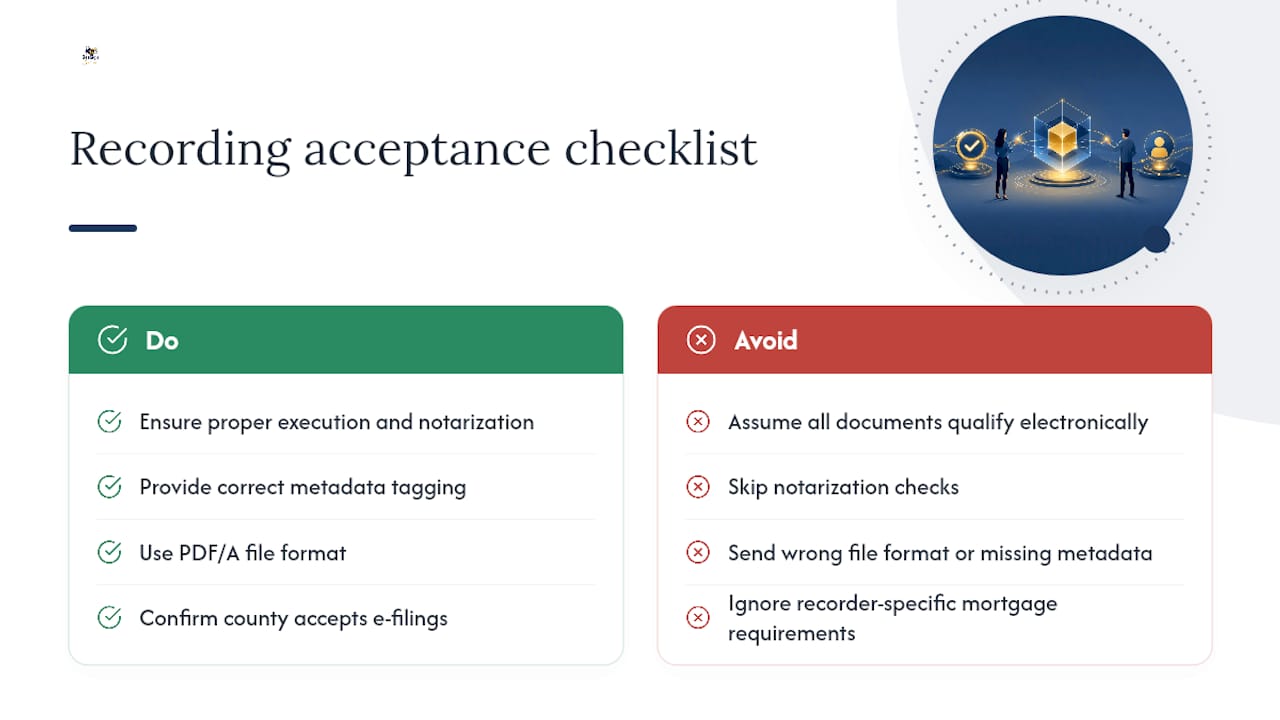
What are the basic title transfer requirements for recording acceptance? You need a properly executed and notarized document, correct metadata tagging, an accepted file format like PDF/A, and confirmation that the destination county recorder accepts electronic filings for that document type.
Sources
- 15 U.S.C. Chapter 96 (ESIGN) — Cornell Law School LII
- U.S. Code Title 15 - Section 7001 (ESIGN) — govinfo
- Electronic Notary: How Does It Impact Recording? — PRIA (2026 update)
- Remote Online Notarization Checklist — ALTA
Recommended
Ready to transform your workflow?
Start using BeeSign today and experience the future of document signing