Why Education Needs White Label eSignature Platforms
Discover why education needs white label platforms now. Control branding, data, and compliance with Beesign's eSignature solutions.

U.S. educational institutions should adopt white-label eSignature and identity-verification platforms now. The E-Sign Act, UETA, and FERPA’s 34 CFR §99.30(d) already give electronic signatures full legal standing for education records, and a white-label deployment lets your institution control branding, data residency, and compliance in one place. Beesign’s white-label platform is a practical fit for this requirement.
Three reasons this matters right now:
- Legal acceptance is settled. ESIGN and UETA remove any barrier to replacing paper signatures on enrollment forms, consent documents, and financial aid agreements.
- Brand and data control. A white-label solution runs under your domain and branding, keeping student data within your chosen infrastructure rather than a third-party consumer product.
- Higher completion rates. Digital signing reduces friction and measurably improves enrollment and document-completion rates compared to paper workflows.
Table of Contents
- Are electronic signatures legally valid for U.S. education records?
- Which education workflows benefit most from white-label eSign and identity verification?
- What security controls should you test during procurement?
- How does Beesign map to education eSignature requirements?
- Key Takeaways
- The case for white-label over generic eSignature tools in education
- Beesign gives education teams a compliant, branded signing workflow
- Authoritative sources and official guidance
Are electronic signatures legally valid for U.S. education records?
Yes, and the legal foundation is solid. The E-Sign Act (Public Law 106-229) establishes that an electronic signature cannot be denied legal effect solely because it is in electronic form. UETA reinforces this at the state level across nearly all U.S. jurisdictions.
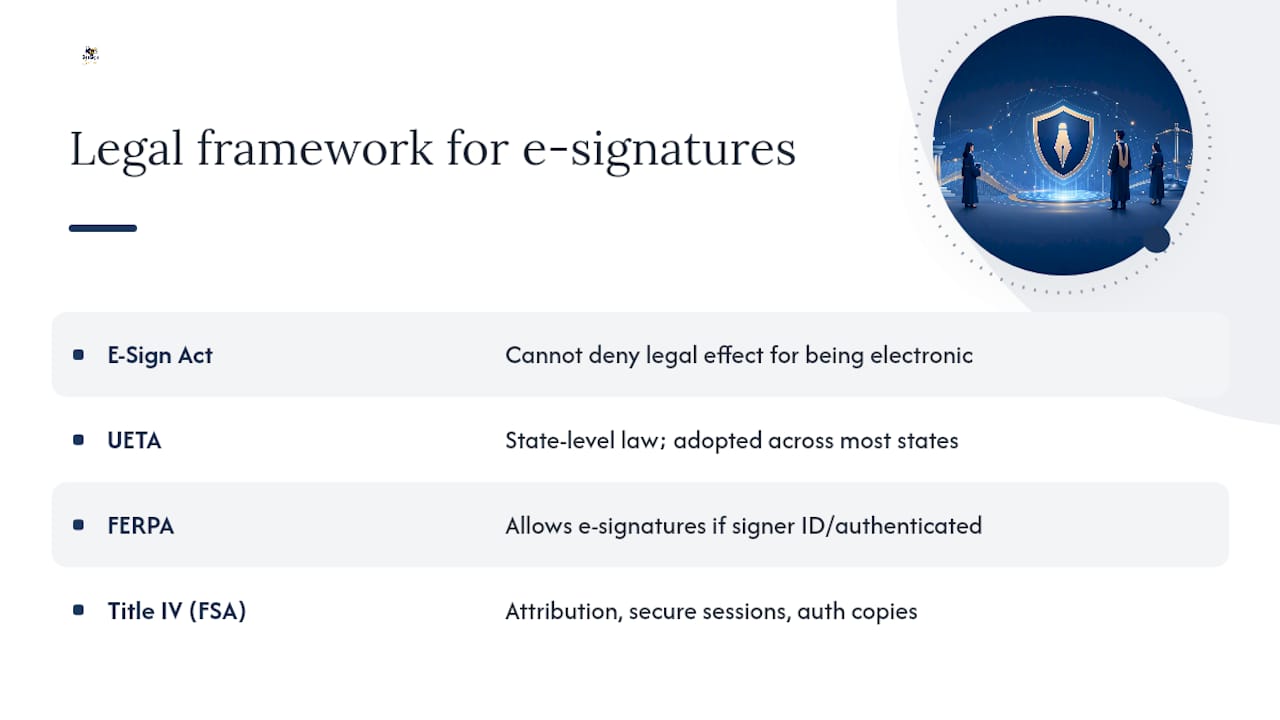
FERPA goes further for education-specific records. Under 34 CFR part 99 §99.30(d), “signed and dated written consent” may include electronic records and signatures, provided the signature identifies and authenticates the signer and indicates approval of the record’s contents. The regulation was deliberately written to allow flexible technology adoption rather than locking institutions into a single technical standard.
For Title IV transactions, the FSA technical guidance adds specificity: acceptable attribution methods include shared secrets, external credentials or tokens, biometrics, and signature images. Secure session management and access to authoritative copies are also required. If your institution processes federal student aid, these controls are not optional.
Regulatory anchor: FERPA final regulations explicitly allow electronic signatures for education records when the signature identifies and authenticates the signer (34 CFR §99.30(d)).
Which education workflows benefit most from white-label eSign and identity verification?
Prioritize workflows that combine legal consent, identity assurance, or high document volume. These deliver the fastest measurable ROI and the clearest compliance benefit.
| Workflow | Primary benefit | Integration needed |
|---|---|---|
| Enrollment forms | Faster completion, branded experience | SIS, SSO |
| Parental consent | Authenticated parent identity, audit trail | SIS, email |
| Federal promissory notes | FSA-compliant attribution, secure session | FSA portal, LMS |
| FERPA consent releases | Legally valid electronic consent | SIS, records system |
| HR onboarding | Faster staff activation, centralized records | HRIS, SSO |
| Vendor and contract management | Consistent approval workflows | ERP, document storage |
| Transcript and records release | Authenticated requester identity | SIS, registrar system |
Highest-impact pilot candidates:
- Enrollment forms (high volume, direct revenue impact)
- Parental consent for minors (legal requirement, currently paper-heavy)
- HR onboarding (immediate internal efficiency gain)
For federal promissory notes, the FSA guidance on attribution methods is the controlling document. Your vendor must support the specific attribution methods it requires.
What security controls should you test during procurement?
Demand demonstrable technical controls, not just vendor attestations. Test each one during the pilot.
| Control | What to test |
|---|---|
| Encryption in transit | Verify TLS 1.2+ on all endpoints via SSL scan |
| Encryption at rest | Request written confirmation of AES-256 and key management policy |
| Access logging | Export an access log and confirm it captures user, action, timestamp, and IP |
| MFA enforcement | Attempt login without second factor; confirm it is blocked |
| Identity verification | Submit a test ID and confirm biometric match result is logged in audit trail |
| Audit trail retention | Export a completed document’s full audit trail and verify it includes document hash |
Risk mitigations to require contractually:
- BYOC storage so records never leave your infrastructure
- Signed data processing addendum naming your institution as data controller
- Contractual breach notification within 72 hours
- Annual penetration test results available on request
- Data export and deletion procedures documented for offboarding
How does Beesign map to education eSignature requirements?
Require a white-label offering that supports custom domains, branded emails, BYOC storage, identity verification, audit trails, and developer APIs. Beesign’s white-label and BYOC platform addresses each of these directly.
| Requirement | What to ask for | Beesign evidence |
|---|---|---|
| Custom branding | Custom domain, branded email sender, logo on all documents | Beesign white-label page documents custom domain and branded email support |
| Identity assurance | Government ID capture, biometric face matching, MFA | Beesign identity verification feature set |
| SIS/LMS integration | REST API, SAML/OIDC SSO, webhook support | Beesign developer REST API and SSO documentation |
| Data residency | BYOC storage (AWS, Azure, GCP) | Beesign BYOC option documented on white-label page |
| Audit trails | Tamper-evident log, blockchain timestamp, PDF/A export | Beesign audit trail and blockchain proof features |
| Compliance alignment | ESIGN, UETA, FERPA, HIPAA, GDPR coverage | Beesign compliance documentation |
Enrollment pilot scenario: An admissions team deploys Beesign under their institution’s domain for incoming student enrollment forms. Students receive a branded email, complete identity verification via government ID and biometric match, and sign the enrollment agreement. The audit trail captures every event. The admissions office exports signed records directly to their SIS via API. Expected outcome: reduced time-to-completion, a complete audit trail for every record, and zero paper handling.
For a deeper look at white-label signing options and how branded deployments work technically, Beesign’s documentation covers domain configuration, email branding, and BYOC setup in detail.
Key Takeaways
White-label eSignature platforms are the right choice for U.S. education because they satisfy ESIGN, UETA, and FERPA requirements while giving institutions full control over branding, data residency, and audit trails.
| Point | Details |
|---|---|
| Legal foundation is clear | ESIGN, UETA, and FERPA §99.30(d) all permit electronic signatures for education records. |
| Compliance checklist is non-negotiable | Require MFA, audit trails, BYOC, ADA compliance, and a signed DPA before any contract. |
| Pilot before full rollout | A 6–12 week pilot on enrollment or parental consent proves ROI and compliance before scaling. |
| FSA transactions need extra controls | Title IV promissory notes require FSA-approved attribution methods and secure session management. |
| Beesign covers the full requirement | Beesign’s white-label platform supports custom domains, BYOC, identity verification, and audit trails for education workflows. |
The case for white-label over generic eSignature tools in education
The conventional wisdom is that any compliant eSignature tool will do the job for education. That view underestimates one critical variable: institutional trust.
When a student receives a signing request from an unfamiliar third-party domain, abandonment rates climb. When a parent sees a generic consumer product logo on a consent form, they hesitate. These are not hypothetical concerns. They are the friction points that make paper workflows persist long after digital alternatives are available.
A white-label deployment solves this at the source. Your institution’s name and domain appear on every touchpoint, and your data stays where your policies say it should. The compliance argument for white-label platforms is well-documented. The trust argument is just as strong and gets far less attention in procurement conversations.
The institutions that move fastest on this are not the ones with the largest IT budgets. They are the ones that treat the signing experience as part of the student experience, not just a back-office compliance task.
Beesign gives education teams a compliant, branded signing workflow
Institutions that need FERPA-compliant, branded document signing without building infrastructure from scratch have a direct path with Beesign. The platform combines electronic signature workflows, government ID capture, biometric face matching, blockchain-timestamped audit trails, and BYOC storage under your institution’s own domain and branding.

The result is a signing experience that looks and feels like your institution, with the compliance controls your legal and IT teams require. No consumer product branding, no data leaving your chosen infrastructure.
To evaluate Beesign for your institution, request a pilot demo and ask for these four things:
- SAML SSO configuration walkthrough
- Live BYOC storage setup demonstration
- Audit trail export in PDF/A format
- Identity verification test with government ID and biometric match
Start your evaluation at Beesign’s white-label page or explore the full platform to see how it fits your institution’s workflows.
Authoritative sources and official guidance
- U.S. Department of Education — Student Privacy
- U.S. Department of Education — FSA technical guidance on electronic signatures (gen0106Arevised.pdf)
- Electronic Signatures in Global and National Commerce Act (E-Sign Act), public law 106-229 — FSAPartners knowledge center
- Minnesota State — Procedure 525p1: electronic signature use and implementation
- Digital Signature Policy — Maryland State Department of Education (MSDE)
- Can digital signing increase school enrollment in higher ed? — Adobe Blog
- BeeSign — White Label & BYOC (product page)
Recommended
Ready to transform your workflow?
Start using BeeSign today and experience the future of document signing