Automate Contract Signing Workflow: A Team Pilot Guide
Learn how to automate contract signing workflow effectively. Discover templates, routing models, and strategies to boost efficiency today!

You can automate your contract signing workflow today, and the measurable payoff starts within the first pilot cycle. The most practical approach for business teams combines a centralized platform with reusable templates, configurable routing models, and electronic signature solutions that comply with the U.S. ESIGN Act and UETA. Platforms already support the full range of routing patterns your team needs, from sequential signing to parallel approval gates, so the technical foundation is ready.
Quick-start plan:
- Assess (Days 1–7): Map your highest-volume contract type (NDAs, vendor onboarding, or sales agreements), count manual touchpoints, and define two or three KPIs.
- Pilot (Weeks 2–8): Build templates, configure routing and identity checks, connect your CRM or DMS, and run a controlled test with a small signer group.
- Scale (Weeks 9–16+): Roll out in waves, train each department, and measure KPI movement against your baseline.
One platform worth piloting is Beesign, which covers templates, routing, identity verification, and API-driven automation in a single workspace aligned with ESIGN/UETA and NIST Cybersecurity Framework 2.0 principles. Your next action: spend the next 24–72 hours documenting your current signing process, identifying the single contract type that causes the most delay, and requesting a pilot configuration from your vendor of choice.
Table of Contents
- Why automate contract signing: measurable business benefits
- What does an automated signing workflow actually include?
- How do you roll out an automated signing workflow step by step?
- What should you look for when choosing a signing platform?
- How should you plan integrations and technical architecture?
- What security and compliance requirements apply to U.S. organizations?
- Which KPIs should you track to prove the pilot worked?
- What are the most common pitfalls when automating signing workflows?
- Beesign in practice: capabilities and a pilot timeline
- Key Takeaways
- A practitioner’s honest take on contract automation
- Ready to run a Beesign pilot in under eight weeks?
- Authoritative sources and references for your evaluation
Why automate contract signing: measurable business benefits
The clearest argument for automating your signing workflow is speed, and speed translates directly to revenue. Manual contract processes typically involve email chains, version confusion, and missed approval deadlines. Replacing those steps with automated routing and agreement workflow automation cuts the time between draft and countersigned document from days to hours.
Concrete outcomes teams report after automation:
- Faster time-to-signature on standard agreements, with approval cycle times dropping when routing rules replace manual follow-up.
- Fewer errors and rework cycles because templates enforce required fields and prevent incomplete submissions from reaching signers.
- Improved audit readiness, since every state change, timestamp, and identity event is logged automatically rather than reconstructed from email threads.
- Fewer missed renewals, because automated reminders and expiry alerts replace calendar entries that get ignored.
Different departments feel the benefit differently. Sales teams close deals faster when contracts leave their CRM opportunity in one click. Legal teams spend less time chasing signatures and more time on substantive review. Procurement and finance gain spend-based approval tiers that enforce policy without manual gatekeeping. When you present the ROI case internally, frame it around three numbers: current average days-to-signature, estimated cost per manual touchpoint, and the dollar value of deals delayed by contract lag.
Document automation also reduces the administrative overhead that legal and ops teams absorb silently, making the productivity gain visible in headcount capacity rather than just cycle time.
What does an automated signing workflow actually include?
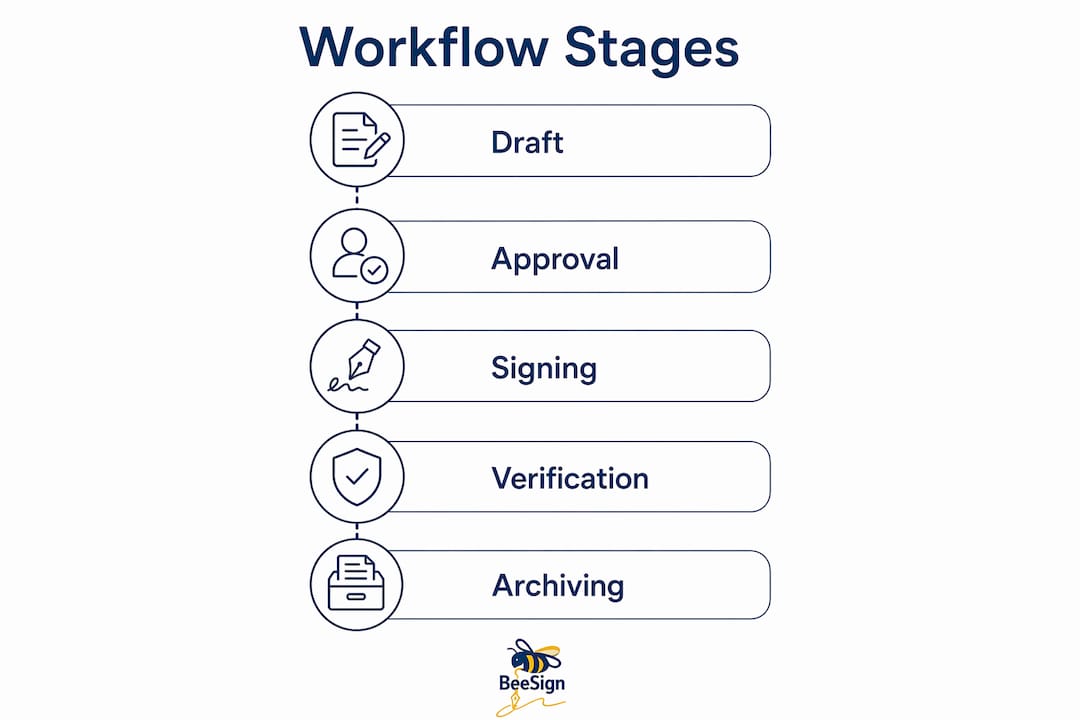
A signing workflow, in the industry sense, is the full operational sequence from document authoring through identity verification, approvals, signature execution, and archival. It is not just the moment a signer clicks “sign.” Understanding each component helps you map your existing process to an automated system without leaving gaps.
The core components, in order:
- Templates and variable fields: Pre-built document structures with merge fields (party names, dates, amounts) that populate automatically from your CRM or form inputs. Templates are the single biggest time-saver in high-volume workflows.
- Drafting and authoring tools: Editors that let legal or ops teams build and version contract language, with optional AI-assisted clause review to flag risky or one-sided terms before the document reaches a signer. AI integration at the drafting stage is the primary driver of reduced legal cycle times, not the signature step alone.
- Approval gates (internal routing): Configurable rules that send a draft to one or more internal reviewers before it goes to external parties. Gates can be sequential (manager, then legal, then finance) or parallel (all three simultaneously).
- Routing models for external signing: Platforms support multiple signing workflow types including sequential, parallel, self-sign, acknowledgment-only, approval, public embeddable forms, and scheduled future sending. Sequential signing is right when order matters legally; parallel signing speeds up multi-party deals where order does not.
- Identity verification: Methods range from email OTP and knowledge-based authentication to ID-document verification and enterprise SSO. The method should match the risk level of the contract.
- eSignature execution: The legally binding signature event, captured with a timestamp, signer IP, and identity method record.
- Repository and archival: Signed documents stored in a searchable, access-controlled repository, with integrations to your DMS or cloud storage.
- Audit trail: An immutable log of every event, from draft creation through each approval and signature, including document hashes that prove the file was not altered after signing.
Treat the signing workflow as an operational control path — not just an eSignature event — to satisfy audit and security frameworks like NIST CSF 2.0. Identity verification, approval gates, and record retention are all part of the same governance chain.
A practical flow looks like this: draft created from template → internal approval gate (sequential or parallel) → document sent to external signer(s) → signature captured with identity check → signed copy archived with full audit trail. You can mix patterns within a single contract, for example, running internal approvals in parallel while requiring external signers to sign sequentially.
Pro Tip: Save your most common workflow configurations as reusable templates. Platforms that support reusable workflow templates let you launch a new vendor onboarding or NDA in seconds rather than rebuilding routing rules each time.

How do you roll out an automated signing workflow step by step?
Implementation works best when you treat it as three distinct phases: assess, pilot, and scale. Rushing from assessment to full rollout without a controlled pilot is the most common reason automation projects stall.
Phase 1: Assess (Week 1)
- Map your current state: list every contract type, volume per month, number of manual touchpoints, and who owns each approval step.
- Identify your highest-impact, lowest-risk candidate for the pilot (NDAs and vendor onboarding agreements are ideal because they are high-volume and structurally consistent).
- Define success criteria: pick two or three KPIs (time-to-signature, approval cycle time, error rate) and record your current baseline numbers.
- Inventory your existing systems: CRM, ERP, DMS, HR platform, and identity provider. Note which ones the signing platform must connect to on day one.
Phase 2: Pilot (Weeks 2–8)
- Build two or three templates for your chosen contract type, including all variable fields and required clauses.
- Configure routing rules: set approval gates, assign roles, and choose the signing model (sequential or parallel) for external parties.
- Set identity verification levels appropriate to the contract risk (email OTP for low-risk NDAs, ID-document verification for high-value agreements).
- Integrate your primary system of record (usually CRM or DMS) so contracts launch and archive automatically.
- Run a test cycle with a small internal group before opening to external signers. Automation builders typically include test modes and publishing controls, so you can validate routing and identity flows safely.
- Collect pilot KPI data and compare against baseline.
Phase 3: Scale (Weeks 9–16+)
- Roll out in waves by department or contract type, not all at once.
- Run a training session for each team before their wave goes live.
- Assign a workflow owner in each department who handles template updates and escalations.
- Review KPIs monthly for the first quarter and adjust routing rules based on observed bottlenecks.
Cost levers to plan for: Most platforms price on a seat basis, per-envelope volume, or API call volume. Seat-based pricing suits teams with predictable user counts; envelope-based suits variable-volume workflows. API-driven pricing applies when you embed signing into a product or automate bulk sends.
Pro Tip: Configure your automation to trigger contract sending automatically when a draft is created from a template. This trigger-action pattern eliminates the manual “send” step and is the fastest single change you can make to reduce cycle time.
Pilot implementation checklist:
- Templates built and tested with sample data
- Routing rules configured and validated in test mode
- Identity verification method selected and tested per signer role
- CRM or DMS integration live and confirmed with a test record
- Audit trail reviewed for completeness (timestamps, IP, identity method, document hash)
- Rollback procedure documented in case of integration failure
What should you look for when choosing a signing platform?
Platform selection comes down to separating what you must have on day one from what you can add later. Procurement teams that treat every feature as a must-have end up in long evaluation cycles; teams that prioritize ruthlessly get to pilot faster.
Must-have capabilities:
| Capability | Why it matters |
|---|---|
| Document templates with variable fields | Eliminates manual drafting for repeat contract types |
| Sequential and parallel routing models | Covers the majority of real-world signing patterns |
| Immutable audit logs | Required for legal enforceability and dispute resolution |
| Identity verification (OTP minimum, ID-doc for high-risk) | Ties the signature to a verified person |
| API and webhooks | Enables CRM/ERP/DMS integration and automation triggers |
| Role-based access control | Prevents unauthorized access to drafts and signed documents |
| ESIGN/UETA compliance | Baseline legal enforceability in the U.S. |
| SOC 2 alignment or certification | Confirms security controls meet enterprise standards |
Nice-to-have features (add in later phases):
- Embedded signing (sign without leaving your app or portal)
- White-label options and bring-your-own-cloud (BYOC) storage
- AI-assisted clause review at drafting stage
- Clause libraries for legal teams
- Advanced analytics and dashboard reporting
- Bulk-send templates for high-volume campaigns
Procurement questions to ask every vendor:
- What is your SLA for platform uptime, and what is the remediation process for downtime?
- Where is contract data stored, and can we specify data residency within the U.S.?
- What are your document retention and deletion policies, and can we export all data in standard formats?
- What audit evidence format do you provide (PDF certificate, JSON log, or both)?
- How do you handle identity verification failures — does the workflow fail safe or proceed?
Pro Tip: Ask vendors for a sample audit trail from a completed signing event before you sign a contract with them. The format and completeness of that evidence tells you more about their compliance posture than any marketing claim.
For a broader comparison of tools and feature sets, the contract workflow tools overview on the Beesign blog covers what to evaluate across platforms.
How should you plan integrations and technical architecture?
The integration layer is where most pilots either accelerate or stall. Getting the architecture right before you build saves weeks of rework.
Integration priority order (highest ROI first):
- CRM integration: Send contracts directly from an opportunity or account record. This is the single integration that sales teams notice immediately and that drives adoption.
- DMS or cloud storage sync: Archive signed documents automatically to your document management system or cloud storage (SharePoint, Google Drive, S3). Eliminates manual download-and-upload steps.
- HR or procurement system: Automate supplier agreement workflow setup and employee onboarding contracts by triggering signing from a new vendor or employee record.
- SSO and SCIM: Connect your identity provider so user provisioning and permissions stay in sync automatically. This is a security requirement for enterprise rollouts.
- Payment gateway: Relevant when contracts include deposit collection or fee authorization at signing time.
Common architecture patterns:
- CRM-first (most common): Contract is generated from a CRM opportunity, sent for signing, and the signed status is written back to the CRM record. Requires a native integration or webhook.
- ERP sync: Signed contract triggers a purchase order or vendor record in your ERP. Requires a webhook listener on the ERP side.
- API-driven signing: Your application calls the signing platform’s API to create, send, and retrieve contracts programmatically. Best for high-volume or embedded use cases. Beesign’s API reference covers the endpoint structure for this pattern.
- Embedded signing: The signing experience lives inside your own application via an iframe or SDK. Reduces context-switching for signers and improves completion rates.
API and webhook considerations:
- Use event-based webhooks (contract sent, viewed, signed, declined, expired) rather than polling to keep your systems in sync in real time.
- Implement idempotency keys on your webhook receiver to handle duplicate delivery without creating duplicate records.
- Validate webhook signatures using the signing secret your platform provides — this prevents replay attacks.
- Plan for retry logic: most platforms retry failed webhook deliveries, so your receiver must handle retries gracefully.
Pro Tip: Start with a read-only CRM integration in week one of your pilot — just pull contact data to pre-fill templates. Add write-back (status updates) in week three once the signing flow is stable. Incremental integration reduces the blast radius of any configuration error.
What security and compliance requirements apply to U.S. organizations?

U.S. organizations have a clear legal baseline for electronic signatures, and meeting it is straightforward when you know what to ask for.
ESIGN and UETA basics: The federal Electronic Signatures in Global and National Commerce Act (ESIGN) and the Uniform Electronic Transactions Act (UETA), adopted in 49 states, establish that electronic signatures carry the same legal weight as handwritten ones, provided the signer consented to electronic transactions and the record is retained in a form that can be reproduced. Your platform must capture that consent and retain the signed record.
When HIPAA applies: If your contracts involve protected health information (PHI) — common in healthcare vendor agreements and business associate agreements — your signing platform must sign a Business Associate Agreement (BAA) with you. Ask for the BAA before you begin a pilot, not after.
Identity assurance levels and contract risk:
- Email OTP: Appropriate for low-risk agreements (NDAs, internal acknowledgments) where the signer’s email address is already known and verified.
- Knowledge-based authentication (KBA): Adds a layer for moderate-risk agreements by asking questions only the signer should know. Useful for OTP-verified electronic signatures in regulated industries.
- ID-document verification: Required for high-value contracts, financial agreements, or any situation where impersonation risk is material.
- Enterprise SSO: Appropriate for internal signers where your identity provider already manages authentication.
The chain of custody — an immutable audit trail capturing identity verifications, state changes, timestamps, and document hashes — is the single most defensible asset in a signing workflow during a dispute or compliance review. Make sure your platform captures all of it, not just the signature timestamp.
Certifications and frameworks to request from vendors:
- SOC 2 Type II report (request the full report, not just a summary)
- ISO 27001 certification (relevant for organizations with international operations)
- NIST Cybersecurity Framework 2.0 alignment documentation
- ESIGN/UETA compliance statement
- HIPAA BAA availability (if applicable)
For a detailed breakdown of identity methods and their mapping to security standards, the identity verification in eSigning guide covers the 2026 landscape.
This article is general information, not legal advice. Confirm current ESIGN, UETA, and HIPAA requirements with qualified legal counsel for your specific situation.
Which KPIs should you track to prove the pilot worked?
Measuring the right metrics from day one is what separates a pilot that gets budget for full rollout from one that gets shelved.
Core KPIs to instrument:
- Time to signature: Days (or hours) from contract sent to fully executed. This is your headline metric.
- Approval cycle time: Time from draft submission to internal approval complete. Tracks the internal bottleneck separately from the external signing step.
- Percentage of contracts automated: What share of your target contract type now flows through the automated process versus manual handling.
- Error and rework rate: Number of contracts returned for correction, missing fields, or wrong signer. Should drop sharply once templates enforce required fields.
- Renewals captured on time: Percentage of expiring contracts that triggered a renewal workflow before the expiry date.
- SLA compliance: For vendor agreements with defined response windows, the percentage meeting the SLA.
KPI-to-stakeholder mapping:
| KPI | Primary stakeholder | Why they care |
|---|---|---|
| Time to signature | Sales, Finance | Faster deals mean faster revenue recognition |
| Approval cycle time | Legal, Procurement | Shorter cycles reduce legal backlog |
| Error / rework rate | Legal, Operations | Fewer errors mean lower remediation cost |
| Renewals captured on time | Finance, Procurement | Missed renewals create compliance and cost risk |
| % of contracts automated | Operations, IT | Measures adoption and process coverage |
Dashboard setup: Pull data from your platform’s audit logs for signing metrics, from your CRM for deal-stage timing, and from your template usage reports for adoption rates. Review weekly during the pilot, then shift to monthly once you hit steady state. Set a target improvement for each KPI before the pilot starts so you have a clear pass/fail threshold.
What are the most common pitfalls when automating signing workflows?
Most automation projects that stall do so for predictable reasons. Knowing them in advance lets you design around them.
Top pitfalls and mitigations:
- “Inbox archaeology” and versioning chaos: When contracts live in email, teams spend time hunting for the latest version. The fix is a centralized contract platform with version control and a single source of truth, integrated with your CRM or DMS so the current version is always one click away.
- Missing integrations at launch: Automating the signing step but leaving the CRM or DMS disconnected means teams still do manual data entry. Prioritize at least one integration (CRM or DMS) before going live.
- Weak identity verification: Using email OTP for high-value contracts creates legal risk. Map identity method to contract risk level before you configure any workflow.
- Over-automating complex approvals: Contracts with frequent exceptions (custom terms, escalations, multi-jurisdiction clauses) break rigid automation rules. Start with your most structurally consistent contract type and add exception handling incrementally.
- Poor change management: Teams revert to email when they are not trained. Assign a workflow owner per department and run a hands-on training session before each rollout wave.
- Unclear ownership: If no one owns template maintenance, templates drift out of date and teams stop using them. Assign a named owner for each template family.
Decision rules for pilot scope:
- Choose a contract type with volume above 20 per month (enough data to measure KPIs).
- Choose a contract type with consistent structure (few custom clauses or exception paths).
- Avoid contracts that require wet signatures or notarization for the first pilot.
- Avoid contracts currently under legal dispute or active renegotiation.
Cutover checklist:
- Old process formally retired for the pilot contract type (no parallel email process running alongside).
- Rollback procedure documented: if the platform fails, who sends contracts manually and how are they logged?
- Escalation path defined for routing failures or identity verification errors.
- First-week support contact identified for each department going live.
Pro Tip: Auto-sign features can accelerate internal approvals, but constrain them carefully. Auto-signing on behalf of a party works only when that party is explicitly authorized and present in the signing order. For anything else, configure the workflow to fail safe and surface a clear diagnostic rather than silently skipping a required signer.
Beesign in practice: capabilities and a pilot timeline
Beesign brings together the components described throughout this guide in a single platform: document templates with variable fields, configurable routing models (sequential, parallel, approval gates, public forms, and scheduled sends), identity verification from email OTP through ID-document checks, a full audit trail, and an API for programmatic automation. The white-label and BYOC storage options mean organizations with strict data residency requirements can keep signed documents within their own infrastructure.
Beesign capabilities relevant to this workflow:
- Template library with merge fields and reusable workflow configurations
- Sequential and parallel signing with mixed internal/external routing in the same contract
- Identity verification options mapped to contract risk level
- Immutable audit trail with timestamps, signer IP, identity method, and document hash
- API and webhooks for CRM, ERP, and DMS integration
- White-label deployment and bring-your-own-cloud storage for data residency control
- ESIGN/UETA compliance and HIPAA BAA availability
Example pilot timeline: vendor onboarding agreements
A procurement team running a high volume of vendor onboarding agreements per month is a strong pilot candidate. A six-week Beesign pilot for this use case typically follows this path:
- Week 1: Platform configuration, template build for vendor agreement, routing rules set (internal legal approval → external vendor sequential signing).
- Week 2: CRM integration live, test cycle with internal team, audit trail reviewed.
- Week 3: First live vendor agreements sent through the automated flow, KPI baseline comparison begins.
- Weeks 4–5: Iteration on routing rules based on observed exceptions, training session for procurement team.
- Week 6: KPI review against baseline, decision on full rollout scope.
The signing workflow must be treated as an operational control path — not just a signature event. When contracts authorize downstream access or spend, identity-bound controls mapped to NIST CSF are what keep approvals from becoming rubber stamps.
For service-oriented businesses, the Beesign service businesses solution page shows how signing integrates directly into operational workflows rather than sitting as a separate step.
Key Takeaways
Automating your contract signing workflow requires a clear pilot scope, the right routing model for each contract type, and KPIs measured from day one to prove value and secure rollout budget.
| Point | Details |
|---|---|
| Start with one contract type | Pick a high-volume, structurally consistent agreement (NDAs, vendor onboarding) for your first pilot. |
| Map all components before you build | Templates, routing, identity verification, and audit trail must all be configured before go-live, not added later. |
| Integrate CRM or DMS first | Connecting your system of record on day one eliminates manual data entry and drives adoption. |
| Measure time-to-signature from the start | Record your baseline before the pilot so you have a clear before/after comparison for stakeholders. |
| Pilot with Beesign | Beesign covers templates, routing, identity verification, API integration, and ESIGN/UETA compliance in one platform. |
A practitioner’s honest take on contract automation
Most teams approach contract automation as a technology project, and that framing is where they go wrong. The technology is the easy part. What actually determines whether automation sticks is whether you treat the signing workflow as a governance function rather than an administrative convenience.
The counterintuitive advice I give to teams starting a pilot: do not automate your most painful contract type first. Automate your most boring one. The high-pain contracts are usually high-exception, and exceptions break automation rules in ways that demoralize early adopters. Your most boring, repetitive contract type is where automation delivers a clean win fast, and that win is what gets you the budget and the organizational trust to tackle the harder workflows.
Two things that reduce adoption friction more than any feature: centralizing templates so teams are not hunting for the “right” version in a shared drive, and assigning a named workflow owner per department who is accountable for keeping templates current. Without that ownership, templates drift, teams improvise, and the process reverts to email within three months.
On stakeholder alignment: the legal team’s concern is usually enforceability, not speed. Show them the audit trail first, not the time-to-signature metric. Once legal is confident the evidence chain holds up in a dispute, they become your strongest internal advocates for broader rollout.
Ready to run a Beesign pilot in under eight weeks?
Faster time-to-signature starts with a pilot scoped to one contract type, not a platform-wide rollout. Beesign is built for exactly that: a focused, low-friction pilot that delivers measurable KPI movement before you commit to full deployment.

A Beesign pilot includes template configuration for your chosen contract type, routing and identity verification setup, a basic CRM or DMS integration, and a training session for your core team. You get a full audit trail from the first signed document, so your legal and compliance teams can evaluate the evidence format before rollout. The Beesign platform supports ESIGN/UETA compliance, HIPAA BAA availability, and white-label deployment for organizations with data residency requirements. Sales teams can also explore the sales and business solution to see how signing integrates directly into deal workflows. Request a pilot configuration at beesign.net and get your first automated contract signed within eight weeks.
Authoritative sources and references for your evaluation
| Source | What to check |
|---|---|
| Federal Acquisition Institute (FAI) Smart Guide | U.S. federal contracting workflow standards and procurement process guidance |
| NIST Cybersecurity Framework 2.0 | Identity assurance controls and audit evidence requirements for signing workflows |
| Gartner Contract Lifecycle Management Reviews | Peer reviews of CLM platforms; use to validate vendor claims against real user experience |
| G2 Contract Management Reviews | User ratings and feature verification for signing and routing capabilities |
| What Is Signature Workflow? (NHIMG) | Governance-focused definition of signing workflows and NIST CSF mapping |
| Signing Workflows Documentation | Technical reference for routing model types (sequential, parallel, approval, public forms) |
| Vendor Contract Workflow Guide (Moxo) | Practical guidance on spend-based routing, automated reminders, and audit-ready logs |
| Contract Automation Guide (Contractbook) | Step-by-step trigger-action configuration and test mode guidance |
Additional checks during procurement:
- Request a sample audit trail (PDF certificate and JSON log) from each vendor before signing.
- Confirm data residency options and export formats in writing.
- Verify HIPAA BAA availability if any contracts touch protected health information.
- Ask for the SOC 2 Type II report, not a summary, and check the report date and scope.
Recommended
Ready to transform your workflow?
Start using BeeSign today and experience the future of document signing