Prove BYOC eSign Custody: 5 Step PoC for IT and Compliance
A procurement and IT playbook to vet BYOC eSign vendors, run a 5 step PoC, verify BYOK HSM flows, and lock in export and exit rights before you sign.

Bring‑your‑own‑cloud eSign means your organization stores signed documents, audit trails, and templates in your own cloud account, not the vendor’s, so your team keeps custody of everything for compliance and audits. It solves the problem of regulated organizations needing verifiable control over signature evidence without giving up centralized workflows or branding. The rest of this guide shows you how to vet a vendor’s BYOC claims, run a real proof of concept, and negotiate the exit terms most buyers forget to ask for.
TL;DR:
- Vendors must demonstrate a clear, live BYOK flow with hardware security modules that never leave your control boundary to verify security claims.
- Integration architecture options vary between direct storage, mounted volumes, or encrypted manifests, with private network connections and identity federation crucial for security.
- Portability tests and detailed exit clauses, including free export obligations and validated forensic packages, are essential to ensure ongoing control over signed evidence.
- Cost often includes platform subscription, setup fees, and your own cloud storage expenses; vendors should itemize BYOC premiums separately to assess compliance value.
- Regular ongoing reviews of storage permissions, forensic exports, and vendor security reports are necessary to maintain compliance and detect drift in custody controls.
Table of Contents
- What Does Bring‑Your‑Own‑Cloud eSign Actually Cover?
- What Security and Compliance Terms Should You Require?
- How Should IT Teams Architect the Integration?
- How Do You Test BYOC Claims in a Proof of Concept?
- What Happens When You Need to Migrate or Exit?
- What Does BYOC eSign Cost, and How Is It Priced?
- What Goes Wrong During BYOC Implementation?
- How Do You Monitor and Audit a BYOC Environment Over Time?
- Balancing Custody, Overhead, and Time to Value
- How BeeSign Fits the BYOC Checklist
- Sources
- FAQ
What Does Bring‑Your‑Own‑Cloud eSign Actually Cover?
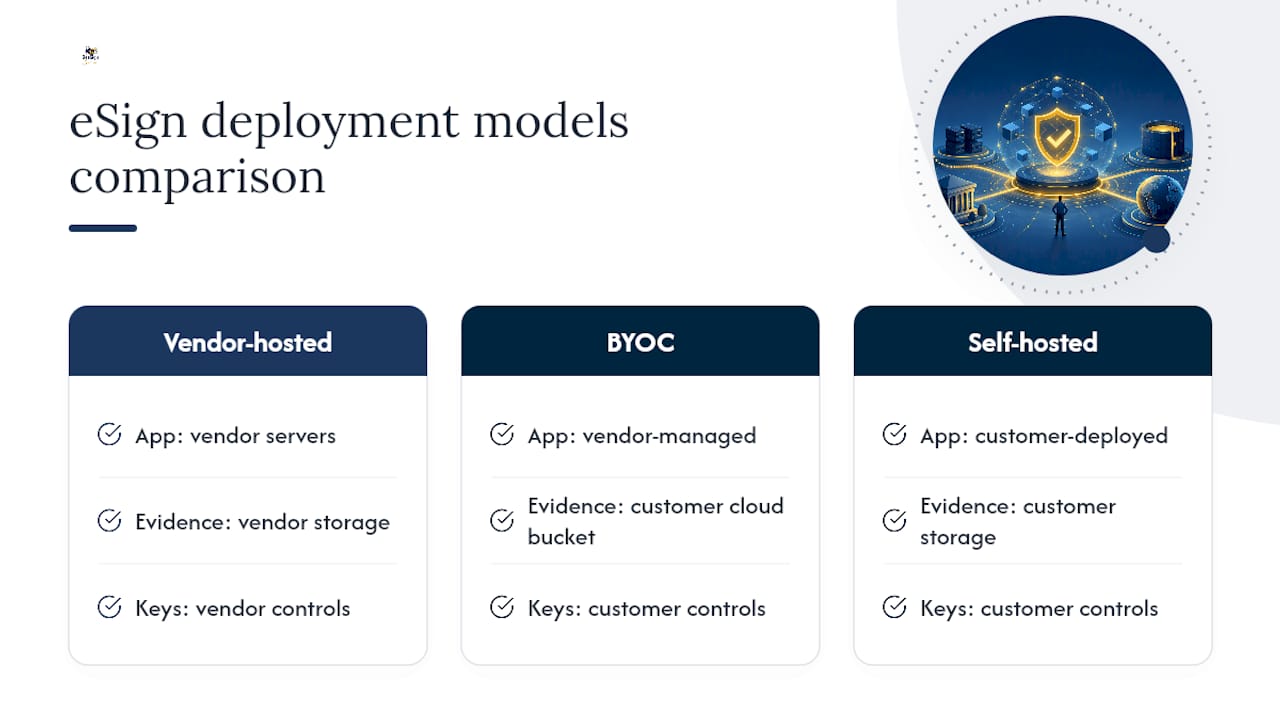
BYOC eSign, in the working sense you need for procurement, means the signed PDFs, tamper-evident audit trails, templates, and identity verification records all live in a cloud storage account you own and control. The vendor’s platform still handles the signing workflow, but it writes evidence into your Google Cloud Storage, AWS S3, or Azure Blob bucket instead of its own database.
That distinction separates BYOC from two other models you’ll see in RFPs. Self-hosted (sometimes open-source) e-sign systems, like the DottedSign self-hosted deployment, run the entire application, not just storage, inside your infrastructure. Fully vendor-hosted platforms keep everything, application and data, on the vendor’s servers. BYOC sits between the two: you get a managed signing experience while the evidence trail stays under your storage keys.
For regulated industries, healthcare under HIPAA, financial services, government contractors, this matters because auditors want to see exactly where a signed contract’s hash, timestamp, and certificate chain physically reside. A vendor offering white-label branding on top of BYOC storage, with custom domains and branded emails included, lets you present the workflow as your own system while your compliance team still points to a storage bucket it controls.
What Security and Compliance Terms Should You Require?
A vendor’s marketing page will tell you BYOC is secure. Your RFP needs to force them to prove it, technically and contractually. Treat the following as a floor, not a wish list.
- Data residency you can point to in writing. Get the specific region and legal entity operating the storage, not a vague “cloud infrastructure” claim; hosting location directly affects how a signature’s evidence chain holds up legally, a point MTR Legal makes when discussing digital sovereignty for e-signatures.
- BYOK and HSM support, with FIPS 140-2 or 140-3 evidence for the hardware security module backing key operations.
- Tamper-evident audit trails with cryptographic anchoring, not just a log entry. An audit trail with proper hashing should capture signer identity, IP, timestamp, and document hash at every step.
- Forensic export formats that include long-term validation (LTV) data, so a signature remains verifiable years after the vendor relationship ends.
- Operational proof: SOC 2 or ISO 27001 reports, recent penetration test summaries, breach notification SLAs, and contractual audit rights.
- Exit-friendly contract language: a data processing agreement that guarantees residency, free and time-bounded export obligations, and no penalty for portability.
A structured sovereignty checklist built around exactly these categories, residency, BYOK, exportable evidence, is becoming the standard framework regulators and buyers expect vendors to answer against.
Pro Tip: Ask the vendor to demonstrate a BYOK flow live, not just describe it. If they can’t show a key request that never leaves your HSM boundary, treat that as a disqualifying gap, not a follow-up item.
How Should IT Teams Architect the Integration?
The architecture decision that matters most is how signed evidence physically lands in your cloud account. Three common patterns exist, and they carry different tradeoffs for latency, cost, and auditability.
- Direct object storage: the platform writes the signed PDF and audit metadata straight to your bucket as the canonical copy, with the vendor holding only a pointer.
- Mounted volumes: your cloud storage is mounted as a working directory the signing engine reads and writes to directly, useful for high-volume batch signing.
- Encrypted manifests: the vendor stores an encrypted package referencing your storage, adding a layer of indirection some security teams prefer for key separation.
Network architecture matters just as much as storage. Insist on VPC endpoints or private links so signing traffic never traverses the public internet, and confirm the platform supports SSO and identity federation through your existing provider rather than a separate login system.
On the integration side, look for a developer REST API that supports server-side signing for backend workflows and embedded signing SDKs for in-app experiences, plus webhooks for status events and an LTV validation API to re-verify certificate chains on demand. Some developer-focused platforms, like Chaindoc, take this further by anchoring document hashes to public ledgers and producing PAdES-format signatures verifiable straight from the PDF, a useful technical benchmark when you’re comparing cryptographic rigor across vendors.
Finally, map out key lifecycle management (rotation, revocation, BYOK re-provisioning) and your retention, backup, and incident response procedures before you sign anything. If the vendor can’t describe their breach response timeline in specific hours, that’s a red flag worth escalating.
How Do You Test BYOC Claims in a Proof of Concept?
Vendor claims about custody and portability are easy to make and hard to verify from a sales deck. A proof of concept forces the issue. Structure it around these steps.
- Define scope precisely: pick a realistic document set, the identity verification levels you actually need (basic email, government ID, biometric face match), expected volume, and your required retention window.
- Run the core test cases: create a signature end to end, then request a full forensic export, then trace the chain of custody from creation to completion, then simulate an exit by asking for a complete data pull.
- Set acceptance criteria before you start: no signing key should ever leave your custody-controlled zone, every audit export must be complete with no gaps, and timestamps plus certificate chains must independently validate.
- Test connectivity and performance: confirm private endpoint access works as advertised and measure API throughput under a load close to your real usage.
- Request documentation: architecture diagrams, BYOK/HSM proof, a sample exported forensic package, and current SOC 2 or ISO 27001 reports.
A PoC run inside your target environment, not a vendor sandbox, is the only way to confirm these claims hold under your actual network and identity controls.
Pro Tip: Don’t just check that the export file exists. Open it and confirm a third party, an auditor with no vendor relationship, could independently verify the signature using only what’s in that package.
What Happens When You Need to Migrate or Exit?
A forensic export worth trusting includes the signed PDF itself, cryptographic hashes, timestamps, the full certificate chain, and validation metadata proving the signature was intact at completion. Anything less leaves gaps an auditor will find eventually.
Before you sign a contract, test portability directly: can that export be opened and independently verified by a different platform, or even a manual verification tool, without calling the original vendor? That proves continuity rather than just theoretical compliance.
Negotiate these items into the contract, not a side email:
- Free, time-bounded export obligations (30 days, not “reasonable effort”)
- A documented runbook for exit, provided at signing, not requested after notice
- Archival format guarantees that support long-term validation as certificate authorities and cryptographic standards evolve
Skipping this step is how organizations end up with years of signed contracts they technically own but practically can’t prove.
What Does BYOC eSign Cost, and How Is It Priced?
BYOC pricing generally layers on top of a standard e-signature subscription rather than replacing it. Most vendors price the core signing platform on a per-seat or per-envelope monthly plan, then add BYOC as a premium tier or a custom enterprise add-on, since supporting customer-owned storage integration and private connectivity takes more engineering and support effort than a default vendor-hosted setup.
Expect three cost categories to show up in any real proposal. First, the platform subscription itself, monthly or annual, scaled by users or signing volume. Second, a setup or integration fee for configuring the connector to your GCS, S3, or Azure Blob account, especially if you’re also requesting VPC endpoints or SSO federation, since those take real engineering hours to configure correctly. Third, your own cloud storage costs, which you pay directly to AWS, Google, or Microsoft rather than through the vendor, since you own the account.
White-label features, custom domains, branded emails, add a separate line item in most pricing models, whether bundled into an enterprise plan or billed as an add-on.
Budget for the hidden cost too: internal engineering time to validate the PoC, negotiate the DPA, and run the exit test described earlier. Organizations that skip that step often pay for it later in support tickets and rushed audits. When comparing quotes, ask vendors to itemize the BYOC premium separately from the base platform cost so you can weigh it against the compliance risk it offsets.
What Goes Wrong During BYOC Implementation?
The most common failure isn’t a security gap. It’s a permissions mismatch between your cloud team and the vendor’s integration, where a bucket policy is too restrictive and signing requests silently fail or fall back to vendor-side caching without anyone noticing until an audit catches it.
Watch for these recurring issues:
- Bucket policy drift: IAM permissions get updated by your cloud team for unrelated reasons and quietly break the signing integration. Fix this with a dedicated service account and permissions that are documented, not shared with other workloads.
- Latency under private links: VPC endpoints add a network hop that can slow high-volume signing batches. Test throughput during the PoC, not after go-live.
- Incomplete audit exports: some integrations sync the signed document but lag on writing metadata, leaving a gap between document and evidence. Confirm exports are atomic, not staged.
- Key rotation breaking old signatures: if BYOK key rotation isn’t handled carefully, older signed documents can become harder to validate. Insist on a documented rotation procedure that preserves backward validation.
- SSO federation mismatches: identity federation setup often stalls in the first two weeks because of attribute mapping issues between your identity provider and the platform. Budget real time for this, not a same-day expectation.
Most of these surface in week one of a properly scoped PoC, which is exactly why skipping that step costs more later.
How Do You Monitor and Audit a BYOC Environment Over Time?
BYOC custody isn’t a one-time setup you configure and forget. Compliance officers should treat it the way they’d treat any regulated data store: with scheduled reviews, not just an annual audit scramble.
Build a recurring cadence around three checks. First, confirm storage bucket permissions haven’t drifted from your original configuration, since IAM changes elsewhere in your cloud environment can quietly loosen access to signed evidence. Second, spot-check forensic exports quarterly, pulling a sample and independently validating the certificate chain and timestamp rather than trusting that the integration is still working correctly. Third, review vendor SOC 2 or ISO 27001 reports on renewal, since a vendor’s security posture at signing doesn’t guarantee it a year later.
Keep a tamper-evident audit trail review on the calendar too, checking that every required field, signer identity, IP, hash, timestamp, is still populating correctly after any platform update on the vendor’s side. Assign ownership explicitly: one person or team should be accountable for confirming BYOC controls monthly, not left to whoever notices a problem first.
Balancing Custody, Overhead, and Time to Value
BYOC isn’t free. It adds setup time, storage costs you manage directly, and ongoing monitoring work that a fully vendor-hosted platform doesn’t require. The tradeoff is real, and pretending otherwise does buyers a disservice.
High-compliance teams, healthcare, finance, government, legal, should require BYOC by default; the audit exposure of not controlling evidence storage outweighs the setup cost every time. Teams without heavy regulatory exposure can often accept vendor-hosted convenience and redirect that engineering time elsewhere. If BYOC is required, start procurement with the PoC, not the contract. Vendors that hesitate on a live BYOK demo are telling you something.
— Mustafa Abusharkh
How BeeSign Fits the BYOC Checklist
If you’ve worked through the checklist above, key custody, forensic exports, white-label branding, you already know what to look for in a vendor. BeeSign is built around exactly that pattern: a white-label BYOC deployment that runs under your own custom domain and branded emails, while signed PDFs and audit trails write directly to a Google Cloud Storage account you control.

The platform layers identity verification, government ID capture, biometric face matching where needed, on top of a developer REST API for automating signing workflows, template management, and status webhooks, so your engineering team isn’t stitching together separate tools for custody and automation. The GCS storage pattern BeeSign documents keeps file contents out of vendor hands entirely, which is the specific technical proof point most RFPs ask for. Sales and operations teams evaluating faster deal cycles can see how the same workflow automation applies to business use cases beyond compliance alone.
If your organization is planning a broader infrastructure shift alongside BYOC adoption, a cloud migration strategy built for IT leadership is worth reviewing before you lock in storage architecture decisions.
Start with a proof of concept scoped to your actual document types and identity requirements, request BeeSign’s architecture documentation directly, or reach out to discuss your compliance requirements before you commit to a contract.
Sources
- Sovereignty Checklist for e‑Signature Providers (2026)
- E-signatures and digital sovereignty | MTR Legal
- Chaindoc: What It Is and How It Works | Chaindoc Labs
FAQ
Is BYOC eSign Legally Valid Under ESIGN and eIDAS?
Yes. BYOC changes where evidence is stored, not the legal framework governing the signature itself; a properly built audit trail under ESIGN, UETA, or eIDAS remains valid regardless of storage location, as long as the hosting and processing chain are documented for compliance review.
Does BYOC Mean the Vendor Never Sees My Documents?
It depends on the architecture, but well-designed BYOC patterns, like storing signed PDFs directly in your Google Cloud Storage bucket, are built specifically to keep file contents out of vendor access while the vendor still manages the signing workflow.
How Is BYOC Different From Self-Hosted eSign?
Self-hosted deployments run the entire application in your infrastructure, while BYOC keeps the vendor’s managed platform but routes signed evidence and audit trails into cloud storage you own and control.
What Should I Ask For Before Signing a BYOC Contract?
Request BYOK/HSM proof, a sample forensic export package, current SOC 2 or ISO 27001 reports, and a contract clause guaranteeing free, time-bounded data export if you decide to leave.
Can BYOC Work With White-Label Branding?
Yes. Platforms like BeeSign combine white-label branding, custom domains and branded emails, with BYOC storage, so the signing experience looks like your own system while evidence stays in your cloud account.
Recommended
Ready to transform your workflow?
Start using BeeSign today and experience the future of document signing