Contract Automation API: 2–6 Week Pilot for Engineering and Legal Teams
Practical implementer's guide to integrating a contract automation API: endpoints, webhooks, idempotency, and compliance controls, plus a 2–6 week pilot...

A contract automation API lets your software create, populate, route, and finalize agreements without a human touching a template file or chasing a signature by email. It cuts contract cycle time by handling templating, approval routing, and e-signature triggers automatically, and it plugs directly into your CRM, ERP, or HR system. Legal ops, sales ops, procurement, and engineering teams use it whenever agreement volume outgrows manual drafting and tracking.
TL;DR:
- Contract automation APIs automate contract creation, routing, and signing, significantly reducing cycle times and integrating directly into existing CRM, ERP, or HR systems.
- They follow a predictable process: create from templates, autofill data, finalize, send for signatures, and retrieve signed documents, with real-time webhooks preferred over polling.
- Proper implementation involves thorough testing of core endpoints and webhooks, clear field mapping, and managing API version compatibility to prevent errors.
- Security measures like TLS, signed webhooks, identity verification, and scoped authentication are essential for legal compliance and audit trails.
- Buying a pre-built API simplifies compliance and speed, while building remains relevant only for on-premise control or unsupported custom workflows.
Table of Contents
- What Is a Contract Automation API, and What Can It Do?
- How Contract Automation APIs Speed Workflows and Cut Risk
- Common Integration Patterns and Technical Architecture
- Implementation Checklist: From Sandbox to Production
- Developer Considerations and Common API Pitfalls
- Security, Compliance, and Audit Trail Essentials
- Build vs. Buy: What I’d Tell Any Team Starting This
- Try Beesign’s Contract Automation API in Your Own Stack
- Sources
What Is a Contract Automation API, and What Can It Do?
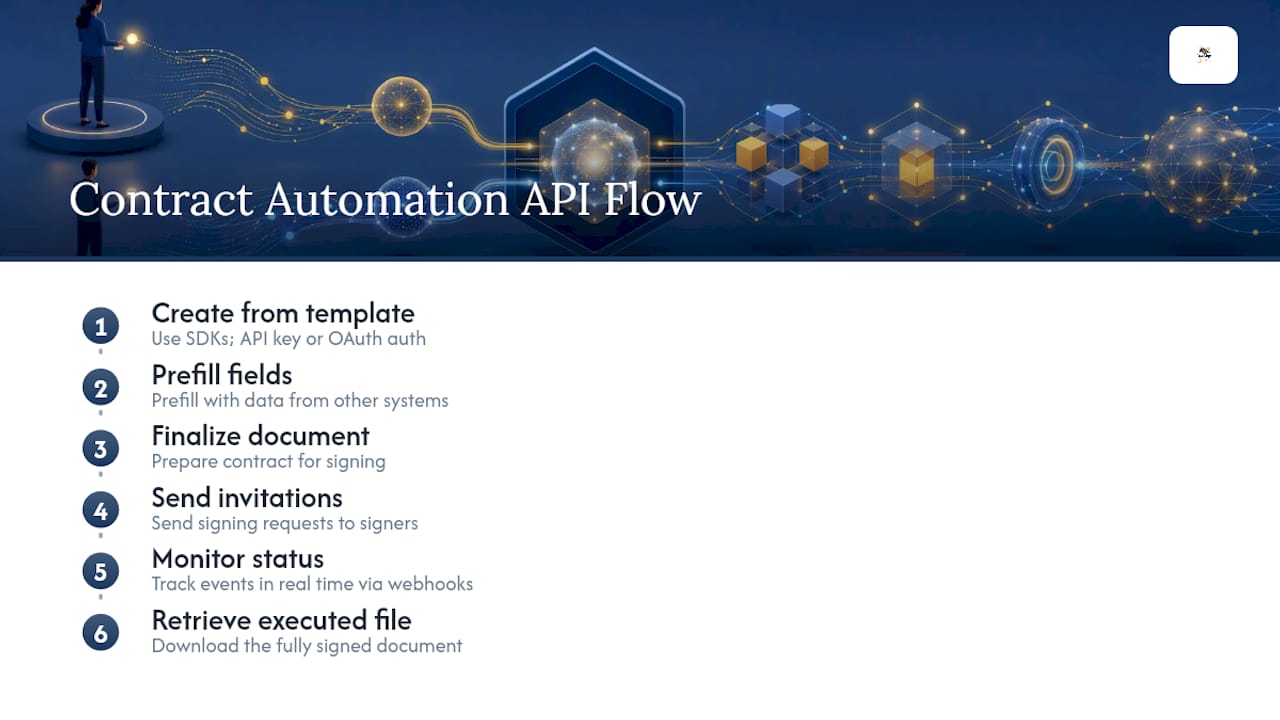
A contract automation API is a set of endpoints your developers call to generate, manage, and finalize agreements programmatically, instead of relying on a person to open a template and fill in blanks (see AI for Developers: Docs, Code, and Onboarding | AmmarAI). Most APIs in this category expose a predictable sequence of operations: create a contract from a template, prefill fields with data pulled from another system, finalize the document for signing, send it to signers, check its status, and download the executed file once everyone has signed.
That sequence is fairly consistent across vendors. Developer documentation from platforms like Docue describes exactly this flow: draft from a template, prefill values, finalize, send invitations, and retrieve the signed document. Supporting infrastructure typically includes webhooks for real-time event notifications, SDKs in common languages to shortcut integration work, and authentication modes like API keys or OAuth Bearer tokens.
Here’s where scope matters: a contract automation API is not the same thing as a full contract lifecycle management (CLM) platform. A CLM product usually includes clause libraries, obligation tracking, and renewal alerts baked into a UI. An API gives you the raw building blocks so you can embed contract generation and signing directly into whatever system your team already uses.
How Contract Automation APIs Speed Workflows and Cut Risk
Manual contract handling breaks down the same way every time: someone forgets to route an approval, a clause gets copied wrong, or a signed PDF sits in an inbox instead of syncing to the CRM. An automated contract workflow API removes each of those failure points by tying contract actions to real business events instead of a person’s memory.
Here’s how that plays out in practice:
- Automated routing and approvals trigger the moment a deal hits a certain stage or a purchase order crosses a threshold, so contracts don’t wait on someone checking a queue.
- Template-driven assembly locks in standard clauses and legal language, which keeps a sales rep from accidentally editing a liability clause.
- CRM and ERP syncing pushes contract metadata like value, term length, and counterparty back into the systems finance and sales already use, so nobody re-keys data.
- Event-driven webhooks update downstream systems the instant a contract is signed, rather than forcing a system to poll for status changes.
Contract automation of this kind combines templating, workflow engines, and alerts to reduce cycle time and tighten governance across the agreement lifecycle, according to Sirion’s overview of contract management automation. The pattern that matters most for your team is simple: fewer manual handoffs means fewer places where a contract can stall or get altered without anyone noticing.
Common Integration Patterns and Technical Architecture
Most teams don’t build a contract automation integration from scratch. They assemble it from a handful of proven patterns, and picking the right one up front saves a rewrite six months later.
- CRM-triggered creation. A deal stage change in your CRM fires an API call that creates a contract from a template and prefills it with the deal’s fields.
- Event sync via webhooks, not polling. Subscribe to events like
contract-completedordocument-createdso your system reacts instantly instead of repeatedly asking the API “is it done yet?” - Archiving to storage or a document management system. Once a contract is executed, an automated job pushes the final PDF and its audit trail to cloud storage or your DMS of record.
- Hybrid flows. Many real deployments combine prefill, a builder UI for edge cases, and an API call to finalize, so reps can adjust a clause without an engineer rebuilding the template.
- Middleware for reliability. A queue layer between your app and the contract API absorbs retries and applies idempotency keys, so a network hiccup doesn’t create three duplicate contracts.
Vendor docs consistently recommend webhooks over polling for tracking lifecycle events, since polling wastes API calls and adds latency to your workflow, per Docue’s platform API documentation.
Pro Tip: Build your webhook consumer to be idempotent before you write a single line of contract-creation code. If your endpoint can safely process the same event twice, a retried delivery or a duplicate webhook will never create a phantom contract in your system.
For teams weighing whether to embed a signing UI or build fully against the API, this comparison of eSignature APIs versus embedded signing walks through the tradeoffs in more depth.
Implementation Checklist: From Sandbox to Production
Skipping steps here is how pilots stall. Follow this order and you’ll avoid the two most common causes of a failed rollout: unclear field mapping and untested webhook delivery.
- Discovery. List which templates need automating, which fields map to which CRM or ERP objects, who the stakeholders are, and what success looks like (cycle time reduced by X days, fewer manual errors).
- Sandbox setup. Request sandbox credentials and confirm your authentication flow, whether that’s an API key or OAuth token exchange, works before touching real contracts.
- Core endpoints. Implement create, prefill, finalize, send, status check, and download. Write test calls against each one using sample data that mirrors your real templates.
- Webhook testing. Verify webhook signatures for integrity, test delivery retries, and confirm your endpoint handles out-of-order events gracefully.
- Staging acceptance. Define acceptance criteria before go-live: does every field populate correctly, does the signed document download intact, does the CRM update within an acceptable window?
- Pilot rollout. Start with a small set of templates and a limited group of users.
Sandbox pilots generally run two to six weeks for a narrow set of templates, while a full enterprise rollout with broader field mapping and compliance sign-off can stretch several months, based on patterns described in Sirion’s contract automation guide. A pilot walkthrough with concrete steps is available in this guide to automating a contract signing workflow.
Developer Considerations and Common API Pitfalls
Engineers integrating a contract workflow API run into the same handful of problems repeatedly. Knowing them ahead of time saves a debugging afternoon.
- Rate limits and retries. Respect published rate limits, and build exponential backoff with idempotency keys so a retried request never duplicates a contract.
- Field mapping and schema validation. Validate every field against the template’s schema before sending it. A mismatched date format or missing required field is the most common cause of a malformed contract.
- Contract versus document identifiers. Some APIs return separate identifiers for the contract object and the generated document; confusing the two is a frequent source of failed status checks, a pattern called out directly in Docue’s platform API docs.
- Builder version mismatches. Builder-specific endpoints often require a matching
builder_versionon the template. Calling a builder endpoint against an incompatible template version returns a409 Conflict, so check compatibility before you deploy. - Versioning and breaking changes. Pin your integration to a specific API version where the vendor supports it, and monitor changelogs before upgrading.
- SDK versus raw HTTP. Use an official SDK when one exists, but always test it against your actual sandbox rather than assuming production parity.
Security, Compliance, and Audit Trail Essentials
Legal teams don’t sign off on a contract automation API because it’s fast. They sign off because it produces evidence a court or auditor would accept. That means your integration needs TLS on every connection, signed webhooks so payloads can’t be tampered with in transit, and an auth model, API key or OAuth, that’s rotated and scoped to the minimum permissions needed.
Contract acceptance in a legal or audit context rests less on how quickly a document moved and more on whether every action, who opened it, who signed it, when, and from where, is captured as tamper-evident evidence.
That evidentiary weight is why identity verification matters more for some contracts than others. A routine internal approval might not need it. A property transfer, a healthcare agreement under HIPAA, or a cross-border commercial contract under eIDAS usually does, and government ID capture with biometric matching gives you a stronger evidentiary record than an email click alone. Where your organization stores that data matters too. Bring-your-own-cloud (BYOC) deployments keep contract data inside infrastructure you already control, which simplifies data residency questions for regulated industries. Retention policies and logging should be defined before your first production contract, not after an auditor asks for one.
Build vs. Buy: What I’d Tell Any Team Starting This
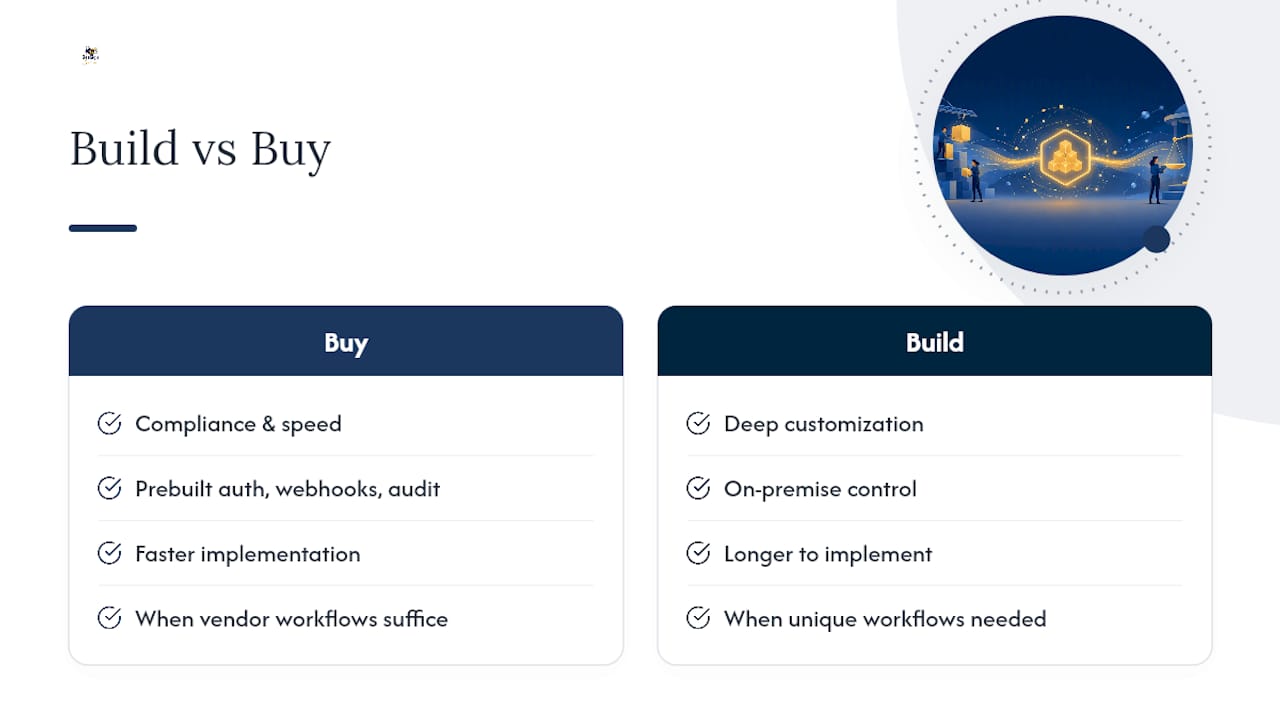
Buy when compliance and speed matter more than deep customization. A pre-built contract automation API already handles authentication, webhook signing, and audit trail generation, problems that take months to build correctly from scratch. Build (or heavily customize) only if you need on-premise control or a workflow no vendor supports out of the box.
Start small: pick two or three templates, wire up sample CRM events, and stand up a single webhook consumer before you touch production data. That narrow pilot tells you more about integration friction than any sales demo will.
— Mustafa Abusharkh
Try Beesign’s Contract Automation API in Your Own Stack
A contract automation platform can provide a developer REST API for contract creation, templating, e-signature routing, and identity verification, including government ID capture and biometric face matching, all under one platform. If you’re working through the implementation checklist above, such platforms may offer sandbox access to test endpoints, webhooks for real-time status updates, reusable templates for prefill flows, and complete audit trails with blockchain timestamp proof for every signed document.

For teams with strict branding or data residency requirements, Beesign’s white-label and BYOC options let you run the entire signing experience under your own domain while keeping contract data inside infrastructure you control. Sales and RevOps teams looking to shorten deal cycles can see how the API fits sales workflows specifically on the sales and business solutions page.
Start with the free trial to test the API against your own templates before committing to a full rollout.
Sources
Recommended
Ready to transform your workflow?
Start using BeeSign today and experience the future of document signing