Pick by End Goal: PDFs for Archive, Web Forms for E Signatures
Decide whether a print-ready PDF or a structured web form fits your signing job. Practical hybrid workflows, field mapping tips, and integration trade-offs.

Choose a PDF when the final document’s layout, print fidelity, and long-term archival matter more than anything else. Choose a web form when mobile completion, structured data, and downstream automation are the priority. Both formats can produce a legally valid electronic signature. The real decision comes down to what happens to that document after signing, and Beesign supports both paths from a single workspace.
TL;DR:
- PDF signatures are ideal for documents requiring exact formatting, offline signing, or long-term archival compliance.
- Web forms facilitate high-volume data collection, conditional logic, automation integration, and faster signing processes.
- Integrating both workflows involves collecting data via web forms, mapping it into PDFs, and routing the complete document for final signature.
- Digital signatures offer cryptographic tamper-proofing suited for high-value or regulated transactions, whereas electronic signatures mainly rely on signer intent.
- Most platforms, including Beesign, support both formats simultaneously, enabling teams to choose the best approach per document or process.
Table of Contents
- PDF Signing vs. Web Form Signing: What’s the Real Difference?
- When Should You Use PDF-Based E-Signatures?
- When Do Web Forms Beat PDFs for Signing?
- How Do You Combine Web Forms and PDFs in One Workflow?
- Electronic Signatures vs. Digital Signatures: When Does the Type Matter?
- What Should Developers Know Before Building Either Workflow?
- Which E-Signature Format Actually Fits Your Workflow?
- Get Both Signing Workflows Without Switching Platforms
- Sources
PDF Signing vs. Web Form Signing: What’s the Real Difference?
A PDF-based e-signature keeps the document as the source of truth. What the signer sees is exactly what gets archived, printed, and handed to a lawyer or auditor five years later. A web-form signature treats the interaction as a structured event: name, timestamp, consent checkbox, and payload get written to a database, and the “document” is often generated afterward, if at all.
That distinction drives every trade-off that follows.
- Layout fidelity vs. data structure. PDFs preserve exact formatting across every device; web forms output clean fields that plug directly into other systems, according to Fluix’s comparison of PDFs and web forms.
- Mobile UX and offline behavior. Web forms render natively on phones and tablets with adaptive layouts; PDFs on mobile often require zooming and pinching, especially on dense multi-page contracts.
- Update and maintenance speed. Editing a web form’s questions takes minutes in a form builder. Editing a PDF template usually means touching the underlying layout file and redistributing it.
- Signer friction and completion rates. Short web forms tend to convert faster because there’s no download, no app switch, and no waiting for a PDF viewer to load.
Neither format wins across the board. A 40-page loan packet has no business being a web form. A five-field event waiver has no business being a PDF.
When Should You Use PDF-Based E-Signatures?
PDF signing is the right call whenever the document itself, not just the data inside it, has to survive intact.
- Legal and regulatory packets. Contracts, NDAs, and compliance filings often need to preserve formatting, page numbering, and exhibit attachments exactly as reviewed by counsel.
- Print-ready, layout-sensitive documents. Leases, loan agreements, and multi-page vendor contracts with tables, initials boxes, and page-by-page signatures don’t translate cleanly into a form.
- Offline or field-based signing. Inspectors, contractors, and delivery drivers working without reliable connectivity need a document they can open, sign, and store locally until they’re back online.
- Archival and audit requirements. Industries that face record retention rules, healthcare, finance, real estate, benefit from a static file that looks identical whenever it’s reopened. Fillable PDFs remain the better choice whenever exact formatting or offline access outweighs integration speed.
If your compliance team asks for “the signed copy,” they almost always mean a PDF.
When Do Web Forms Beat PDFs for Signing?
Web forms win whenever the goal is capturing information at scale and acting on it immediately, not producing a formatted document.
- High-volume intake. Event registrations, waivers, job applications, and payment authorizations move faster as forms because there’s no file to download or reopen.
- Conditional logic and localization. A form can show or hide fields based on prior answers, switch languages, or adjust required fields by region, something a static PDF layout can’t do without a redesign.
- CRM and automation integration. A completed web form can trigger a webhook the instant it’s submitted, updating a CRM record, kicking off a fulfillment task, or notifying a sales rep automatically.
- Faster time to signed record. Web forms avoid attachment loops entirely and create a single submission record, which shortens the gap between “signed” and “processed” from hours to seconds.
A school collecting 2,000 permission slips a semester, or a gym processing daily liability waivers, gets far more value from a form than from a fleet of individually emailed PDFs.
How Do You Combine Web Forms and PDFs in One Workflow?
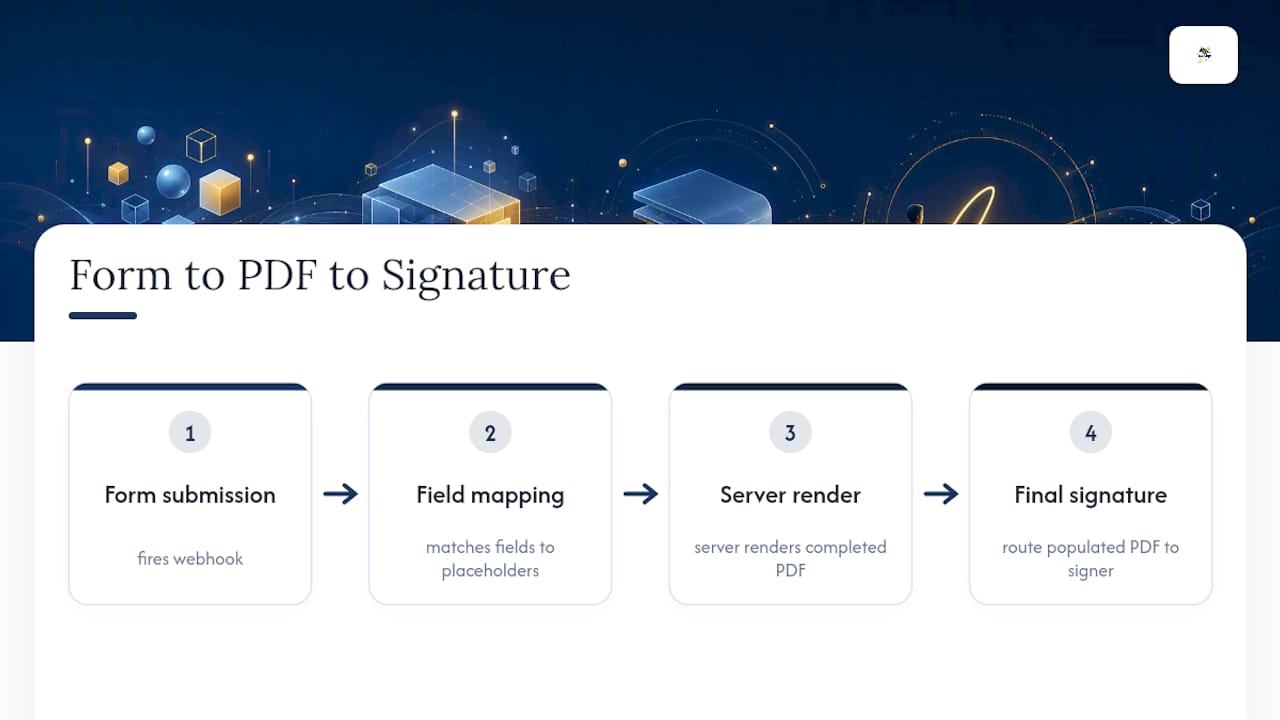
You don’t have to choose one format forever. The most common pattern in practice is capture first, sign last: collect structured data through a web form, map that data into a PDF template, then route the populated PDF for final signature.
The mechanics usually look like this: a web form submission fires a webhook, a mapping layer matches each field to its corresponding placeholder in the PDF template, and the platform server-renders a completed document ready for signing. Beesign’s embedded e-signature integration pattern works this way, letting a form’s payload populate a template automatically instead of requiring manual data entry.
A few operational habits keep this pattern from breaking. Version-lock your PDF templates so a field mapping doesn’t silently point at the wrong placeholder after an edit. Validate form fields before mapping, not after, so a malformed phone number or missing signature never reaches the final document. And keep the audit trail continuous across both stages, so the record shows the same signer identity from form submission through PDF execution.
Pro Tip: Build your PDF template first, then design the web form around its exact fields. Reverse the order and you’ll spend hours reconciling mismatched field names later.
Electronic Signatures vs. Digital Signatures: When Does the Type Matter?
Most people use “e-signature” and “digital signature” interchangeably, but they aren’t the same thing. An electronic signature is a legal category defined by intent: a typed name, a drawn scribble, or a click on “I agree” all qualify if the signer meant to be bound. A digital signature is a technical implementation, a cryptographic signature backed by a PKI certificate issued by a Certificate Authority, that adds tamper-evidence and stronger identity binding on top of that intent.
The legal test for whether a signature holds up in court almost never hinges on how it looks. It hinges on intent, association with the signer, and whether the record was retained with integrity.
Most U.S. courts already treat typed or clicked signatures as legally valid for the overwhelming majority of commercial contracts, under the framework the ESIGN Act and UETA established. Certificate-based digital signatures, meanwhile, typically run $50 to $500 per year depending on assurance level and issuer.
So when do you need to step up from standard e-signature to certificate-backed digital signature? High-value transactions, cross-border agreements where foreign courts may weigh cryptographic proof more heavily, and heavily regulated sectors are the usual triggers. For everything else, a well-documented audit trail, timestamps, IP address, consent language, does the legal heavy lifting. Long-term archives should preserve that audit trail alongside the document itself, not just the signed file in isolation.
What Should Developers Know Before Building Either Workflow?
Implementation effort differs sharply depending on which format you’re building around, and it’s worth scoping before committing engineering time.
- API patterns. Embedded signing keeps the signer inside your own interface; remote signing redirects to a hosted page; server-side PDF generation renders a populated document on demand from your database.
- Template and field mapping. Plan for a mapping layer between form fields and PDF placeholders early. Retrofitting it after launch means touching every existing template.
- Attachments and file standards. Large attachments and multi-file submissions need size limits and compression rules. Regulated workflows may also require PAdES or XAdES-compliant signature formats for long-term validation.
- Webhook reliability. Build retry logic and error alerting into every webhook handler. A missed webhook on a hybrid form-to-PDF pipeline means a signed document that never gets generated.
Which E-Signature Format Actually Fits Your Workflow?
Three questions settle most of these debates faster than any feature comparison. Is the end goal an archival document or a structured dataset? Does the signer need offline access, or are they always online? And does downstream automation matter more than layout precision? Answer those honestly and the format picks itself.
Beesign was built around the reality that most teams need both. Reusable templates, field mapping, identity verification, and bring-your-own-cloud storage all live in one workspace, so you’re not maintaining separate tools for PDF contracts and web-form intake.
— Mustafa Abusharkh
Get Both Signing Workflows Without Switching Platforms
If you’ve read this far, you already know the honest answer isn’t “PDF” or “web forms.” It’s whichever one matches the job in front of you, and most businesses need both by the end of the quarter. Beesign is built for exactly that: reusable templates for archival PDF contracts, structured web forms for high-volume intake, and a mapping layer that connects the two without manual re-entry.

Identity verification, complete audit trails, and a developer API come standard, so whether you’re signing a 30-page lease or collecting 500 event waivers a week, the compliance trail looks the same. Teams that need the signing experience to carry their own brand, custom domain, branded emails, self-hosted storage, can set that up through Beesign’s white-label and BYOC options. For sales teams and operations leads ready to close agreements faster, the Sales & Business solution is the fastest way to see both workflows running side by side. Start a free trial and map your first PDF template today.
Sources
- E-signatures legal requirements — Purdue Global Law School blog
- E-signature vs Digital Signature: research 2026 — magicegypt
- PDFs vs. Web Forms: Best Document Format for Data Collection — Fluix blog
- Online forms vs fillable PDFs — FormHug blog
Recommended
Ready to transform your workflow?
Start using BeeSign today and experience the future of document signing