Identity Verification for New Employees: HR Guide
Ensure compliance and security with identity verification for new employees. This HR guide covers essential processes and benefits for hiring.

Identity verification for new employees is the process of confirming that every hired individual is who they claim to be by validating government-issued ID documents and biometric data before granting employment credentials and system access. Federal law requires this: U.S. employers must complete Form I-9 for every new hire to verify both identity and employment authorization. Skipping or delaying this step creates legal exposure and opens the door to impostor hires. This guide walks HR professionals and hiring managers through the core methods, workflow integration, common pitfalls, and real benefits of a well-built verification program.
What is identity verification for new employees?
Identity verification, formally called identity proofing, is the structured process of confirming that a person’s claimed identity matches verifiable evidence. For HR teams, this means checking government-issued documents, running biometric comparisons, and logging results in a way that satisfies auditors and regulators.
The role of identity verification for new hires goes beyond a compliance checkbox. Identity verification prevents impostor hires by confirming that the person who shows up on day one is the same person who applied and passed screening. Without it, organizations risk granting system access, benefits, and sensitive data to someone who was never vetted.

Form I-9 sets the legal floor. Every employer in the United States must collect and review acceptable identity and work authorization documents within three business days of a new hire’s start date. Noncompliance carries civil fines and, in repeat cases, criminal penalties. Identity proofing is what makes that review meaningful rather than ceremonial.
Core methods used in employee identity checks
Modern employee identity checks combine three technical layers: document authentication, biometric liveness detection, and facial recognition. Each layer catches a different category of fraud.
-
Document authentication reads the machine-readable zone (MRZ) on passports, scans barcodes on driver’s licenses, and checks security features like holograms and microprint. AI-driven document authentication detects subtle anomalies such as tampering and expiration issues that a manual review would miss, and it generates timestamped audit logs automatically.
-
Biometric liveness detection requires the candidate to submit a selfie or short video. The system confirms the image comes from a live person, not a printed photo or screen replay. This step blocks the most common spoofing attempts in remote onboarding.
-
Facial recognition compares the live selfie to the photo on the submitted ID document. A match above the system’s confidence threshold confirms the person holding the document is the document’s rightful owner.
-
Automated workflow triggers send verification requests, collect results, and flag exceptions without manual intervention. Automated workflows for remote onboarding use document capture, biometric liveness checks, and facial recognition to verify identities rapidly, which matters when you are onboarding dozens of hires in parallel.
Pro Tip: Request a liveness detection demo from any vendor you evaluate. Some platforms still use static selfie checks, which are far easier to spoof than video-based liveness analysis.
For onsite hires, in-person document inspection remains valid under Form I-9. Remote hires require a fully digital pipeline, and that pipeline needs all three layers above to meet the same legal standard.
How to integrate verification into the new hire onboarding workflow
Timing is the most underrated variable in the new hire verification process. Place verification too early, and you lose candidates who are not yet committed. Place it too late, and you have already provisioned accounts for someone who fails the check.
Verification belongs at the Select or Hire phase, after a conditional offer is accepted but before system access is granted. That timing balances fraud prevention with candidate experience. The candidate is committed, so friction is tolerable. The employer has not yet invested in provisioning, so a failed check costs little to act on.
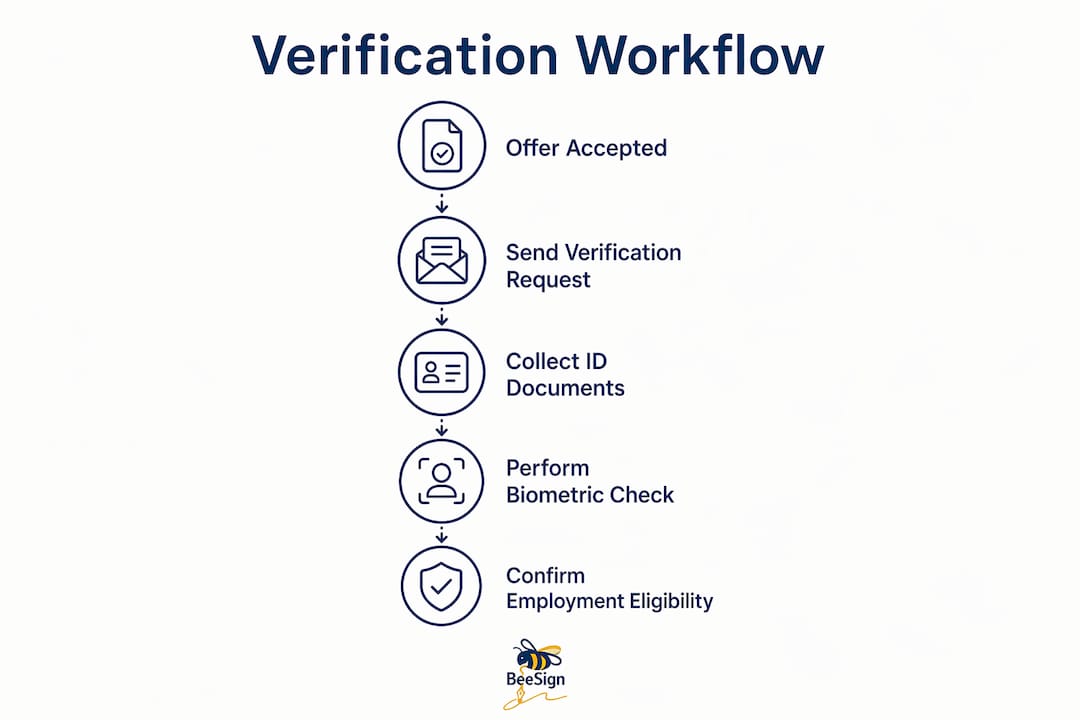
Here is a practical sequence for embedding identity authentication for hires into your workflow:
- Trigger verification automatically. Configure your HRIS or ATS to send a verification link the moment a candidate accepts an offer. Manual emails create delays and inconsistency.
- Collect document images and biometric data. The candidate uploads a photo of their government-issued ID and completes a liveness check via selfie or video.
- Run automated checks. The platform authenticates the document, runs liveness detection, and compares the selfie to the ID photo. Results return in minutes.
- Route exceptions to a human reviewer. Flags for expired documents, low-confidence matches, or unsupported document types go to an HR queue, not a dead end.
- Link results to the employee profile. Integrating verification with HRIS and provisioning gates ensures accounts are only created for verified employees. This step closes the gap between HR and IT.
- Synchronize with background screening. Run identity verification and background checks in parallel, not sequentially. Parallel processing cuts total onboarding time without reducing thoroughness.
- Issue credentials and complete Form I-9. Once verification passes, the system can trigger document signing, badge issuance, and account creation in a single automated sequence.
| Onboarding phase | Verification action | Responsible team |
|---|---|---|
| Offer accepted | Send verification link via HRIS trigger | HR / Recruiting |
| Document submission | Candidate uploads ID and completes liveness check | Candidate |
| Automated review | Platform authenticates document and biometrics | Verification platform |
| Exception handling | HR reviews flagged cases manually | HR |
| Provisioning | Accounts and credentials created post-verification | IT / HR |
Pro Tip: Place identity proofing before background check payment, not after. If a candidate fails verification, you avoid paying for a background check on a fraudulent applicant.
Effective identity proofing integrated during IT orientation or account setup reduces friction while maintaining strong security for hybrid and remote teams. That phase works well as a secondary check for roles requiring elevated system access.
What are the most common challenges in employee identity verification?
Even well-designed verification programs generate exceptions. Knowing the common failure points lets you build fallback procedures before they become HR support tickets.
-
Legal vs. preferred name mismatches. A candidate who goes by a nickname or has recently changed their name may submit an ID that does not match the name in your ATS. Configure identity workflows to manage name discrepancies or place verification after the candidate logs in with their legal name. Never reject a candidate automatically on a name mismatch alone.
-
Unsupported or expired documents. Not every platform accepts every document type. Tribal IDs, foreign passports, and certain state-issued cards sometimes fall outside a system’s supported list. Build a manual review path for these cases and train your HR team to handle them consistently.
-
Poor image quality. Candidates submitting photos in low light or with glare will generate low-confidence results. Send clear instructions with examples before the verification step. A short instructional video reduces failure rates significantly.
-
Inconsistent document requests. Asking one candidate for a passport and another for a driver’s license without a documented, neutral policy creates discrimination risk. The Form I-9 process already defines acceptable document lists. Apply them uniformly and document your process.
-
Automation flags on legitimate documents. Older IDs with worn security features sometimes trigger false positives. A human review queue with a 24-hour SLA prevents these cases from stalling onboarding.
The goal is a fallback procedure that is fast, fair, and documented. Every exception should follow the same path, regardless of who the candidate is.
Why thorough verification protects your organization
Identity verification prevents impostor hires and is a strategic HR control, not just a legal formality. The downstream benefits extend well beyond compliance.
A verified workforce means your background checks, credential issuances, and access grants all attach to confirmed identities. If you run a background check on a fraudulent applicant, you waste the fee and the time. Worse, you may hire someone whose real history would have disqualified them. Verification stops that before it starts.
Audit readiness is another concrete benefit. Timestamped verification logs satisfy USCIS auditors, internal security reviews, and, in regulated industries, HIPAA or SOC 2 assessors. Manual paper files do not provide the same reliability or searchability.
“Identity verification confirms the person behind the credentials, while background checks verify history. Both are complementary but distinct controls. Skipping either one leaves a gap that fraud can exploit.”
Verification and background checks are complementary but distinct. Organizations that treat them as interchangeable end up with gaps in both. A complete new hire verification process runs both in parallel and links results to a single employee record.
For HR teams managing digital onboarding workflows, automated verification also shortens time-to-productivity. Candidates complete checks on their own schedule, results process in minutes, and provisioning triggers automatically. That removes days from a process that used to require in-person appointments and manual data entry.
Key Takeaways
Identity verification for new employees requires document authentication, biometric liveness detection, and HRIS integration to prevent fraud and satisfy federal compliance requirements.
| Point | Details |
|---|---|
| Legal baseline is Form I-9 | Every U.S. employer must verify identity and work authorization for all new hires within three business days. |
| Timing determines effectiveness | Place verification at the Select or Hire phase, after offer acceptance but before system access is granted. |
| Three-layer verification is the standard | Combine document authentication, biometric liveness detection, and facial recognition for reliable results. |
| HRIS integration closes the gap | Link verification results directly to employee profiles to automate provisioning and prevent unauthorized access. |
| Exceptions need a documented path | Build a manual review queue for name mismatches, unsupported documents, and low-confidence flags. |
What I’ve learned about verification timing after years in HR tech
Most HR teams I speak with place identity verification at the wrong stage. They either run it too early, during initial application, where it creates unnecessary friction and candidate drop-off, or too late, after the employee has already received a company email address and system access. Neither approach is defensible.
The right answer is the Select or Hire phase. That is the moment when the candidate has skin in the game and the employer has not yet committed resources to provisioning. Placing verification there is not just a security decision. It is an operational one. You avoid paying for background checks on fraudulent applicants, and you avoid the much harder problem of revoking access from someone already inside your systems.
What I have also seen is that HR teams treat verification as an IT problem and IT teams treat it as an HR problem. The result is a gap where neither team owns the exception queue. The fix is simple: assign a named owner for verification exceptions before you launch any automated workflow. That person does not need to be a technical expert. They need to know the policy, have access to the review queue, and have a clear SLA to work within.
The fraud tactics targeting onboarding are getting more specific. Synthetic identities, deepfake selfies, and document templates are all available to bad actors at low cost. A verification program that was adequate two years ago may not be adequate now. Build in a policy review cycle, at minimum annually, and check whether your platform’s liveness detection has kept pace with current spoofing methods.
— Mustafa Abusharkh
Beesign supports compliant onboarding from verification to signature
HR teams that want verification and document signing in one place have a direct path with Beesign. The platform combines identity verification and document signing into a single workflow, so new hires complete biometric checks and sign offer letters, NDAs, and policy acknowledgments without switching between systems.

Beesign integrates with HRIS and ATS platforms via API, triggering verification automatically when a candidate reaches the hire stage. Every verification generates a timestamped audit log that satisfies ESIGN, eIDAS, and HIPAA requirements. For organizations that need branded workflows, Beesign’s white-label option keeps the experience under your own domain. The HR and operations solution is built specifically for teams managing high-volume onboarding with compliance requirements. Visit Beesign to see how the platform fits your current onboarding stack.
FAQ
What documents are acceptable for new employee identity verification?
Form I-9 defines three lists of acceptable documents, including U.S. passports, permanent resident cards, driver’s licenses, and Social Security cards. Employers must accept any document from the approved lists without specifying which one a candidate must provide.
When should identity verification happen in the onboarding process?
Verification belongs at the Select or Hire phase, after a conditional offer is accepted but before system access or credentials are issued. That timing prevents fraud without creating unnecessary friction early in the hiring pipeline.
How does biometric liveness detection work in remote onboarding?
Liveness detection requires the candidate to submit a selfie or short video that the system analyzes to confirm a live person is present. This blocks spoofing attempts using printed photos or screen replays, which are the most common fraud methods in remote identity checks.
What is the difference between identity verification and a background check?
Identity verification confirms that the person is who they claim to be using ID documents and biometrics. A background check validates that person’s history, including criminal records, employment, and credentials. Both are necessary and neither replaces the other.
How should HR handle a failed identity verification?
Route the case to a manual review queue with a documented SLA. Check for common causes like name mismatches, poor image quality, or unsupported document types before concluding the candidate has failed. Apply the same review process to every flagged case to avoid inconsistent treatment.
Recommended
Ready to transform your workflow?
Start using BeeSign today and experience the future of document signing