Engineers: Keep Long Term Validation Signatures Verifiable 5–10 Years
For engineers and compliance: implement LTV signatures using PAdES/RFC3161, verify with OpenSSL, and schedule 5–10 year timestamp renewals.

Long-term validation signatures work by locking in proof that a digital signature was valid at the moment it was made, so the signature still checks out years after the signer’s certificate expires. The core requirement is simple to state and hard to skip: you must capture the certificate chain, the revocation status (OCSP or CRL), and a trusted timestamp at signing time or immediately after. Miss that window and there’s no clean way to reconstruct trust later. Even then, LTV isn’t permanent protection. It needs scheduled re-timestamping to survive decades of cryptographic drift.
TL;DR:
- Long-term validation signatures require capturing the entire certificate chain, revocation status, and timestamp evidence immediately at signing to remain trustworthy over decades.
- Standards like PAdES, ETSI TS 119 312, and RFC 3161 define how to embed and renew validation evidence for PDFs, with LTA templates supporting periodic timestamp renewal.
- Creating an LTV-enabled PDF involves synchronously collecting verification data, embedding it with DSS and VRI, and maintaining an auditable process with scheduled re-timestamping.
- Offline signing must include queueing evidence capture and secure storage, as verification relies on embedded, not live, proof of validity.
- Regular re-timestamping every five to ten years is recommended to address cryptographic drift and expiration of timestamp tokens, ensuring long-term document validity.
Table of Contents
- What Long-Term Validation Signatures Actually Do
- The Standards That Govern LTV: PAdES, ETSI, and RFC 3161
- How to Create an LTV-Enabled PDF Signature
- Verifying LTV Signatures: Acrobat and the Command Line
- Preservation and Evidence Renewal Over Time
- Building LTV Into Your Signing Pipeline
- How Beesign Approaches LTV and Long-Term Preservation
- Where Teams Get LTV Wrong
- A Practical Path to Implementing LTV
- Sources
- FAQ
What Long-Term Validation Signatures Actually Do
A digital signature starts decaying the moment it’s created. Three separate clocks are ticking against you: the signer’s certificate will expire, the revocation servers (OCSP responders, CRL endpoints) that prove the certificate wasn’t revoked will eventually go offline or stop answering historical queries, and the cryptographic algorithm behind the signature could become obsolete or breakable. Any one of these can make a signature that was perfectly valid in 2026 look unverifiable, or worse, untrustworthy, by 2036.
Long-term validation signatures solve this by bundling the evidence needed to prove validity before it disappears. That package typically includes:
- The full certificate chain, up to a trusted root
- OCSP responses or CRL entries proving the certificate wasn’t revoked at signing time
- Signing policy identifiers, where applicable
- DSS (Document Security Store) and VRI (Validation Related Information) entries embedded in the PDF
- One or more RFC 3161 timestamp tokens anchoring the signing time to a trusted clock
It helps to think of LTV as a snapshot, not a subscription. Long-term validation signatures capture what’s true right now. Keeping that snapshot meaningful for 10, 20, or 30 years is a separate job: ongoing preservation governance, which we cover further down.
The Standards That Govern LTV: PAdES, ETSI, and RFC 3161
You don’t get to freelance the implementation here. Long-term validation signatures for PDFs are governed by a specific stack of standards, and each one solves a distinct piece of the puzzle.
- PAdES (PDF Advanced Electronic Signatures), profiled in ETSI TS 102 778‑4, defines how validation data gets embedded directly into the PDF using DSS and VRI structures, followed by a document time-stamp. PAdES-LT (Long-Term) adds the validation data; PAdES-LTA (Long-Term Archival) goes further by requiring document time-stamps that can be periodically renewed, which matters for anything you need verifiable past the life of the first timestamp.
- ETSI TS 119 312 lays out cryptographic-suite recommendations, including guidance on how often you should renew evidence as algorithms age.
- RFC 3161, the Time-Stamp Protocol, defines exactly how a Time Stamping Authority (TSA) signs a hash to prove data existed at a specific time, and how that token gets verified later.
- LTV-JWS extends JSON Web Signatures with LTV capabilities, defining signature levels (SIG-B, SIG-T, SIG-LTV, SIG-LTA) for teams working outside the PDF ecosystem.
If your implementation doesn’t map to one of these, you’re inventing your own standard, and auditors won’t thank you for it.
How to Create an LTV-Enabled PDF Signature
Building LTV into your signing pipeline isn’t exotic, but the sequence matters. Here’s the checklist engineering and PKI teams should follow:
- Capture evidence at signing, not later. Grab the full certificate chain, OCSP/CRL responses, and signing policy identifiers the moment the signature is applied. Waiting even a few days increases the odds that a CRL has rolled over or an OCSP responder no longer has the historical record.
- Request the TSA timestamp synchronously where possible. For high-value documents (contracts, regulatory filings), call your Time Stamping Authority during the signing transaction itself rather than batching it later.
- Embed the validation data using DSS and VRI. This is what makes the evidence part of the document rather than a side file that can get lost.
- Choose PAdES-LT or PAdES-LTA based on your retention horizon. If the document needs to stay verifiable for more than a handful of years, LTA’s renewable timestamp structure is the safer bet.
- Handle offline signing gracefully. If a device can’t reach the TSA or OCSP responder at signing time, queue the evidence-capture step to run the moment connectivity returns, and flag any document that shipped without it.
- Log every step. Configuration of timestamp server endpoints, error handling, and retry logic all belong in an auditable trail, not just application logs nobody checks. A tamper-evident audit trail makes this defensible later.
Pro Tip: Treat TSA calls like any other critical dependency: set a timeout, define a fallback (queue and retry), and alert your team if the failure rate creeps above a baseline you’re comfortable defending in an audit.
Verifying LTV Signatures: Acrobat and the Command Line
A successful verification has to prove three things: the document hasn’t been altered since signing, the signature was created while the certificate was still valid, and the certificate wasn’t revoked at that specific moment. Anything less is a partial check, not a real validation.
In Adobe Acrobat or Reader, open the signature panel and inspect the signature properties. You’ll see the embedded DSS and VRI data listed alongside the certificate chain, and Acrobat will run a full validation using that embedded evidence rather than reaching out to live servers, which is the entire point of LTV. The PDF Association’s guidance walks through exactly where to find this in Acrobat’s interface and how to trigger a manual revalidation.
For command-line or scripted verification, OpenSSL’s ts tool handles RFC 3161 timestamp tokens directly:
openssl ts -verify -in token.tsr -data document.pdf -CAfile ca-chain.pemchecks that the timestamp token matches your document hash and chains to a trusted CA.- You can validate entirely offline once you’ve exported the embedded OCSP/CRL responses and timestamp tokens, which is the whole reason to capture them up front instead of relying on live lookups.
Mastering openssl ts -verify output (matching message imprint and CA chain) matters here: it’s how you verify independently of any proprietary viewer, which auditors increasingly expect.
Preservation and Evidence Renewal Over Time
LTV is not a “set it and forget it” mechanism. A timestamp token has a lifetime tied to the TSA’s own certificate and the strength of the algorithm behind it. If that algorithm weakens, the entire evidence package needs re-anchoring, not just a patch.
ETSI TS 119 312 guidance recommends planning re-timestamping on roughly a 5 to 10 year cadence for anything that needs multi-decade defensibility. This is where archive timestamps come in: each new timestamp wraps and re-anchors the prior evidence, creating a recursive chain of trust that doesn’t rely on any single timestamp surviving forever.
Practical governance steps include:
- Maintaining an audit trail of every preservation action, including who triggered a re-timestamp and when
- Defining a response plan for TSA key compromise or a mass-revocation event affecting your signer population
- Monitoring cryptographic-policy advisories so you’re not caught flat-footed when an algorithm gets deprecated
Pro Tip: Don’t wait for a compliance audit to discover your archive timestamps have quietly lapsed. Build automated monitoring that flags any document approaching its timestamp’s expiry window well before it becomes urgent.
Building LTV Into Your Signing Pipeline
Most teams land on one of two integration patterns: timestamp-on-signature, where the TSA call happens synchronously as part of the signing transaction, or post-signing augmentation, where evidence gets gathered and embedded in a separate batch step. High-value documents usually justify the synchronous approach; bulk archival ingestion is better suited to asynchronous processing.
A conceptual API sequence looks like this: sign the document, gather the certificate chain and revocation data, request the TSA timestamp, then embed or append the DSS. Your preservation stack needs an evidence repository, a scheduled job for re-timestamping, and monitoring for changes in cryptographic policy.
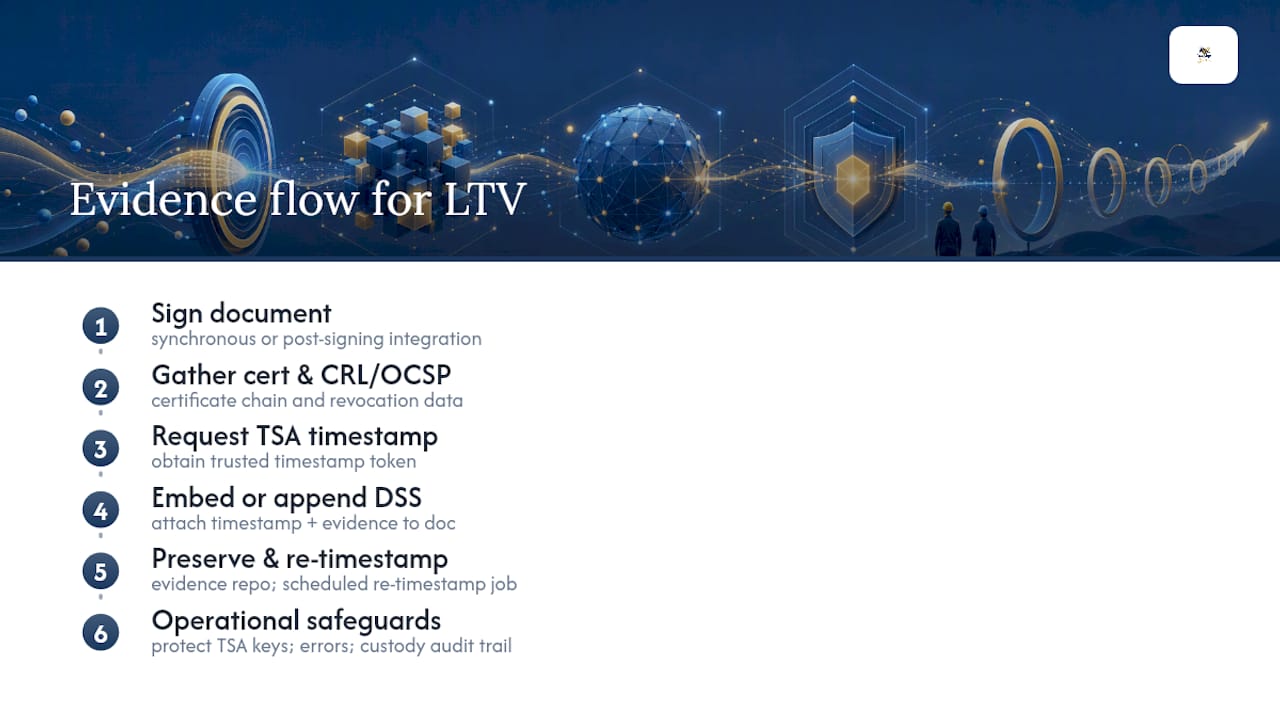
Operationally, protect your TSA client credentials the way you’d protect any signing key, build clear error handling for timestamp failures, and document evidence custody so an audit trail exists for every document that passes through the pipeline.
How Beesign Approaches LTV and Long-Term Preservation
Some platforms include features useful for LTV work such as developer REST APIs for automating signing and evidence capture, identity verification for stronger signer assurance, audit trails, and blockchain timestamp proof. Compliance-heavy workflows often benefit from white-label deployment and bring-your-own-cloud storage options that keep evidence inside the user’s infrastructure. Combined with an API-driven signing flow, that gives engineering teams a practical starting point for integrating timestamp capture with their own TSA or preservation service.
Where Teams Get LTV Wrong
The most common mistake is treating LTV as a one-time checkbox instead of a lifecycle commitment. Teams capture the timestamp, embed the DSS, and consider the job done, then discover years later that revocation evidence was never collected or that nobody ever tested offline verification.
Start with a pilot on your highest-stakes document type. Schedule re-timestamp jobs before you need them, not after an audit flags the gap. And put evidence custody ownership somewhere specific. Security, legal, and records management all have a stake, but if nobody owns it explicitly, nobody will.
— Mustafa Abusharkh
A Practical Path to Implementing LTV
If you’re evaluating platforms for this work, the job is really three things stitched together: signing with an API you can automate, capturing evidence at the right moment, and keeping that evidence somewhere you control. Beesign’s electronic signature API handles the signing and automation piece, its identity verification adds signer assurance where you need it, and white-label and BYOC deployment means the evidence and audit trail stay inside your own infrastructure rather than a vendor’s black box.
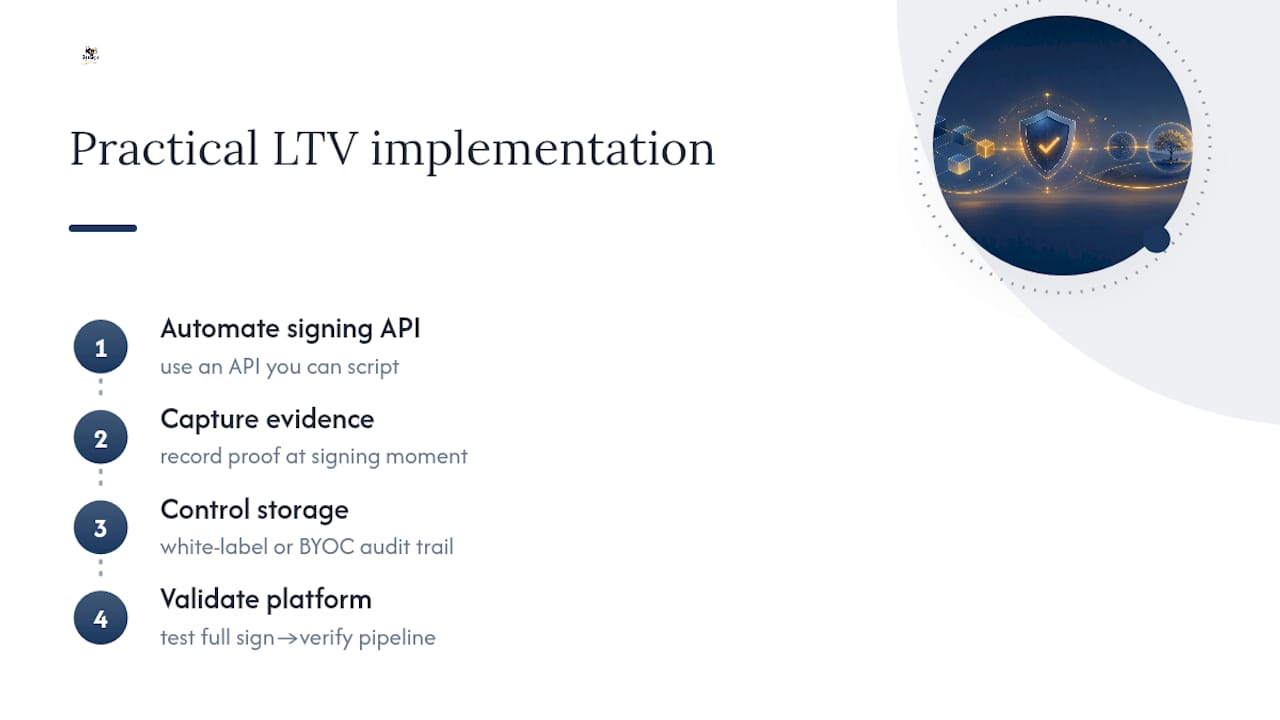
When you’re checking a platform against this checklist, look at the API documentation directly, confirm what evidence gets captured automatically versus what you’ll need to wire up yourself, and run a real document through a full sign-to-verify cycle before committing. Beesign’s Individual plan starts at $9.99 per month, with Enterprise and custom integration options for teams that need deeper API work or white-label deployment. Start a trial and run your own signing pipeline through it before you decide.
Sources
- RFC 3161 — Time-Stamp Protocol (TSP)
- ETSI TS 102 778‑4 — Profiles for advanced electronic signature formats supporting LTV
- OpenSSL ts — Time Stamping Authority client and server documentation
- PDF Association — Long-term validation of signatures
FAQ
What company is best for verifying signatures?
No single vendor “wins” verification since it depends on open standards like PAdES and RFC 3161 rather than proprietary tech, but platforms with built-in audit trails and API-driven evidence capture, including Beesign, make the process far easier to manage than manual workflows.
How do you validate a digital signature?
You confirm three things: the document hasn’t changed since signing, the certificate was valid at signing time, and it wasn’t revoked. This is done through Acrobat’s built-in validation panel or command-line tools like openssl ts -verify for timestamp tokens.
What are the three types of digital signatures?
The three PAdES-recognized levels most teams reference are basic (B), timestamped (T), and long-term validation (LTV or LTA), with each level adding more embedded evidence to keep the signature verifiable further into the future.
What are the legal requirements for a valid signature?
Legal validity generally requires signer intent, an association between the signature and the document, and evidence of the signing process, with frameworks like ESIGN and eIDAS setting the specific rules depending on jurisdiction; check what makes an eSignature valid for a fuller breakdown.
How often should I re-timestamp an LTV signature?
Industry guidance from ETSI recommends planning evidence renewal roughly every 5 to 10 years to stay ahead of cryptographic-algorithm obsolescence and expiring timestamp tokens.
Recommended
Ready to transform your workflow?
Start using BeeSign today and experience the future of document signing