Court Proven Real Estate ESIGN Workflow That Maps Recorder Rules
Adopt a transaction‑first electronic signature workflow that locks templates, scales risk‑based ID, preserves tamper‑evident audit trails, and includes a...

A compliant real estate e-signature workflow runs on a locked transaction record, not a loose PDF: approved template, prefilled data, defined signer roles and order, risk-based authentication, then send, track, and archive with a completion certificate. Anchor it to ESIGN and UETA, follow NAR guidance on when to escalate to remote online notarization, and you close faster without losing legal ground.
TL;DR:
- Standardized templates with version locking and role-based access prevent document drift and delays caused by outdated or incorrect agreements.
- Risk-based authentication methods should match the document’s sensitivity, from email verification for low-stakes forms to biometric ID for high-value transfers.
- Properly chaining each step from creating a locked transaction record to archiving with an audit trail ensures legal enforceability and traceability of signatures.
- RON is necessary only when notarization is legally required, and recorder acceptance varies by state; verify local rules before relying solely on RON for deeds.
- Monitoring handoff metrics, such as time from document ready to first view and correction rates, helps identify workflow bottlenecks and improve signing efficiency.
Table of Contents
- What Does a Real Estate E-Signature Workflow Look Like Step by Step?
- What Makes an Electronic Signature Legally Enforceable?
- When Do You Need RON Instead of Standard E-Signing?
- How Do You Stop Templates From Drifting Out of Version Control?
- Which Systems Should Your Signing Workflow Connect To?
- Which Metrics Actually Tell You Where the Workflow Breaks?
- BeeSign in Practice: Mapping Features to the Workflow Above
- One Operational Rule Worth Repeating
- Ready to Pilot a Workflow-Native Signing Process?
- Sources
- FAQ
What Does a Real Estate E-Signature Workflow Look Like Step by Step?
Every closing document that gets signed electronically should pass through the same sequence of checkpoints. Skip one, and you either slow the transaction down or create a document nobody can defend later.
Here’s the order that holds up under scrutiny:
- Create and lock the transaction record. Open a dedicated file for the deal before anything gets sent for signature. Locking it prevents the wrong version from circulating.
- Pull an approved template from the central library. Never let an agent build a purchase agreement from scratch or from last year’s saved copy.
- Prefill property and party data. Addresses, names, and dates should populate automatically from your transaction management system, not get retyped by hand.
- Label the version and lock it during signing. Cornell’s e-signature process guidance recommends this specifically to stop version drift, where a signer completes an outdated draft while the current one still floats around inboxes.
- Set signer roles and signing order. Buyer signs before seller countersigns, or all parties sign in parallel; the document dictates the sequence, not convenience.
- Place required fields. Signature, initials, date, and any attachments (disclosures, addenda) need exact placement so nothing gets left blank.
- Match authentication to risk. A rental application might need only email verification; a deed transfer needs a lot more.
- Send, then monitor. Track open rates, send reminders on a schedule, and manage corrections without restarting the whole packet.
- Generate the completion certificate. This is the document that proves who signed, when, and how.
- Route the executed package. Send it to title, escrow, and compliance, then archive the authoritative PDF with its full audit trail.
Pro Tip: Build your signer order into the template itself, not into a separate email instruction. Templates that hardcode routing logic eliminate the single most common closing delay: someone signing out of turn and invalidating the sequence.
This order matters because NAR’s own analysis points out that signing itself is rarely the bottleneck. The friction shows up around it, in review, revision, approval, and delivery to the next party. Design the workflow around those handoffs, not around the moment someone clicks “sign.”
What Makes an Electronic Signature Legally Enforceable?
A signature graphic by itself proves nothing. What holds up in a dispute is the evidence trail around it, and ESIGN and UETA both point to the same five elements.
- Intent to sign. The signer must have taken an affirmative action, not just had a signature auto-applied.
- Consent to do business electronically. Documented, not assumed.
- Attribution. Evidence tying the signature to the specific person, not just to an email address.
- Association. A clear link between the signature and the exact document version signed.
- Retained copy. An accurate, accessible record the signer can access later.
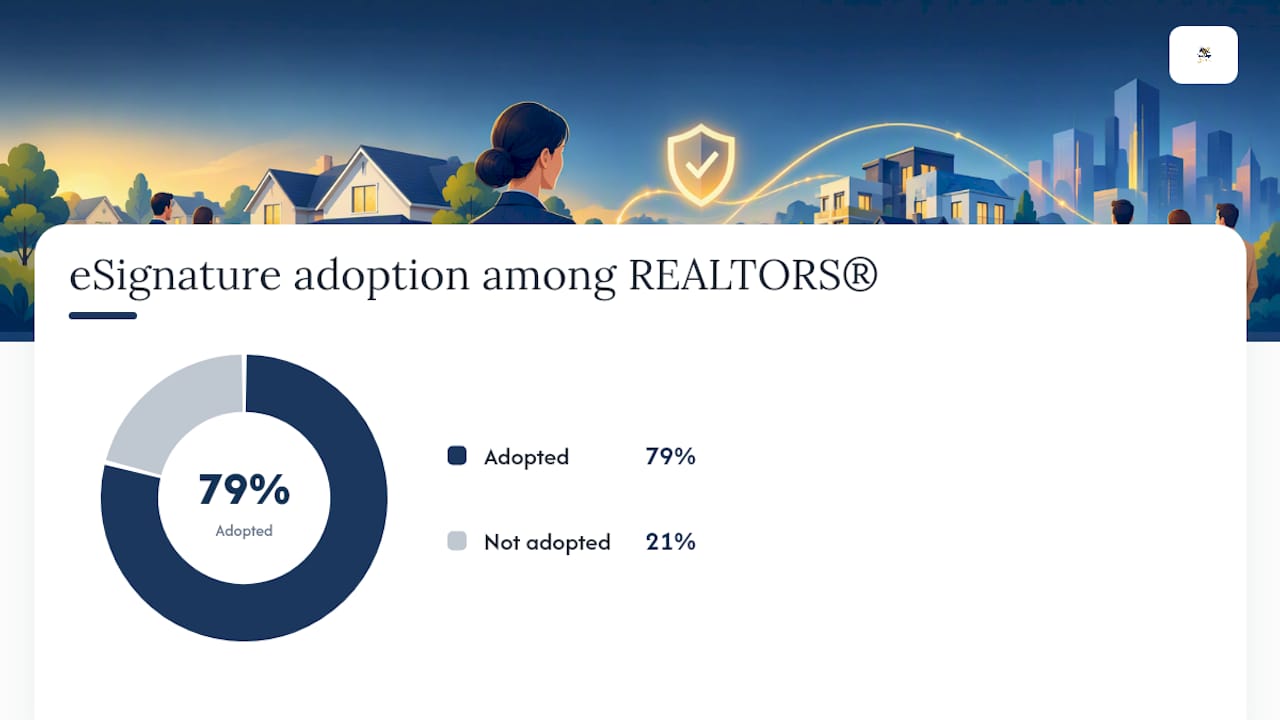
By the numbers: eSignature is the most widely adopted technology among REALTORS®, used by 79% of agents, largely because it saves time and improves the client experience.
Recording adds another layer most agents underestimate. Not every county recorder accepts the same electronic format, and some still run limited e-recording pilot programs rather than full acceptance. Florida’s statute is a useful example: it explicitly treats an electronic signature as satisfying signing requirements for an electronic record, while still setting conditions around notarization and format. That is state-specific language, and your state’s recorder rules may differ.
The practical fix is layered controls: a completion certificate on every executed document, a tamper-evident audit trail, controlled storage rather than a shared drive, and a compliance or counsel review step for anything that will be recorded or notarized.
When Do You Need RON Instead of Standard E-Signing?
Ordinary e-signing covers most listing agreements, disclosures, and amendments. But deeds, some powers of attorney, and any document your state requires to be witnessed or notarized need a different track.
- Remote online notarization (RON) lets a notary complete the process over audio-video technology, which is a real advantage for multi-location deals. NAR’s guidance is clear that RON availability and recorder acceptance vary by jurisdiction and document type, so it is not a universal substitute for in-person notarization.
- Risk-based authentication should scale with the document: email or SMS confirmation for low-stakes forms, knowledge-based authentication (KBA) for mid-tier agreements, and ID capture with a selfie or biometric match for anything tied to a large fund transfer or ownership change.
- Before launch, verify your recorder’s stance on RON and e-recording, and build a manual exception lane for deeds and other recordable instruments that need special handling.
How Do You Stop Templates From Drifting Out of Version Control?
Centralized templates turn individual agent habits into a repeatable process, which is exactly the standardization Cornell’s e-signature documentation points to as the fix for inconsistent packages.
- Assign one template owner who approves changes; nobody edits a live template without that sign-off.
- Version-label every template and lock it the moment it enters the signing stage.
- Build an exception lane for unusual or recordable documents that don’t fit the standard packet.
- Use role-based access and audit logging so you can see who touched what template, and when.
Pro Tip: Run a quarterly template audit. Agencies that skip this find outdated disclosure language sitting in “approved” templates for months, invisible until a closing gets challenged.
Which Systems Should Your Signing Workflow Connect To?
A signature tool that operates in isolation from your other systems creates more work, not less. NAR’s reporting on real estate technology warns that stacking disconnected point tools adds login friction and re-keying errors instead of removing them.
Priority integrations to look for:
- CRM and transaction management so signer data and status sync without manual entry.
- MLS and standard forms libraries to keep templates current with association-approved language.
- Title and escrow systems for direct handoff of executed packages.
- Accounting platforms for commission and fee reconciliation.
- E-recording services where your county supports direct digital submission.
Workflow-native features matter more here than a long feature list: conditional routing based on document type, clear signer-role management, and webhooks or an API that lets your systems talk to each other automatically. A platform with fewer features but tighter integration will outperform one with more buttons and no connections.
Which Metrics Actually Tell You Where the Workflow Breaks?
Measuring only “envelopes completed” hides where the real friction lives. Cornell’s process research recommends tracking the gaps between handoff points instead.
- Document-ready to first view. A long gap here often points to a delivery or notification problem, not a signer problem.
- First view to completion. Slow completion after a signer opens the document usually signals a confusing template or too many required fields.
- Completion to filing. This gap reveals bottlenecks on your side, in routing to title or compliance.
Adoption context: with 79% of REALTORS® already using eSignature, the differentiator between agencies is no longer whether they sign electronically, but how tightly they measure and fix the workflow around it.
Also track reminder counts, rejection or correction rates, approval latency, and how often documents get routed into your exception lane. High correction rates point to a template problem. High latency at the completion step usually points to your authentication method being too heavy for the document’s actual risk level.
BeeSign in Practice: Mapping Features to the Workflow Above
BeeSign builds each step described above directly into the platform rather than treating it as a manual add-on.
- Central template library with version locking, so agents always send the current, approved package.
- Identity verification, including government ID capture and biometric face matching, scaled to document risk.
- Tamper-evident audit trails and blockchain timestamp proof on every completed document.
- A REST API for connecting signing to your CRM, transaction management, or title systems.
- White-label and bring-your-own-cloud (BYOC) deployment, so your compliance team controls where documents actually live.
A short pilot works better than a full rollout on day one. Pick one transaction type, like a standard listing agreement, configure the template, turn on identity verification, run it through ten to twenty real transactions, and measure the handoff metrics above before expanding further.
One Operational Rule Worth Repeating
Standardize the template, then measure before you scale. The single rule that prevents the most closing headaches: build your exception lane and lock templates before anything gets sent, not after a problem surfaces. Start with one transaction type, measure it honestly, then expand.
— Mustafa Abusharkh
Ready to Pilot a Workflow-Native Signing Process?
The platform fits the workflow described above by providing transaction-level control rather than a simple send-and-sign button. Templates lock automatically, identity verification scales to the document, and every completed file carries its own audit trail and completion certificate, aiding compliance teams in evidence retention.

To pilot it, pick one high-volume document type, like a standard purchase agreement, and configure it as a locked template inside the Electronic Signatures product. Turn on identity verification for anything involving a deposit or fund transfer, run it through a batch of real transactions, and track first-view time, correction rate, and time-to-file the same way described in the metrics section above. Brokerages that need documents to stay inside their own infrastructure should also look at the white-label and BYOC options, which keep signed files on your own cloud rather than a third party’s. Plans start at $9.99 per month on the Individual tier, with custom Enterprise pricing available for larger teams; check current pricing and start a trial to see how the workflow performs on your own transactions.
Sources
- E-signature Process | IT@Cornell
- Digital Closings – E-Signatures & Remote Notarization
- Chapter 695 Section 27 - 2026 Florida Statutes - The Florida Senate
- 2025 REALTORS® Technology Survey Report
FAQ
What Are the Steps in the Electronic Signature Process?
The core sequence is: create a locked transaction record, select an approved template, prefill data, set signer roles and order, authenticate signers based on risk, send and monitor, then archive the completed document with its audit trail. Each step exists to preserve evidence, not just to move the deal forward.
Can a Real Estate Contract Be Signed Electronically?
Yes. Under ESIGN and UETA, electronic signatures satisfy signing requirements for most real estate contracts, including purchase agreements, disclosures, and leases. Recordable documents like deeds may face additional state-specific conditions, as seen in Florida’s statute language.
What Are the Requirements for a Valid Electronic Signature?
A valid electronic signature needs documented intent to sign, consent to transact electronically, attribution to the specific signer, association with the exact document version, and a retained accurate copy. These five elements come directly from ESIGN and UETA guidance, and the signature image alone satisfies none of them without that supporting evidence.
What’s the Best E-Signature Software for Real Estate Agencies?
The strongest option is a platform built around real estate transaction workflows rather than generic document signing. BeeSign fits that profile with central templates, risk-based identity verification, tamper-evident audit trails, and white-label deployment, and its Individual plan starts at $9.99 per month with pricing details available for review.
When Should a Brokerage Use Remote Online Notarization Instead of Standard E-Signing?
Use RON when a document legally requires notarization and the parties can’t meet in person, since NAR’s guidance confirms RON handles that scenario well for multi-location closings. Standard e-signing covers the rest of the packet, but recorder acceptance of RON varies by state, so verify local rules before relying on it for deeds.
Recommended
Ready to transform your workflow?
Start using BeeSign today and experience the future of document signing