What Is a Benefits Enrollment Agreement? A Guide for HR
Discover what a benefits enrollment agreement is and why it’s crucial for HR. Ensure compliance and streamline employee benefits today!

A benefits enrollment agreement is the signed record of which health, dental, vision, retirement, or other employer-sponsored benefits an employee has chosen, along with the payroll deduction amounts tied to those choices, and it often doubles as a salary reduction agreement when pre-tax elections are involved. Once signed, it binds both sides. Your employee agreed to specific deductions and coverage; you agreed to provide that coverage on the terms stated. Verbal promises don’t override it.
If you’re holding a newly signed form (or about to send one out), here’s what to do first:
- Confirm which enrollment window applies: new hire, qualifying life event, or open enrollment.
- Verify the employee’s identity and double check dependent and beneficiary details before filing.
- Save a signed copy in your HRIS or benefits system immediately. Don’t let it sit in someone’s inbox.
Pro Tip: Treat the signed form as the single source of truth. If a carrier’s records ever conflict with what your employee signed, the written enrollment agreement your company keeps on file is usually what settles the dispute.
Key Takeaways
A benefits enrollment agreement is a signed, legally binding record of an employee’s benefit elections that controls payroll deductions and coverage effective dates, and written terms generally override verbal promises when disputes arise.
| Point | Details |
|---|---|
| Definition matters legally | The signed form, not a verbal conversation, typically controls disputes over elections and coverage. |
| Three enrollment triggers | New hires, annual open enrollment, and qualifying life events each carry their own deadline. |
| Complete fields prevent errors | Identity, dependent, plan election, and signature fields all need to be captured accurately the first time. |
| Retention protects you | Keep signed records for the plan year plus your applicable audit window, stored securely and tagged for retrieval. |
| Digital workflows reduce risk | Platforms like BeeSign add identity verification, audit trails, and payroll integration to the enrollment process. |
Table of Contents
- What Is a Benefits Enrollment Agreement, and What Types Exist?
- Why Does the Benefits Enrollment Agreement Matter?
- When Do Employees Need to Complete an Enrollment Agreement?
- What Should a Benefits Enrollment Form Include?
- What Legal and Compliance Points Should HR Check Before Finalizing Forms?
- How Long Should You Keep Enrollment Agreements on File?
- How Can E-Signature Workflows Improve Benefits Enrollment?
- What HR Teams Consistently Get Wrong About Enrollment Forms
- Simplify Enrollment Collection With BeeSign
- Frequently Asked Questions
- Sources
What Is a Benefits Enrollment Agreement, and What Types Exist?
A benefits enrollment agreement, sometimes called a benefits enrollment form or benefits selection agreement, is a signed record of an employee’s benefit selections and the contribution amount tied to each one for a given plan year, or a portion of it. That definition matters because enrollment forms are legally recognized instruments, not just administrative paperwork you file and forget.
You’ll run into several variations depending on the trigger and the plan involved:
- New-hire enrollment forms capture first-time elections during a company’s initial eligibility window.
- Open-enrollment election forms cover the annual period when all employees can review and change benefits, typically for the upcoming plan year.
- Special or qualifying-event forms get triggered by marriage, birth, adoption, divorce, or loss of other coverage, outside the normal enrollment calendar.
- Salary reduction agreements apply specifically when an employee elects pre-tax contributions under a Section 125 cafeteria plan, such as an FSA or HSA.
- Digital portal confirmations are the electronic equivalent, generated when an employee completes elections through a benefits administration platform instead of a paper form.
There’s also a distinction worth understanding: the enrollment form your company keeps on file is not always the same document as the carrier’s enrollment application. Carriers often require their own intake forms for underwriting or eligibility purposes. Your employer-provided form, though, is usually the operative record for payroll deductions and internal coverage decisions. If the two ever disagree, you need to know which one governs, and that usually comes down to which document your plan documents designate as controlling. Don’t assume they’re interchangeable just because they collect similar information.
Why Does the Benefits Enrollment Agreement Matter?
An enrollment agreement isn’t a formality. It’s the document that actually controls three things: what gets deducted from a paycheck, what coverage takes effect and when, and what happens if there’s ever a disagreement about any of it.
Courts and plan administrators generally treat the signed written agreement as the controlling evidence in a dispute. Under a legal principle called the parol evidence rule, a verbal promise that contradicts what someone signed is difficult to enforce. If an employee later claims they were told they’d get family coverage but the signed form shows employee-only coverage, the form usually wins.
That has real consequences for your operation:
- Payroll accuracy depends on the form matching what actually gets withheld. A mismatch between the signed election and the payroll system creates errors that compound every pay period until someone catches them.
- Compliance touchpoints run through this document too. ERISA governs how group health and retirement plans document elections and disclosures, ACA rules affect eligibility and affordability calculations, and COBRA notices depend on accurate enrollment records to calculate continuation coverage correctly.
- Dependent and beneficiary accuracy protects you during audits and claims disputes. A wrong Social Security number or an outdated beneficiary designation can delay a claim for months.
- Coverage gaps get prevented when effective dates are documented clearly, rather than assumed.
Pro Tip: Run a quarterly spot check comparing signed enrollment forms against your payroll deduction report. Catching a mismatch in March costs you an hour. Catching it during an ACA audit costs you a lot more.
When Do Employees Need to Complete an Enrollment Agreement?
Three moments trigger the need for a benefits enrollment agreement, and each comes with its own clock.
New-hire enrollment happens once an employee becomes eligible, and employers commonly give a short window to make elections. Adobe’s benefits program, for example, requires medical, dental, and vision decisions within a short window of hire. Miss that window, and the employee typically defaults to no coverage (or a default plan, depending on your policy) until the next enrollment opportunity.
Open enrollment is the annual period when every employee, regardless of hire date, can review and change elections for the upcoming plan year. Timing varies by employer. Indiana University’s 2026 open enrollment, for instance, runs online during a specified period in early November, with employees walking through a portal to select and confirm elections before the window closes.
Qualifying life events open a special enrollment window outside the normal calendar. Marriage, a new child, divorce, or losing other coverage all count. Adobe’s policy allows 31 days from the event to make changes, which is a fairly typical range across employers.
A few practical notes for tracking these deadlines:
- Document the trigger date for every life-event enrollment, since the clock starts there, not when the paperwork gets filed.
- Missing a window generally locks an employee out until the next qualifying event or open enrollment, so build reminder triggers into your process rather than relying on memory.
- Keep a record of any late or missed elections and the reason, in case it gets questioned later.
What Should a Benefits Enrollment Form Include?
This is where most enrollment problems actually start. A form missing a field forces a follow-up email, delays an effective date, or worse, creates a payroll deduction that doesn’t match what the employee actually elected.
Core information every form needs
Start with identity basics: legal name, Social Security number or another employee identifier, date of birth, current address, employee ID, hire date, and eligibility status. These sound obvious until you’re reconciling a rejected claim because a middle initial didn’t match across systems.
Dependent and beneficiary data
If the employee is adding a spouse or children, you need full names, dates of birth, relationship to the employee, and identifying numbers for each dependent. For life insurance or retirement plans, beneficiary designations need a name, relationship, and allocation percentage. This is also where it’s worth asking whether a dependent has other coverage, since Medicaid and CHIP eligibility can affect whether coordination of benefits rules apply.
Plan election fields
List every plan option available, coverage tier (employee only, employee plus spouse, family, and so on), the effective date, and whether the election is pre-tax or after-tax. If FSA or HSA contributions are on the table, the dollar amount and the salary reduction agreement language need to appear explicitly, since Section 125 compliance depends on that paper trail existing.
Authorization and signature
The form needs clear consent language authorizing payroll deductions, HIPAA or PHI release language where the plan requires it, and a signature line with a date and method (wet signature or electronic). A form without an unambiguous signature block is a form you can’t defend later.
Administrative fields
Note the reason for enrollment (new hire, open enrollment, or qualifying event), a checklist of supporting documentation for life events (marriage certificate, birth certificate, proof of prior coverage loss), and instructions for how the employee receives confirmation.
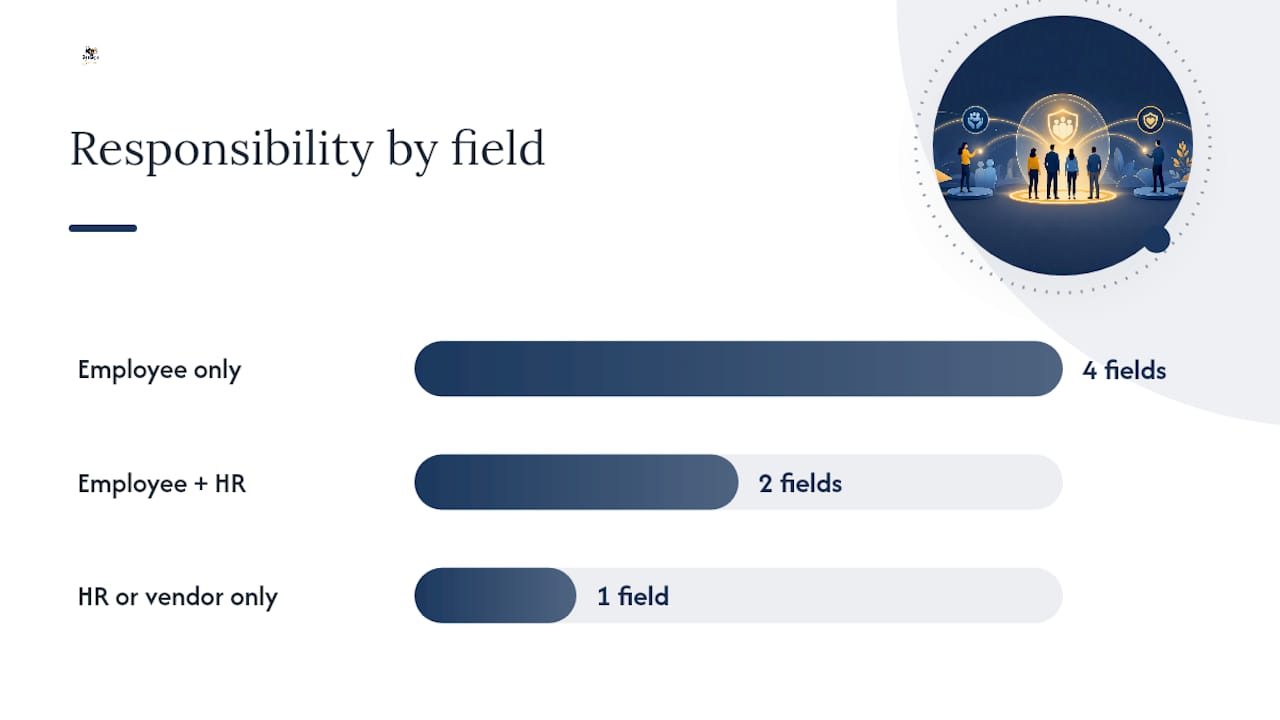
Here’s how responsibility typically breaks down across those fields:
| Field Category | Required or Optional | Who Completes It |
|---|---|---|
| Employee identity and contact info | Required | Employee |
| Dependent and beneficiary details | Required if adding dependents | Employee |
| Plan and coverage tier selection | Required | Employee, confirmed by HR |
| Salary reduction/FSA-HSA amounts | Required for pre-tax elections | Employee |
| Supporting life-event documentation | Required for special enrollment | Employee, verified by HR |
| Effective date confirmation | Required | HR or benefits vendor |
| Signature and consent | Required | Employee |
A sample enrollment form template from a university HR department shows how this typically gets organized on paper: identity fields up top, plan elections in the middle, dependents and beneficiaries next, and signature last. If you’re building or updating your own template, a tool like BeeSign’s onboarding document workflows can help you standardize the layout across every new hire, so nobody has to reinvent the form each time someone joins.
What Legal and Compliance Points Should HR Check Before Finalizing Forms?
Get this part wrong and a form that looks complete can still expose your company to a dispute you didn’t see coming.
The biggest principle to understand is that enrollment forms function as binding contracts once signed. Under the parol evidence rule, written terms generally control over anything said verbally during onboarding. If an HR rep tells an employee their coverage starts immediately but the signed form lists a later effective date, the form typically wins in a dispute.
“A signed enrollment form or the final processed portal record serves as proof of the employee’s election,” and keeping that confirmation is what resolves later disagreements over payroll deductions or coverage start dates, according to guidance on submitting employee benefit enrollment forms.
A few compliance checkpoints worth confirming before you finalize any form:
- ERISA disclosure requirements tie into the plan documents your enrollment forms reference. Make sure the summary plan description and the enrollment form language actually match.
- COBRA and ACA notices should accompany elections where applicable, particularly for group health plans subject to continuation coverage rules.
- Section 125 cafeteria plan rules apply whenever an employee elects pre-tax contributions, and the salary reduction agreement language needs to be explicit and separately acknowledged, not buried in fine print.
- PHI and privacy limits mean you should only collect health information the plan administration genuinely requires. HIPAA governs how that data gets stored and shared, and over-collecting creates unnecessary risk.
- Carrier-specific applications sometimes exist alongside your internal form. If a carrier requires its own disclosures or signatures, don’t assume your internal enrollment form satisfies that requirement on its own; check with the carrier directly.
Reviewing your form language against your electronic signature disclosure practices is a good habit, particularly if you’re moving from paper to digital collection and want the consent language to hold up the same way.
How Long Should You Keep Enrollment Agreements on File?
Retention policy here isn’t optional guesswork. Keep signed elections and confirmation records for at least the plan year plus whatever additional period your applicable state or federal audit requirements demand; many employers default to several years given how ERISA and IRS audit windows can reach back.
Where you store these records matters as much as how long you keep them:
- Use a secure HRIS or benefits administration system rather than shared drives or email inboxes.
- Encrypt cloud storage and maintain an immutable audit trail showing who signed, when, and through what method.
- Store the signed final version only, never a draft. If a life event triggers a change, keep both the original and the updated record so the history is traceable.
- Tag every record by employee, plan year, and enrollment event type so payroll reconciliation and compliance requests don’t turn into a scavenger hunt.
Pro Tip: Set a recurring calendar reminder to audit your enrollment record storage twice a year. Files that “should be somewhere” during an actual DOL audit are worse than files that are simply missing, because someone has to spend hours proving the negative.
How Can E-Signature Workflows Improve Benefits Enrollment?
A compliant digital enrollment process needs four things working together: identity verification, explicit consent language, secure storage, and a tamper-proof audit trail. Miss any one of those and you’ve digitized the paperwork without actually solving the compliance problem.
Start with a template you trust, then route it for the right approvals before it ever reaches the employee. When the employee signs, the platform should verify identity, capture consent language clearly, and timestamp the transaction in a way that can’t be altered after the fact. Once signed, generate an automatic confirmation receipt. Portal-based enrollment tools already lean on this pattern, advising employees to save confirmation emails or receipts as proof of their election, precisely because that record is what settles disputes later.

The bigger win comes from integration. When your enrollment form connects directly to payroll and benefits administration systems, an approved election can automatically create the right payroll deduction and confirm eligibility, instead of someone manually re-keying data from a signed PDF into three different systems.
Here’s the practical sequence worth building into your process:
- Prepare a standardized template so every employee sees the same fields in the same order.
- Route the form for any required internal approvals before sending it to the employee.
- Collect the signature along with identity verification, not just a checkbox.
- Generate a confirmation receipt automatically and store it in your system of record.
This is exactly where a workflow-native e-signature platform earns its place in your HR stack. A platform offering identity verification, reusable templates, and bring-your-own-cloud storage cuts the manual re-entry work and reduces the odds of a compliance gap slipping through unnoticed.
What HR Teams Consistently Get Wrong About Enrollment Forms
If there’s one thing worth prioritizing above everything else in this process, it’s verifying identity before you verify anything else on the form. Elections, dependent additions, beneficiary changes: none of it matters if you can’t confirm the person signing is who they say they are. After that, require supporting documentation for every life event, confirm the payroll integration actually reflects what was signed, and keep confirmation receipts as a matter of routine, not an afterthought.
The traps I see repeated across HR teams are predictable. Relying on verbal commitments instead of getting elections in writing. Running multiple versions of the same form because nobody retired the old one. Signature evidence that’s ambiguous about when or how someone actually signed. And a surprising number of employers who never confirm effective dates with the carrier, discovering the mismatch only when a claim gets denied.
The fixes are just as predictable, which is the encouraging part. Standardize one template and retire every other version in circulation. Make the fields that matter required, not optional, so incomplete submissions can’t slip through. And set automated reminders ahead of open enrollment so employees aren’t scrambling on the last day, which is when most errors happen.
Simplify Enrollment Collection With BeeSign
If you’re still juggling paper forms, email attachments, and a spreadsheet to track who signed what, the enrollment process is costing you more hours than it should. BeeSign gives HR teams a workflow built specifically for this kind of document: reusable enrollment templates, built-in identity verification, a complete audit trail for every signature, and bring-your-own-cloud storage so your records stay inside your own infrastructure rather than a vendor’s.

Because BeeSign connects through a developer API, enrollment data can flow directly into your payroll and benefits administration systems instead of getting re-typed by hand. That’s one less place for a mismatch between what an employee signed and what payroll actually deducts. If you’re setting up open enrollment for next year or building a cleaner new-hire process, start with the electronic signature product page to see how a template-based workflow fits your current systems, or begin a trial to test it against your next enrollment cycle.
Frequently Asked Questions
What is a benefits enrollment agreement, in simple terms? It’s the signed document recording which benefits an employee chose and how much they’re contributing toward them, and it governs payroll deductions and coverage effective dates for that plan year.
Can an employee change their enrollment agreement after signing it? Yes, but only during specific windows: annual open enrollment or within a set period (commonly 31 days) after a qualifying life event like marriage or the birth of a child.
What happens if an employee misses the enrollment deadline? They’re typically locked out of making elections until the next open enrollment period or a qualifying life event occurs, so tracking deadlines closely matters for both sides.
Does a benefits enrollment agreement need a physical signature? No. Electronic signatures are legally valid under laws like ESIGN and UETA, provided the platform captures consent and identity verification properly, which is why many employers have shifted to digital enrollment tools.
How long should an employer keep signed enrollment agreements? At minimum, for the plan year plus whatever additional period applicable audit or record retention requirements call for, stored securely with an accessible audit trail.
Sources
A few references are worth bookmarking if you’re building or refining your own enrollment process:
- Benefits Enrollment Form definition — Law Insider
- Parol evidence rule — Legal Information Institute (Cornell Law)
- How to fill out and submit an employee benefit enrollment form — LegalClarity
- Open Enrollment guide (2026) — Indiana University HR
Recommended
Ready to transform your workflow?
Start using BeeSign today and experience the future of document signing