The Role of eSignature in HR Workflows: 2026 Guide
Discover the role of eSignature in HR workflows and how it streamlines onboarding, reduces compliance risks, and enhances efficiency. Learn more!

Electronic signatures, formally defined under the U.S. ESIGN Act and the EU’s eIDAS regulation, are the legal equivalent of handwritten signatures applied through digital means. The role of eSignature in HR workflows goes far beyond replacing ink on paper. When properly integrated, an electronic signature becomes an automated system event that triggers onboarding steps, updates payroll records, and creates a defensible audit trail. HR teams that treat signing as a governance control point, not just a convenience, reduce compliance risk and cut document turnaround from days to minutes.
How eSignature automates multi-party routing and bulk document processing in HR
The most immediate e-signature benefit in HR is eliminating the sequential paper chase. A new hire’s offer letter, for example, typically requires signatures from the candidate, a hiring manager, and an HR representative. Without automation, that chain stalls every time one party is unavailable. With a properly configured electronic signature process in HR, the system routes the document automatically to each signer in the correct order and sends reminders without human intervention.
Bulk document signing is equally critical for HR departments managing large workforces. Batch send features allow HR teams to push policy acknowledgments to hundreds of employees simultaneously, with each document personalized using CSV data sources. That means every employee receives a version with their name, department, and effective date already populated. The result is a policy rollout that takes hours instead of weeks.

Federal compliance forms add another layer of complexity. Multi-party routing systems automate W-4, I-9, and state-specific tax forms across all 41 U.S. states that require them. That automation matters because I-9 errors carry fines ranging from $288 to $2,861 per form. Removing manual data entry from that process directly reduces your exposure.
Key capabilities that define effective HR eSignature automation:
- Sequential routing: Documents move automatically from signer to signer based on predefined rules.
- Bulk sends with personalization: CSV data populates individual fields before sending, eliminating manual customization.
- Automated reminders: The system follows up with unsigned parties on a schedule you set.
- Compliance form management: Federal and state forms are generated, routed, and stored without manual handling.
Pro Tip: Before your next company-wide policy update, test your bulk send with a small pilot group of 10 employees first. Catching a field-mapping error at that scale costs you an hour. Catching it after 500 sends costs you a full remediation cycle.
How does eSignature integration with HRIS platforms improve governance?
Embedding eSignature into an HRIS platform like Workday or SAP HCM transforms a signature from a document event into a system event. When a new hire signs their offer letter, that action can automatically trigger account provisioning, benefits enrollment, and payroll setup. Digital signing cuts hiring cycle time by 30% and reduces contract turnaround from 20 minutes to 1 minute. Those numbers reflect what happens when signing is wired into the broader HR lifecycle rather than sitting as a standalone step.
“Treating eSignature as a lifecycle governance event enables automated provisioning, benefits activation, and payroll updates. But it requires deliberate workflow design to avoid systemic failures. A poorly mapped trigger can propagate errors across multiple downstream HR systems faster than any manual process ever could.”
The governance value of this integration is consistency. Every signing event carries a timestamp, signer identity, and approval status. That data feeds directly into your employee record without a human re-entering it. E-signature software that integrates with HR management suites eliminates manual data entry and reduces the risk of human error. That is not a minor efficiency gain. It is the difference between an audit you can pass and one you cannot.
Poor integration design creates the opposite effect. When eSignature sits outside your HRIS as a disconnected tool, HR teams manually download signed PDFs and upload them to employee records. That gap introduces version control problems, delays downstream workflows, and creates compliance blind spots. Fragmented identity data from poor integration can propagate errors across multiple downstream HR systems faster than manual processes. The risk is not theoretical. It is a structural flaw in how many organizations currently deploy signing tools.
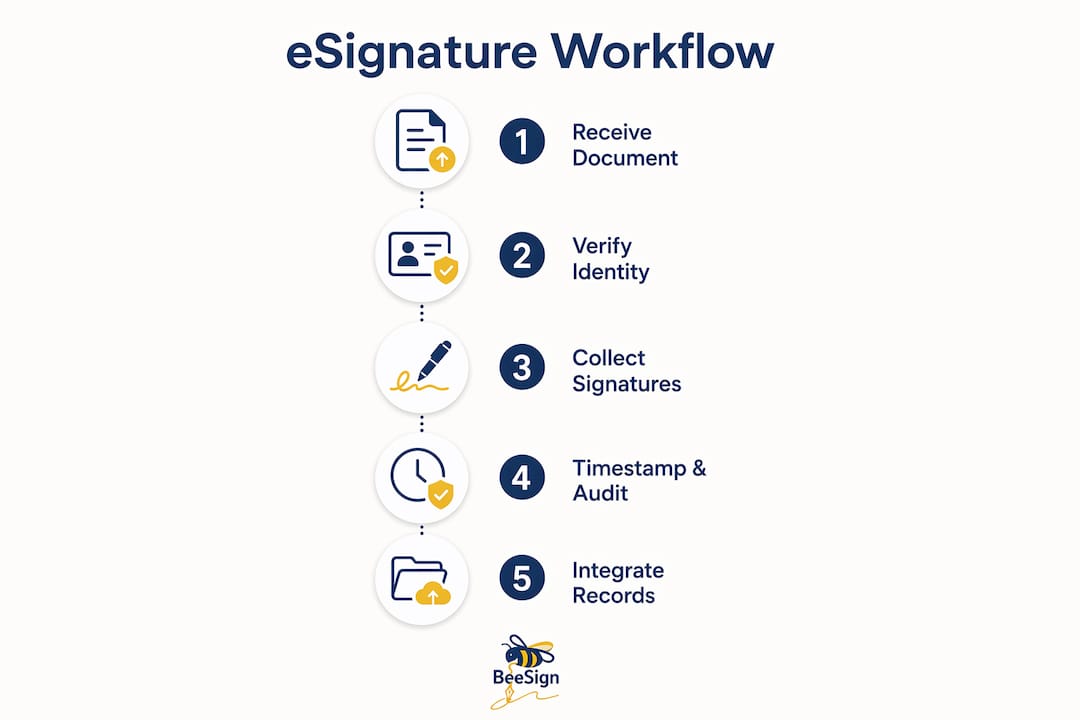
Authentication strength also matters for governance. Qualified electronic signatures with multi-factor authentication align with the NIST Cybersecurity Framework 2.0 and are recommended for remote or distributed workforces. For HR teams managing employees across multiple states or countries, matching authentication level to the legal requirements of each jurisdiction is a non-negotiable design step.
What are the practical applications of eSignature across the HR lifecycle?
The electronic signature process in HR applies at every stage of the employee lifecycle, not just onboarding. Each stage has distinct document types, signer combinations, and compliance requirements.
- Offer letters and pre-hire agreements. The candidate signs first, then the hiring manager, then HR. The system timestamps each step and locks the document after final execution.
- Federal and state compliance forms. Digital onboarding sends all 11 required documents, including I-9 and W-4, before the employee’s first day. HR teams save 3–5 hours per hire and avoid costly I-9 violation fines.
- Annual policy acknowledgments. Benefits updates, code of conduct revisions, and safety policy changes go out as bulk sends. Each employee’s signed acknowledgment is stored automatically with a timestamp.
- Performance and compensation documents. Promotion letters, salary change notices, and performance improvement plans require a clear approval chain. eSignature enforces that chain and records it.
- Offboarding documents. Separation agreements, non-disclosure confirmations, and final pay acknowledgments require the same auditability as onboarding documents. A signed offboarding packet with a verified audit trail protects the organization in any future dispute.
| HR Stage | Document Type | Key Compliance Requirement |
|---|---|---|
| Pre-hire | Offer letter, background consent | Candidate identity verification |
| Day-one onboarding | I-9, W-4, state tax forms | I-9 completion within 3 business days |
| Ongoing employment | Policy acknowledgments, benefits elections | Dated, stored acknowledgment records |
| Offboarding | Separation agreement, final pay notice | Signed evidence for potential disputes |
Automating the HR eSignature process reduces handling time and error rates while improving retention of signature evidence and approval status. That retention is what makes your audit trail defensible when a regulator or plaintiff’s attorney asks for documentation.
Common pitfalls and best practices for eSignature workflows in HR
The most common mistake HR teams make is treating eSignature as a simple signing tool rather than a workflow control point. When you deploy a signing tool without connecting it to your HRIS, you get faster PDFs but not faster HR. The document moves quickly. The downstream processes still wait for a human to act on it.
Designing sign steps as named control points fixes this. Each signature event should have a defined name, a designated approver role, a retention rule, and a trigger for the next workflow step. That design discipline is what separates an approval workflow that governs your HR process from one that just collects signatures.
Best practices for HR teams implementing eSignature workflows:
- Map every trigger before go-live. Identify which HRIS actions each signature event should initiate. Test each trigger in a staging environment before rolling out to production.
- Align authentication to legal requirements. Standard email-based signing works for most internal documents. I-9 verification and cross-jurisdictional contracts may require multi-factor authentication or qualified electronic signatures under eIDAS.
- Set retention rules at the document level. Different document types have different legal retention periods. Build those rules into your template configuration, not as a manual afterthought.
- Audit your audit trail. Periodically verify that your signing platform captures signer IP address, timestamp, and identity verification method. If it does not, your audit trail may not hold up under legal scrutiny.
Pro Tip: Run a quarterly review of your eSignature templates. Forms change, regulations update, and signer roles shift. A template built for last year’s org chart can create compliance gaps you will not notice until an audit.
Key Takeaways
eSignature in HR workflows functions as a governance layer that automates document routing, enforces approval chains, and triggers downstream HRIS actions, making compliance faster and more defensible.
| Point | Details |
|---|---|
| eSignature as a system event | Connecting signing to your HRIS triggers provisioning, payroll, and benefits automatically. |
| Bulk sending saves significant time | HR teams save 3–5 hours per hire and can push policy updates to hundreds of employees at once. |
| I-9 compliance has real financial stakes | I-9 violation fines range from $288 to $2,861 per form, making automation a direct cost control. |
| Authentication must match legal context | Remote and cross-jurisdictional documents require multi-factor or qualified electronic signatures. |
| Poor integration creates systemic risk | Disconnected signing tools introduce version control gaps and delay downstream HR workflows. |
eSignature is a governance tool, not just a time-saver
I have worked with HR teams that deployed eSignature platforms and declared victory after their first bulk send. The documents moved faster. Everyone was happy. Then an audit arrived, and the team discovered their signed PDFs lived in a separate system with no connection to their HRIS. The audit trail existed, but the downstream records did not match. That is not a technology failure. It is a design failure.
The organizations that get the most value from eSignature treat every signing event as a named control point in their identity lifecycle. They ask: what happens the moment this document is signed? Who needs to know? What system needs to update? What record needs to be created? When you answer those questions before deployment, you build a process that governs itself.
The speed gains are real. Cutting contract turnaround from 20 minutes to 1 minute matters. But the deeper value is the consistency. Every new hire goes through the same verified steps. Every policy acknowledgment lands in the same place with the same timestamp format. That consistency is what makes HR defensible at scale. I would encourage every HR leader to spend as much time designing their post-signature triggers as they do selecting their signing platform. The platform is the easy part. The governance design is where the real work happens.
— Mustafa Abusharkh
Beesign supports compliant, automated HR signing workflows
HR teams that need multi-party routing, bulk document signing, and tight HRIS integration have a practical option in Beesign. The platform centralizes contracts, templates, and identity verification in one place, with compliance built around ESIGN, eIDAS, and HIPAA requirements.

Beesign’s HR and operations solution supports the full employee lifecycle, from offer letters through offboarding, with real-time tracking and a complete audit trail on every document. For teams that need their own branded environment, Beesign’s white-label option keeps data within your infrastructure. If you are ready to move signing from a standalone step to a governed workflow event, the Beesign electronic signature platform is built for exactly that.
FAQ
What is the role of eSignature in HR workflows?
eSignature in HR workflows automates document routing, enforces approval chains, and triggers downstream HRIS actions like payroll setup and access provisioning. It functions as a governance control point, not just a faster way to sign documents.
How do e-signatures help with HR compliance?
Electronic signatures create a timestamped, tamper-evident audit trail for every document, including I-9 and W-4 forms. That audit trail is the primary defense against I-9 violation fines, which range from $288 to $2,861 per form.
What is the best way to use bulk document signing in HR?
The most effective approach uses CSV-driven bulk sends that personalize each document before delivery, then route signed copies automatically to your HRIS. This method works for annual policy acknowledgments, benefits elections, and compliance form updates.
How does eSign law affect HR document requirements?
The U.S. ESIGN Act gives electronic signatures the same legal weight as handwritten ones for most HR documents. For cross-border or high-stakes agreements, eIDAS-qualified electronic signatures with multi-factor authentication provide a higher evidentiary standard.
What happens when eSignature is not integrated with an HRIS?
Without HRIS integration, signed documents sit in a separate system and require manual transfer to employee records. That gap delays downstream workflows, introduces data entry errors, and creates compliance blind spots that surface during audits.
Recommended
Ready to transform your workflow?
Start using BeeSign today and experience the future of document signing