Branded Signing Emails: Technical and Procurement Guide
Discover how branded signing emails enhance trust and customer sentiment. Learn the essential steps to implement them effectively.

Yes, you can send fully white-label branded signing emails from an e-signature platform. The requirement is a custom sending domain, SPF/DKIM/DMARC authentication, and per-workflow template controls. Branded transactional emails increase trust and retention and measurably improve customer sentiment, making this a procurement priority, not a cosmetic one.
What your vendor must support before you sign:
- Custom sending domain or subdomain (e.g.,
sign.yourdomain.com) with full DNS ownership - SPF, DKIM, and DMARC records configured and verified, plus BIMI readiness if brand visibility matters
- Per-workflow email templates: signature request, reminder, and completion receipt
- Tamper-evident audit trail links embedded in every outbound message
- Compliance labeling aligned to ESIGN, UETA, and HIPAA where your use case requires it
Your immediate next steps: validate domain ownership in your vendor’s sandbox, request a staging environment to run end-to-end delivery tests, and confirm legal compliance coverage before any production cutover.
Pro Tip: Ask your vendor for a DMARC report from their sandbox domain before committing. If they cannot produce one, their authentication infrastructure is not production-ready.
Key Takeaways
Branded signing emails require authentication, template control, and compliance verification before any production deployment.
| Point | Details |
|---|---|
| Authentication is the foundation | SPF, DKIM, and DMARC must be configured on your custom subdomain before any other branding work begins. |
| BIMI lifts open rates | Emails using BIMI can achieve open-rate lifts of about 38% and up to 120% improvement in brand recall. |
| Separate your sending streams | Keep transactional signing emails on a dedicated subdomain, isolated from marketing sends, to protect sender reputation. |
| Compliance requires verification | Confirm ESIGN, UETA, and HIPAA coverage plus tamper-evident audit trails before signing a vendor contract. |
| Beesign covers the full stack | Beesign provides custom domain, SPF/DKIM/DMARC, BYOC storage, audit trails, and identity verification in one white-label platform. |
Table of Contents
- What do branded signing emails actually mean for e-signature buyers?
- Exactly what can you brand inside signing request and completion emails?
- Technical setup checklist: DNS, authentication, and testing for branded sending
- Deliverability and operational best practices for signing emails
- Compliance and security expectations for branded signing email flows
- What to ask vendors: RFx questions, SLAs, and cost factors
- Practical subject lines, CTA copy, and completion receipt examples
- Common rollout pitfalls and realistic timelines
- Beesign makes white-label branded signing emails straightforward
- Sources
What do branded signing emails actually mean for e-signature buyers?
The phrase “branded signing emails” describes something specific in the e-signature context: white-label signature request and completion emails sent by your platform that carry your company’s domain, logo, and colors, not the vendor’s. This is distinct from email signature blocks (the contact footer you append to outbound mail) and from cryptographically signed email protocols like S/MIME or DKIM. Those are different products for different problems.
The workflows in scope are:
- Signature request: the initial email a signer receives with a link to the document
- Reminder: automated follow-up when a signer has not acted within a defined window
- Completion receipt: confirmation sent to all parties when the document is fully executed
Out of scope by definition: general marketing emails, internal workflow notifications to your own staff, and any message not triggered by a document signing event.
Every branded signing email should carry embedded trust signals buyers expect: a link to the tamper-evident audit trail, a note confirming signer identity verification, and a compliance label referencing ESIGN or UETA. These signals are not decorative. They are what make a recipient confident the email is legitimate and the signature legally binding.
Exactly what can you brand inside signing request and completion emails?
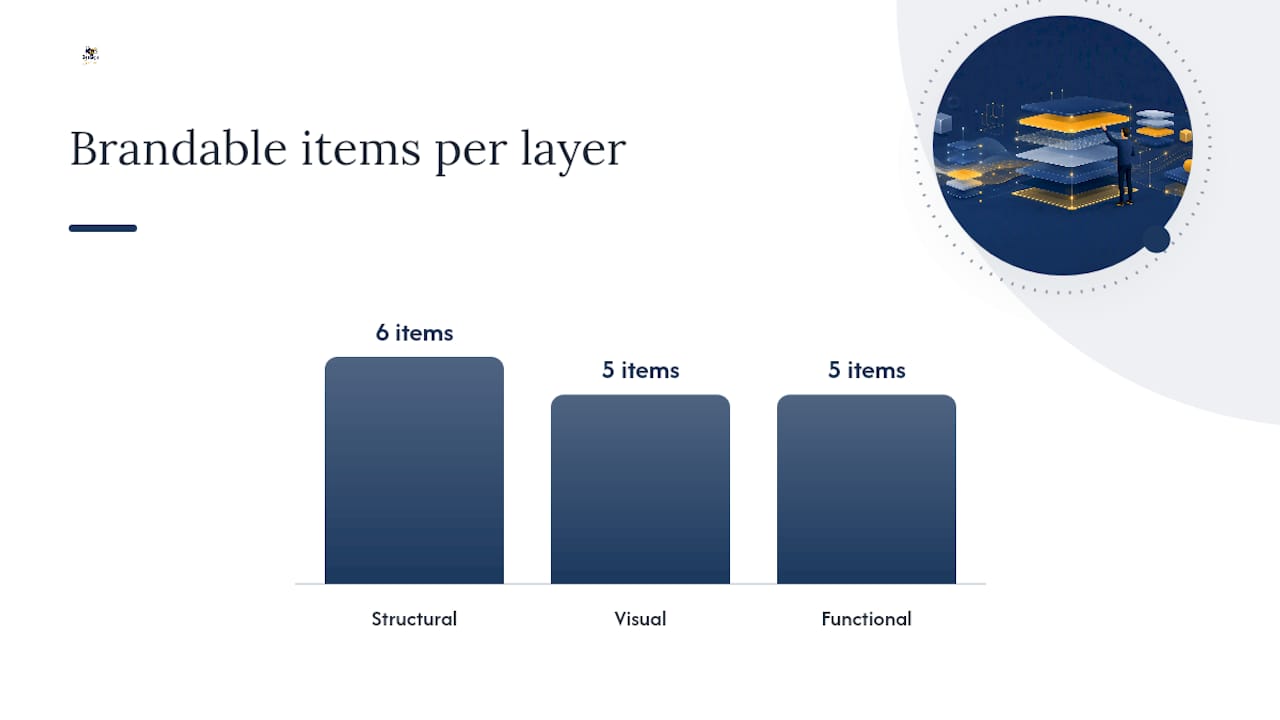
The scope of customization falls into three layers.
Visual elements include your logo (typically placed in the email header), primary and secondary brand colors applied to backgrounds and dividers, web-safe or hosted fonts, header and footer layout, and a hero image or illustration above the document preview.
Structural elements cover:
- Subject line (e.g., “Action required: your NDA from Acme Corp”)
- Sender name and reply-to address
- From address on your custom domain or subdomain
- Preheader text visible in inbox previews
- Separate templates for each workflow: request, reminder, and completed
- CTA button text and color
Functional elements include an embedded document thumbnail or preview, a direct link to the audit trail, your support contact details, signer identity verification cues (such as a note confirming ID capture or biometric match), and branded return URLs that land signers on your domain after completion.
Two items require explicit vendor confirmation: custom unsubscribe or preference handling for any blended transactional-plus-promotional messages, and whether bring-your-own-cloud (BYOC) storage references appear in the email metadata or receipt. Both affect compliance posture.
Technical setup checklist: DNS, authentication, and testing for branded sending
Authentication is the foundation. SPF, DKIM, and DMARC are non-negotiable prerequisites for reliable delivery and a precondition for BIMI display in major inboxes.
For integration, the choice between API and SMTP matters operationally. A REST API with webhooks gives you per-message delivery events (delivered, bounced, complained) in real time, which is essential for tracking signing status alerts and triggering reminders accurately. SMTP is simpler to configure but gives you less event granularity. Review the Beesign API reference for webhook event schemas before finalizing your integration architecture.
Testing must cover DNS propagation (allow 24–48 hours), authentication validation using tools like MXToolbox or Google Admin Toolbox, and inbox placement tests across Gmail, Outlook, and Apple Mail. Run at least one end-to-end test: send a real signature request from your staging subdomain, complete the signing flow, and verify the completion receipt arrives authenticated and branded.
Pro Tip: Use a staging subdomain (e.g., sign-staging.yourdomain.com) that is completely separate from your production sender. This protects your production sender reputation during testing.
Deliverability and operational best practices for signing emails
Signing emails are transactional, triggered by a user action, and must reach the inbox every time. A missed signature request is a delayed contract. The operational practices that protect delivery are straightforward but require discipline.
- Use a dedicated transactional subdomain isolated from your marketing sends. Mixing transactional and marketing streams risks contaminating your sender reputation when a marketing campaign generates complaints.
- Run an IP warming plan if you are on a dedicated IP: start with low daily volume and ramp over 4–6 weeks.
- Implement suppression and bounce handling immediately. Hard bounces must be suppressed after the first failure; soft bounces after a defined threshold.
- Integrate a complaint feedback loop (FBL) with major ISPs so spam complaints trigger automatic suppression.
Monitor these metrics weekly:
- Delivery rate (target: a high rate)
- Bounce rate (hard bounces should stay low)
- Spam complaint rate (keep low to protect Google and Yahoo sender standing)
- Open rate on signature requests as a proxy for inbox placement
- Time-to-completion: how long after the request email is sent does the signer act?
Emails using BIMI can achieve open-rate lifts of about 38% and up to 120% improvement in brand recall in supported inboxes, according to Smartmails. For a signing email, that brand recognition translates directly into signer confidence and faster completion.
Compliance and security expectations for branded signing email flows
Compliance is not a checkbox. It is a set of verifiable controls your vendor must demonstrate before you go live.
Regulatory trust signals to confirm:
- ESIGN Act and UETA compliance for U.S. electronic signature enforceability
- HIPAA-compliant handling if your documents contain protected health information
- eIDAS alignment if you operate across EU jurisdictions
- Audit trail admissibility: every signed document must carry a tamper-evident log of signer identity, IP address, timestamp, and document hash
Security controls to require:
- Encrypted message content in transit (TLS) and at rest
- Signer identity verification options: government ID capture, biometric face matching, or knowledge-based authentication depending on risk level
- BYOC storage so document data stays within your infrastructure
- Role-based access control (RBAC) limiting who can modify email templates or sending configurations
Operational audit expectations include defined retention policies for audit logs, documented breach notification timelines, and log access that supports your own compliance audits. Ask vendors for their SOC 2 Type II report or equivalent. For a deeper look at how ESIGN and UETA affect signature admissibility, the legal comparison between electronic and wet signatures is worth reviewing before finalizing your compliance checklist.
A subtle cross-sell inside a completion email is acceptable if the transactional content stays primary, but overly promotional placement can reclassify the message as marketing and change your compliance obligations under CAN-SPAM.
What to ask vendors: RFx questions, SLAs, and cost factors
Drop these directly into your RFP or demo agenda.
- Can we send all signing emails from our own domain or subdomain, with full DNS control?
- Do you support SPF, DKIM, DMARC, and BIMI out of the box, or does that require professional services?
- What APIs and SDKs are available, and do webhooks fire on every delivery event?
- Is a sandbox or staging environment included, and how long does onboarding take?
- What is your SLA for email delivery, platform uptime, and support response?
- What are the setup fees for white-label configuration and BYOC storage?
- Are dedicated IPs available, and do you provide an IP warmup plan?
| Commercial item | What to confirm |
|---|---|
| White-label setup fee | One-time or included in enterprise tier |
| Dedicated IP cost | Monthly add-on or included above a volume threshold |
| BYOC storage | Supported cloud providers, data residency options |
| Professional services | Onboarding hours for DNS setup, template build, and testing |
| Implementation timeline | Typical range from contract to production cutover |
For enterprise buyers, the white-label e-signature feature guide covers what a full white-label rollout includes and what to expect during onboarding.
Practical subject lines, CTA copy, and completion receipt examples
Subject lines should lead with action and identify the sender clearly. Keep them under 50 characters so they render fully on mobile.
- Request:
[Action required] Sign your NDA — Acme Corp - Reminder:
Reminder: your contract from Acme Corp awaits - Completion:
Signed and complete: your agreement with Acme Corp
CTA button text should be short and specific. “Review and Sign” outperforms “Click Here” because it tells the signer exactly what happens next. Keep the button color consistent with your brand primary, and place it above the fold so it is visible without scrolling.
A completion receipt should include:
- A confirmation line: “All parties have signed. Your document is legally binding.”
- A direct link to download the signed document
- A link to the audit trail with timestamp and signer identity summary
- Your support email or phone number, prominently placed
Making support contact easy to find in transactional messages measurably improves customer sentiment. For mobile rendering considerations, the mobile signing app guide covers how signing emails render across devices.
Keep tone neutral and factual. Avoid urgency language that reads as pressure. A line like “This request expires soon” is informative; “Sign now before it’s too late” erodes trust.
Common rollout pitfalls and realistic timelines
Three problems account for most white-label email rollout delays.
Authentication misconfiguration is the most common. A missing DKIM selector or an SPF record that does not include the vendor’s sending IPs causes immediate delivery failures. Validate every record with a third-party checker before going live.
Mixing transactional and marketing streams from the same subdomain is the second. If your marketing team sends a campaign from sign.yourdomain.com and it generates complaints, your signing emails suffer. Keep the streams on separate subdomains with separate DNS records.
Insufficient cross-client testing is the third. An email that renders correctly in Gmail may break in Outlook 2019 or Apple Mail on iOS. Test every template in at least five clients before production.
A realistic timeline from contract to full production looks like this: domain verification and DNS setup takes 2–5 business days including propagation. Template build and review adds another 3–5 days. Sandbox testing and stakeholder sign-off typically runs 5–10 days. IP warmup, if you are on a dedicated IP, requires 4–6 weeks of gradual volume ramp. Start DMARC in monitoring mode (p=none) and move to p=quarantine only after your DMARC reports confirm all legitimate senders are authenticated.
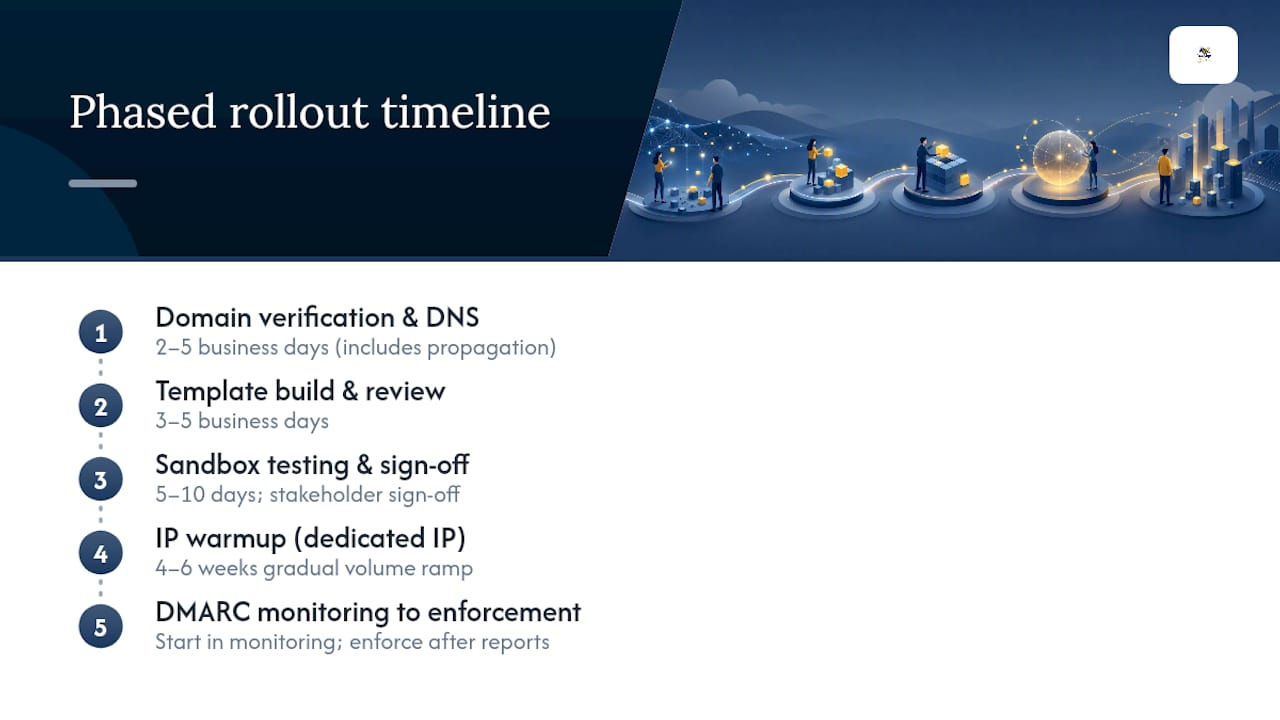
Plan a phased cutover: run your branded subdomain in parallel with the vendor’s default sending for one week, compare delivery metrics, then cut over fully.
Beesign makes white-label branded signing emails straightforward
Beesign’s white-label e-signature platform gives U.S. businesses the full stack for branded signing emails: custom domain and subdomain configuration, SPF/DKIM/DMARC support, BIMI readiness, per-workflow email templates, and BYOC storage so your document data never leaves your infrastructure. Audit trails with blockchain timestamp proof and signer identity verification (government ID capture and biometric face matching) are built in, not bolted on.

The REST API and webhook system fire on every delivery event, giving your team real-time signing status alerts without polling. Onboarding includes professional services for DNS setup, template configuration, and sandbox validation. Compliance coverage spans ESIGN, UETA, eIDAS, and HIPAA. Start your 7-day free trial or schedule a white-label implementation review at Beesign.
Sources
- Transactional Email Guide: Best Practices and Examples for 2026 | Mailsoftly
- Transactional Email: Building Trust, Retention, and Revenue - SendWP
Recommended
Ready to transform your workflow?
Start using BeeSign today and experience the future of document signing